What's new

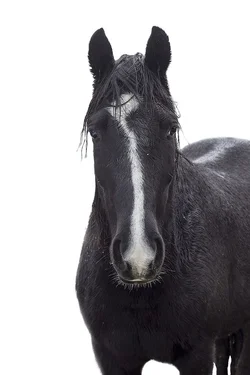
First White Background Attempt-Horse In Rain

mrs.hankIII

No longer a newbie, moving up!
Joined
Apr 15, 2014
Messages
142
Reaction score
39
Can others edit my Photos
Photos OK to edit
I have very little experience with swapping out backgrounds. And this one wasn't pleasant, it was raining, sky was just a gray blob so hey, why not see what I can come up with? Took way too many attempts, another photographer friend kept saying I missed spots and of course, I didn't see them. And then bright me turned my screen brightness down and what do you know? All messed up. So here's my final product. Thoughts? I'm so burnt out at this point that more eyes would be handy!

Taken with a Canon t3i and a 50mm f/1.8
 

Attachments

  • stormywhite1nowatermark.webp
    stormywhite1nowatermark.webp
    77.5 KB · Views: 190
The replacement background looks good to me. I see a tiny spot here and there, but only because I am looking.
 
Looks pretty good to me. You even managed to get the background replaced pretty well behind the bits of "hair" around the sides of the head. This is not always the easiest thing to do.

WesternGuy
 
His back legs got screwed in the process, I can see now when comparing to the original. This took so much time, can't believe how tedious it is!
 
What process are you using to extract the horse? This shouldn't be more than about a 10-15 minute job.
I'm wondering the same thing. Maybe an original file would help us see why it was so tough?
 
I agree, seems you just went from gray to white?
 
It was tough because I've never done this before, and my screen was too bright to see areas where I was missing. So I would upload it, then look at it on my phone and what do you know, missed a chunk. Lather, rinse, repeat. Now that I have my screen brightness dropped down and I know the process, it is a +/- 15 minute job.

Process is quite simple. And no, it wasn't just a grey background. Horse was standing in his pasture but the sky was grey and boring so I decided to roll with something different. Did it making an adjustment layer, selecting white dropper, and adjusting background until it was white then using a low opacity white brush for fine details and edging. Quite simple, really. Damien Symonds tutorial, is what I was working off of.
 

Create an account or login to comment

You must be a member in order to leave a comment

Create account

Create an account on our community. It's easy!

Log in

Already have an account? Log in here.

New Topics

Back
Top Bottom