What's new

Getting into portraits cc please!!

The problem with 1.8 f stop is that the entire face wont be sharp this close up even well focused on the eyes.
 
I often shoot 1.8, 2.8
You have to be sure the focus to be on the eyes, get closer, focus, lock it.
I'm not a big fan of the arms positions. Armpits are no no, crop in the middle of the arm makes your model looks like she was amputeed. I personnaly don't mind the top of the head crop.
Also because of how she is laying, she have less of a neck.
 
Last edited:
so how are these?
?
DSC_3198.webp

DSC_3257.webp
 
I agree with some of the other members here. Not a fan of cutting top of the head and right arm. If those are not cut, probably you would have had enough room for making depth of field, I guess.
 
If you are getting into portraits, you need to educate yourself on the subject.

https://www.amazon.com/Direction-Qu...72821621&sr=1-6&keywords=portrait+photography

https://www.amazon.com/Mastering-Po...72821701&sr=1-2&keywords=portrait+photography

As for your photo, there is so much wrong with it to be honest, I can hardly find anything that is right (OK, there is eye contact).
Wrong depth of field, soft focus, awkward pose that makes her neck look unflattering, cut limb, random light, tight crop, hair is a mess, two straps on her left shoulder do not look good, red spots on her nose must be removed, some skin cleaning is desirable in post production, and what is that blue thing in her ear? Is it necessary? And did I say the light direction and quality could be better?

She has beautiful eyes and lips and deserves better. Her bright blue vest matches her tattoo, but fails to complement her eyes and hair. It just distracts.

Sometimes good portraits are a result of a lucky combination of light, pose, mood and details, but it is a rarity. Usually you need to work on all these components before pressing the button.

I think at this stage you just need to understand that a decent portrait demands great attention to small detail. I think you need to start getting into it with reading on the subject and looking at great portraits and figuring why they are great. A forum critique on its own will not help.

Sorry for the harsh critique, but I hope it will help.

 
If you are getting into portraits, you need to educate yourself on the subject.

https://www.amazon.com/Direction-Qu...72821621&sr=1-6&keywords=portrait+photography

https://www.amazon.com/Mastering-Po...72821701&sr=1-2&keywords=portrait+photography

As for your photo, there is so much wrong with it to be honest, I can hardly find anything that is right (OK, there is eye contact).
Wrong depth of field, soft focus, awkward pose that makes her neck look unflattering, cut limb, random light, tight crop, hair is a mess, two straps on her left shoulder do not look good, red spots on her nose must be removed, some skin cleaning is desirable in post production, and what is that blue thing in her ear? Is it necessary? And did I say the light direction and quality could be better?

She has beautiful eyes and lips and deserves better. Her bright blue vest matches her tattoo, but fails to complement her eyes and hair. It just distracts.

Sometimes good portraits are a result of a lucky combination of light, pose, mood and details, but it is a rarity. Usually you need to work on all these components before pressing the button.

I think at this stage you just need to understand that a decent portrait demands great attention to small detail. I think you need to start getting into it with reading on the subject and looking at great portraits and figuring why they are great. A forum critique on its own will not help.

Sorry for the harsh critique, but I hope it will help.
Thank you! Not taking anything personal...just trying to learn and get better.

Sent from my XT1585 using Tapatalk
 
+1 regarding light direction and quality and that a portrait photographer has to be aware of, and manage, lots and lots of details.

Post #19, in the top photo her eye sockets are dark (raccoon eyes) but the white balance looks OK.
A 20x30 piece of inexpensive white foam board works pretty good as a reflector, but a couple of light stands with 45" umbrellas and a couple of hot shoe flash units is much more versatile and allows many more options for flattering supplemental lighting.

In the second photo her eye sockets aren't so dark as to be called raccoon eyes but her face is underexposed.
What camera light meter mode did you use?
For portraits I used a hand held light meter so I could meter incident, reflected, and flash lighting.
The light meter in the camera can only meter reflected light.

On-Camera Flash: Techniques for Digital Wedding and Portrait Photography
Off-Camera Flash: Techniques for Digital Photographers

As important to have as a good portrait lens:
New Sekonic L-478DR-U Pocket Wizard Lightmeter
 
+1 regarding light direction and quality and that a portrait photographer has to be aware of, and manage, lots and lots of details.

Post #19, in the top photo her eye sockets are dark (raccoon eyes) but the white balance looks OK.
A 20x30 piece of inexpensive white foam board works pretty good as a reflector, but a couple of light stands with 45" umbrellas and a couple of hot shoe flash units is much more versatile and allows many more options for flattering supplemental lighting.

In the second photo her eye sockets aren't so dark as to be called raccoon eyes but her face is underexposed.
What camera light meter mode did you use?
For portraits I used a hand held light meter so I could meter incident, reflected, and flash lighting.
The light meter in the camera can only meter reflected light.

On-Camera Flash: Techniques for Digital Wedding and Portrait Photography
Off-Camera Flash: Techniques for Digital Photographers

As important to have as a good portrait lens:
New Sekonic L-478DR-U Pocket Wizard Lightmeter
I believe the metering mode was on spot I have since changed that setting on the camera to a matrix mode. I can not afford a light meter or think I am ready for another piece of tech equipment that i don't understand. I am currently saving for a stand, speed flash and umbrella

Sent from my XT1585 using Tapatalk
 
Thank you! Not taking anything personal...just trying to learn and get better.

Just shoot what and how you like (unless you are planning a career in photography). Not a fan of rules and guidelines in art. Some of my favorite shots have countless "errors".


p!nK
 
Ok. sorry for my ignorance but when would you want a shallow depth vs non shallow. Further distance between subject and background?

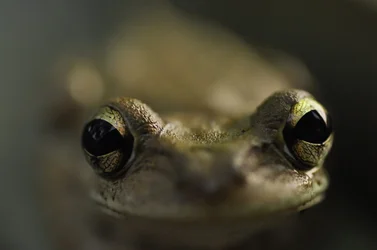
I use some fairly wide open apertures for macro shots, which give VERY shallow depths of field when I'm so close, like in this frog (shot at 60mm f2.8):
treefrog.webp
You can literally see how shallow the depth of field is. This is when I first got my macro and was playing around, and this frog lived in my orchid plants, so he let me get VERY close. He jumped away when my lens touched him.

Shallow depths of field tend to work better when you are further from your subject when taking the photo. Had I been further away when I shot this, I would have gotten a bit more (not a whole lot) of his face in focus. Largely, if I've got an aperture wider than f5, I'm either pretty far away from my subject and or in terrible lighting, or my macro subject is very flat / I'm trying to provide a dramatic effect like in these blue berries (shot at 60mm f4):
for web-1435.webp
Here, I had a less open aperture than the frog and I was a bit further away (I think an additional 8 inches over the frog distance), so my depth of field is increased a bit more.
 

Create an account or login to comment

You must be a member in order to leave a comment

Create account

Create an account on our community. It's easy!

Log in

Already have an account? Log in here.

Back
Top Bottom