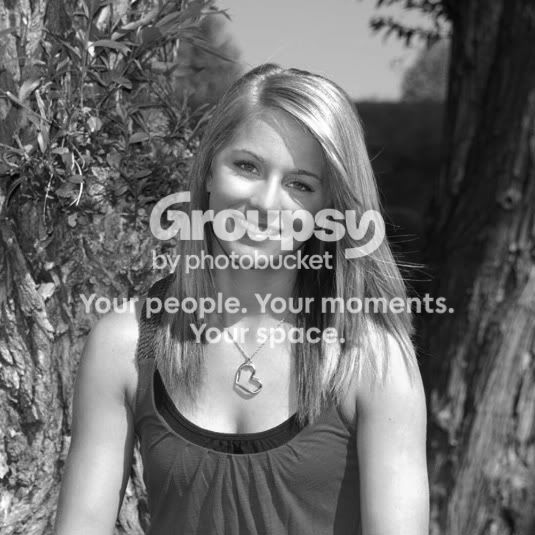
Hello all... I understand that this shot does have a very harsh shadow across the face. The sun came out unexpectedly and I did not have my sun shade/filter. Is there anything I can do to fix it?
Chris
Being a reduced size JPEG there's not much that can be done. hopefully you have a RAW capture so the blown highlights can be recovered.
First I opened it in ACR as a 16 bit file and played with the Recovery and Exposure sliders. Since it's not the RAW file, recovery didn't help much with the blown areas in her hair, cheeks, chin, lower neck, shoulders and arms.
In the Photoshop work space open ed a new layer, set the blending mode to soft light and checked the box to fill the layer with 50% gray. I set the Dodge tool to Modtones, 58% and checked the "Protect Tones" box. I then dodged with a soft edged brush in the shadow areas. I then made a Curves adjustment layer and set a custom contrast curve.
Lastly I returned the image to 8-bit mode, flattened the image, created the mat and frame, flattened again and resaved at the highest quality.
You didn't ask for critique but the pose is not flattering. You need to make sure your subjects are sitting tall and are leaning slightly forward at the waist. Shoulders should be at about a 45 degree angle to the image sensor and their weight on the back foot if standing. When they are sitting it's nice if you can get the front foot up and get the shoulder line off level a little. Check into the 3-1-2 pose and the 2-2-1 pose. Most portraits of an individuals are done with the camera in the portrait orientation, which is how I cropped the image. Ideally, you want an eye on a rule-of-thirds or goldern ratio power point which can't be done with the landscape orientation.





![[No title]](/data/xfmg/thumbnail/32/32159-cd588f68f116c390a4eaddec2380f1a6.jpg?1734161046)
![[No title]](/data/xfmg/thumbnail/32/32182-3ec35e12e238c681a086455c4586fbef.jpg?1734161047)
![[No title]](/data/xfmg/thumbnail/32/32183-06800ba86381f42976d75297ee6b5942.jpg?1734161047)

![[No title]](/data/xfmg/thumbnail/31/31011-439c1242fe08cf6b54f32bf06523a567.jpg?1734159083)