What's new

got to shoot a runway model today

Joined
Jan 2, 2014
Messages
242
Reaction score
62
Location
Atlanta, GA
Can others edit my Photos
Photos NOT OK to edit
$IMG_4404.webp$IMG_4424.webp$IMG_4435.webp$IMG_4494.webp
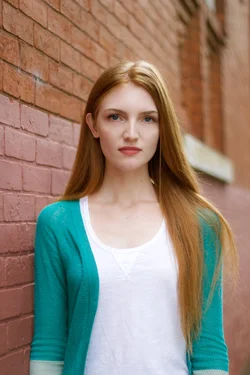
What do you guys think of these?
It helped me a bit to be "under pressure", knowing she had been photographed by professionals before.
 

Attachments

  • $IMG_4460.webp
    $IMG_4460.webp
    1 MB · Views: 184
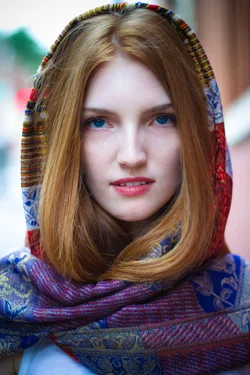
#2 is very nice
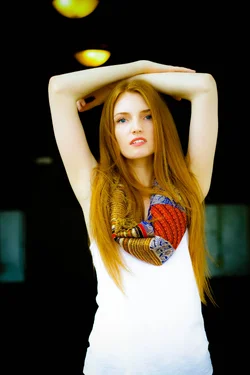
#4 is pretty good
The others have background issues/cropping issues/ lighting color issues
 
Not bad! :sillysmi:

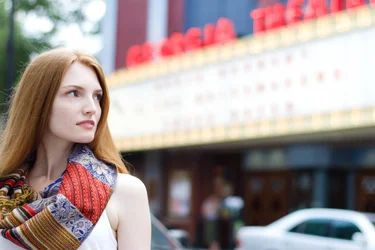
1- I'd crop more to have less headroom

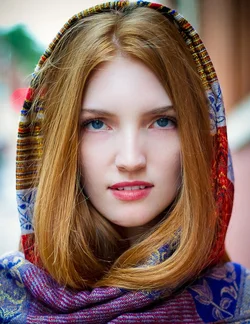
2- Skintone is a little too cool to me.

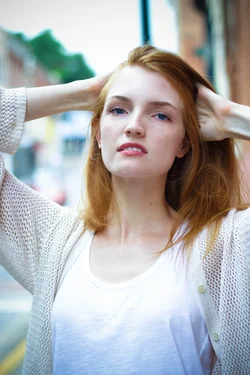
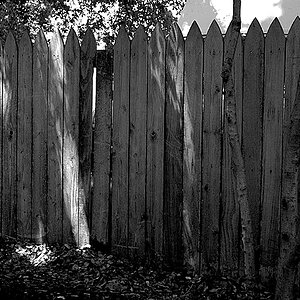
3 - Not a fan of the crop in this one. Horizontal would have worked better

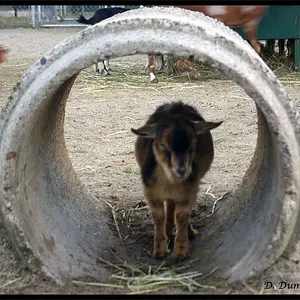
4 - A little too warm, haha.

5 - I like the ... I dunno... framing... of her... but I wish that maybe the theatre was a little more obvious... Less blurred... if you're going to make it that big of a part of the composition, anyway.
 
Not bad! :sillysmi:

1- I'd crop more to have less headroom

2- Skintone is a little too cool to me.

3 - Not a fan of the crop in this one. Horizontal would have worked better

4 - A little too warm, haha.

5 - I like the ... I dunno... framing... of her... but I wish that maybe the theatre was a little more obvious... Less blurred... if you're going to make it that big of a part of the composition, anyway.

Haha, yeah--I know they are not perfect! But I am trying. I'll take your advice on the final product of the three that can be edited :)
 
2 and 4 are my favorites... but I agree the skin tones don't seem quite right in either. I'd love to have a play editing #2. #3 is not flattering to her jaw line at all, I would omit that one entirely.
 
You know what's great about photographing experienced models? They push you to excel and they know how to move with the camera. I think you have some post processing concerns to work out (maybe monitor needs calibrated?), some general image quality and white balance issues BUT, I like the overall feel and get what you were trying to accomplish. 1, 2, & 5 stand out with 2 being your best. I personally like the cooler skin tone as it contrasts with her hair and shaw and matches closer to #5. #1 needs a different crop - maybe open it up and show more space and leading line.
 
View attachment 77724

Background is a bit distracting, with that strong line leading right away from her face.

View attachment 77725
Maybe cut into the head and frame this very tightly. Either that, or leave some top space. The head touching the top of the frame with that much space below the chin causes unneeded, unwanted visual tension.


View attachment 77726

I'm not fond of the pole sprouting out of the top of the head in this one. As e.rose mentioned, going "wide" instead of "tall" would have included the arms, and you could have stepped off to the side to make the pole disappear. As-shot,the green pole simply must be cloned out. The dark vignette on a bald sky just calls attnetion to the bald sky. I'd lose the vignette effect.


View attachment 77728
Skin tones look a wee bit yellow here. Except for the one with the yellow lights, you have reasonably good color and a reasonably consistent range of color.

 
$IMG_4424-2.webp

I played a little.. hope you don't mind as your profile said photos ok to edit. Wish I were on the computer I usually edit on with LR 5 instead of 3 but oh well! lol Lovely image.

 
Back off on the skin processing. Back wayyyyyyyyyy off!

What device are you looking from??

I don't think her skin looks over processed at all. If anything, there are still things that I'd retouch. :lol:

Of all the things that came to mind, good and bad when seeing these, the thought that skin looked overdone was not one of them. :lol:
 
Back off on the skin processing. Back wayyyyyyyyyy off!

What device are you looking from??

I don't think her skin looks over processed at all. If anything, there are still things that I'd retouch. :lol:

Of all the things that came to mind, good and bad when seeing these, the thought that skin looked overdone was not one of them. :lol:

Purple scarf, 100% around the mouth! (Calibrated editing monitor)
 
Yeah, Tirediron...are you looking at these through a McNaughton's filter, or maybe one of the Gallo filters?
 
Back off on the skin processing. Back wayyyyyyyyyy off!

What device are you looking from??

I don't think her skin looks over processed at all. If anything, there are still things that I'd retouch. :lol:

Of all the things that came to mind, good and bad when seeing these, the thought that skin looked overdone was not one of them. :lol:

Purple scarf, 100% around the mouth! (Calibrated editing monitor)

Nope. I'm not seeing what you're seeing. :lol:

It just looks like her lipstick could have been touch up a little more before that photo was taken, to me.

Although now, I'm curious to see the SOOC version, haha.
 
I see spots on each cheek kind of where edits were made.. but that's it.
 
tirediron said:
Purple scarf, 100% around the mouth! (Calibrated editing monitor)

Oh, yes, I think I see that very faint hint of some minor smudging work done when I look really, closely and after you told me to look at it and mentioned exactly where to look. But yeah, there is definitely a hint of some skin softening that can just barely be noticed there, in that one shot, around the mouth, at 100% view. I mean, I guess there is:wink:
 

Create an account or login to comment

You must be a member in order to leave a comment

Create account

Create an account on our community. It's easy!

Log in

Already have an account? Log in here.

Back
Top Bottom