What's new

got to shoot a runway model today

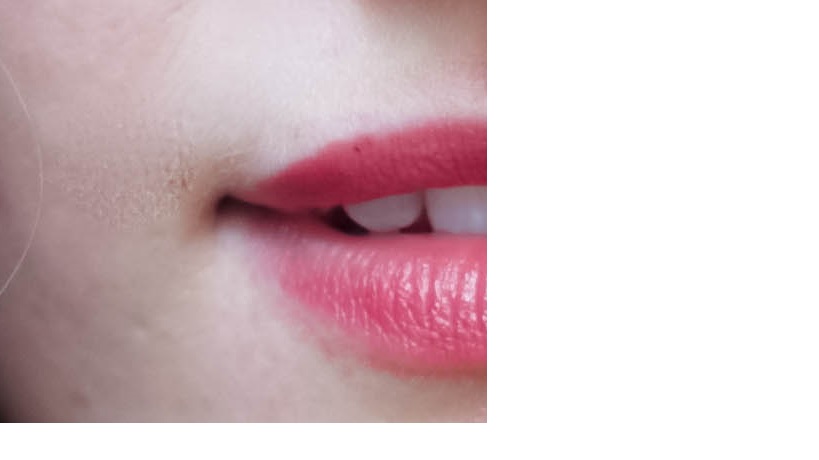
This is what I'm looking at...

Smoothing.jpg
 
This is what I'm looking at...

Smoothing.jpg

Yes....exactly what I saw once you told us to look around the mouth at 100%. It's horrible false advertising...it makes her skin look smooth and pretty and womanly and stuff at normal sizes when seen on-screen, but when blown up to poster size, yup...there is a littlersomething-something going on there.

Vancouver Chain.....meet "Yank". lol...
 
This is what I'm looking at...

Smoothing.jpg

OOOOOOOOOOH, that. :biglaugh:

Yes.

Well. I think more-so than her needing to back off the skin smoothing, she needs to learn a better *method* of skin smoothing and move away from *blurring*. :lol:

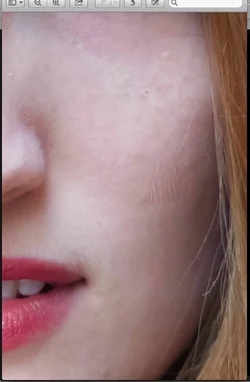
But since we're looking at blown up portions... I downloaded the file to take a look at it after you posted this and I ran into this:

$Screen Shot 2014-06-23 at 11.44.03 PM.webp

Page - I'm pretty sure I've done it at some point too, but be careful with your brush strokes.

That very obviously looks like you accidentally clicked your mouse/trackpad while you had the clone stamp tool selected and didn't realize it left a mark on her face... but it left a pretty sizable brush print, haha. :sexywink:
 
Page - What method of skin smoothing are you currently using? I may have something useful to show you :sillysmi:
 
Page - What method of skin smoothing are you currently using? I may have something useful to show you :sillysmi:
Oh no!! Yes, I must have messed up something when I was doing touch ups. Can't believe I missed it! I was using iPhoto and Photoshop clone tool. Don't laugh haha
 
This is what I'm looking at...

Smoothing.jpg

OOOOOOOOOOH, that. :biglaugh:

Yes.

Well. I think more-so than her needing to back off the skin smoothing, she needs to learn a better *method* of skin smoothing and move away from *blurring*. :lol:

But since we're looking at blown up portions... I downloaded the file to take a look at it after you posted this and I ran into this:

View attachment 77744

Page - I'm pretty sure I've done it at some point too, but be careful with your brush strokes.

That very obviously looks like you accidentally clicked your mouse/trackpad while you had the clone stamp tool selected and didn't realize it left a mark on her face... but it left a pretty sizable brush print, haha. :sexywink:

Oh my god! That looks awful Haha. Thanks guys for pointing this out!
 
Page - What method of skin smoothing are you currently using? I may have something useful to show you :sillysmi:
Oh no!! Yes, I must have messed up something when I was doing touch ups. Can't believe I missed it! I was using iPhoto and Photoshop clone tool. Don't laugh haha

Not laughing at you at all -- We all start somewhere... but stop using iPhoto. Stop it now. :lol: :sexywink:

iPhoto is great for the people who come through our store and "like photography"... but only the stuff done on their iPhones.

If you have photoshop, I will 100% send you some info. :sillysmi:
 
Page - What method of skin smoothing are you currently using? I may have something useful to show you :sillysmi:
Oh no!! Yes, I must have messed up something when I was doing touch ups. Can't believe I missed it! I was using iPhoto and Photoshop clone tool. Don't laugh haha

Not laughing at you at all -- We all start somewhere... but stop using iPhoto. Stop it now. :lol: :sexywink:

iPhoto is great for the people who come through our store and "like photography"... but only the stuff done on their iPhones.

If you have photoshop, I will 100% send you some info. :sillysmi:

Share the wealth of information on your skin smoothing E. Others want to learn too. (I use the skin softening in the Nik Collection software but like to have options on how to do it.)
 
tirediron said:
Purple scarf, 100% around the mouth! (Calibrated editing monitor)

Oh, yes, I think I see that very faint hint of some minor smudging work done when I look really, closely and after you told me to look at it and mentioned exactly where to look. But yeah, there is definitely a hint of some skin softening that can just barely be noticed there, in that one shot, around the mouth, at 100% view. I mean, I guess there is:wink:

I dunno it was hard to miss. I view all pictures at 100% if I can. There's an obvious spot tool circle on her left cheek that's killing me.

you can have smooth blemish-free skin without it looking obvious or unnatural. I HATE overly smooth skin. HATE IT.

#2 is the only keeper in my eyes, and it needs help in post.
 
Oh no!! Yes, I must have messed up something when I was doing touch ups. Can't believe I missed it! I was using iPhoto and Photoshop clone tool. Don't laugh haha

Not laughing at you at all -- We all start somewhere... but stop using iPhoto. Stop it now. :lol: :sexywink:

iPhoto is great for the people who come through our store and "like photography"... but only the stuff done on their iPhones.

If you have photoshop, I will 100% send you some info. :sillysmi:

Share the wealth of information on your skin smoothing E. Others want to learn too. (I use the skin softening in the Nik Collection software but like to have options on how to do it.)

I have some client work I *really* need to do right now, but I told Page I would do like... a screen cast or whatever.

So I think I'll just use one of my images to do that later on and I'll share it with y'all. :)
 
tirediron said:
Purple scarf, 100% around the mouth! (Calibrated editing monitor)

Oh, yes, I think I see that very faint hint of some minor smudging work done when I look really, closely and after you told me to look at it and mentioned exactly where to look. But yeah, there is definitely a hint of some skin softening that can just barely be noticed there, in that one shot, around the mouth, at 100% view. I mean, I guess there is:wink:

I dunno it was hard to miss. I view all pictures at 100% if I can. There's an obvious spot tool circle on her left cheek that's killing me.


#2 is the only keeper in my eyes, and it needs help in post.

Yeah I don't view anything at 100%, haha.

I don't feel like downloading every single image I look at. :lol:

Call me lazy. Cause I am. :biglaugh: :lmao:
 
Watch the angle of the light.

When the light source is to high the subject then has dark eye sockets (raccoon eyes).

You can create fill light using a reflector with ambient light, but by only using ambient light you severely limit your lighting control and options, and often wind up needing more gear and assistants than if you use flash.
 
but by only using ambient light you [...snip...] often wind up needing more gear and assistants than if you use flash.

I use the same # of assistants whether I'm using flash or shooting available light. :lol:
 
I think she should stick to the runway, she is not good infront of the camera
 

Create an account or login to comment

You must be a member in order to leave a comment

Create account

Create an account on our community. It's easy!

Log in

Already have an account? Log in here.

Back
Top Bottom