oxo
TPF Noob!
- Joined
- Apr 24, 2016
- Messages
- 12
- Reaction score
- 3
- Location
- Perth Western Australia
- Can others edit my Photos
- Photos OK to edit
First post so be gentle please.
I have been using my camera for about two years on and off but for the last couple of months i have really knuckled down and become addicted to taking images.
I usually shoot in Jpeg fine just because it's easier to load into Photoshop (yes i know RAW is the core)
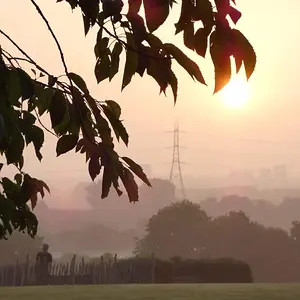
I find a lot of my images come out grainy while others are really nice crisp and just what i expected out of the camera, why the difference in image quality please?
I have been using my camera for about two years on and off but for the last couple of months i have really knuckled down and become addicted to taking images.
I usually shoot in Jpeg fine just because it's easier to load into Photoshop (yes i know RAW is the core)
I find a lot of my images come out grainy while others are really nice crisp and just what i expected out of the camera, why the difference in image quality please?




![[No title]](/data/xfmg/thumbnail/40/40287-4f839095000f74d779b90ed75df9dc62.jpg?1734174702)