What's new

Having Trouble with Changing the Color of Coach's Shirt

cloud9imagery

TPF Noob!
Joined
Jul 6, 2011
Messages
66
Reaction score
7
Location
Manchester, Tennessee
Can others edit my Photos
Photos OK to edit
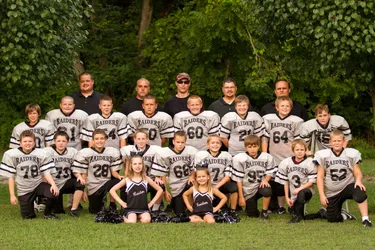
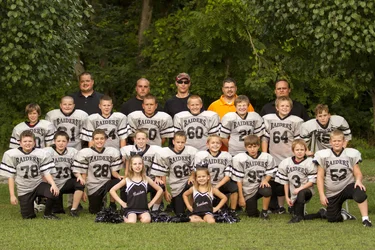
I took this group shot for my son's team, however, one coach forgot to wear black. I am wanting to change the orange to black similar to those of the coach's. I have tried the Hue/Saturation and the Replace Color, but it doesn't show the texture and there is still an orange "glow" around the shirt afterwards. Any help would be appreciated! (Also, I have already added a new head and a new torso on two kids.)
$IMG_0748_test.webp
 
All I did was select the shirt with the Quick Selection Tool and refined the edge to expand it a bit to cover those nasty orange glows. Then I pasted it onto another layer to then play around with saturation and lightness, to get the black. I then took the eraser tool to remove some black glow on the kids faces. I can send you the image through e-mail. Though it looks good at fairly low resolution, it might not look too good in the bigger prints.
 
Running and advertising a photo business with a web site and you don't know the basics of colour correction? So Cole you going to start offering your services to everyone?
 
You know, I have always used photoshop 7 for my photos and never had a problem. Matter of fact, I would still be using it if my logic board had not crashed on my Apple. I am stuck with a PC laptop until the end of August and have added photoshop cs6 which I am not familiar with at all and for whatever reason, it doesn't want to work with me. So, when does asking for help become a problem? Especially when I am on a time crunch for this one; otherwise, I wouldn't have asked for the help. Geez. I truly appreciate Cole's help and maybe one day I can help him with something. Last time I checked, good people help others and unless we are competitors, what is the problem with helping each other? Seems to me that is the point to this whole forum: to help each other.
 
A trick I have used in the past.
Import the image into PS
Create a new layer - not copy layer, new layer
Now take the brush tool and brush over the orange or what you want to change.
Change the blending mode to overlay.
 
You know, I have always used photoshop 7 for my photos and never had a problem. Matter of fact, I would still be using it if my logic board had not crashed on my Apple. I am stuck with a PC laptop until the end of August and have added photoshop cs6 which I am not familiar with at all and for whatever reason, it doesn't want to work with me. So, when does asking for help become a problem? Especially when I am on a time crunch for this one; otherwise, I wouldn't have asked for the help. Geez. I truly appreciate Cole's help and maybe one day I can help him with something. Last time I checked, good people help others and unless we are competitors, what is the problem with helping each other? Seems to me that is the point to this whole forum: to help each other.

You're right, I was wrong on this. However I have been working with all the versions of photoshop and the change you are trying to make is still very basic in all of the them. On the picture itself, I make sure that everyone knows what they are suppose to be wearing before the photo is done, if anyone shows up with the wrong colours, it stays that way. I used to spend hours changing heads and faces in group pictures until I realized that if people can't pay attention for 30 seconds, look straight ahead and smile, then so be it.
 
Brian: I actually tried that and it still didn't work right. When I looked at Cole's work, he actually had a darker black outline to cover the color fringing that present (possibly due to my camera) and I had never had that problem before.
 
Imagermaker: Thanks. And, yes, I will remember that for next time. I am attempting to get the football league's contract and so I took photos of my husband's team and wanted to make sure everything was great so that maybe I can get the bid next year. I still have some learning to do with sports but I am getting there. :D
 
Funny how people can jump all over you on this forum after they make a few quick assumptions, isn't it? :)
 

Create an account or login to comment

You must be a member in order to leave a comment

Create account

Create an account on our community. It's easy!

Log in

Already have an account? Log in here.

New Topics

Back
Top Bottom