We seem, to also have about the same amount of people who hop in after a discussion or disagreement has been taken care of and keep stirring the pot to keep an argument going. He said he was in the wrong and appologised, the OP accepted that appology and here you come in trying to start it back up. It's done with, let it go.
I realize the concept of why many photographers do not want to help others...money. My beliefs is if you help people then those people will help others and the train of giving continues. I am not educated in photography...although I continue to learn, but I am well educated in other fields, so I pass my knowledge on, because we are on this Earth only so long, and I feel it is a person's responsibility to offer assistance to anyone that ask. As a past teacher, in my classrooms I had a large sign: There is no dumb question, and to learn is knowledge no one can ever take from you! Imagemaker46 that was up standing to appologize, shows your character. Ysarex that was nice of you to fix it for him. Just my two cents.
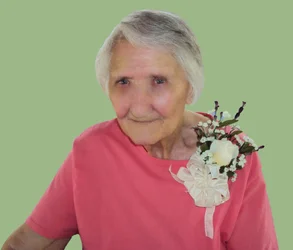
Try using the Magic wand and setting the sensativity level, so it won't attach to everything and in case the shirt then adjust using the color mode that is located under Image then go to adjustments. If you want it just black and worry about highlights the easiest way is to use the magic eraser, and chose the color black. Zoom in on the picture to get almost all othe shirt and erase with black. Use different size brushes to get smaller areas. I will even zoom in to I actually see the pixels. Use the eye dropper and pick the color black from one of the others guys shirts, so they match. The down size is the magic eraser only gives you a flat color, but I have printed in high resolution and it does print well. I use it alot for a solid color background change. This is my Granny, and I changed the back ground of this picture with it. Good luck with your business and never think about not asking for help their is always someone to assist you!