What's new

Help me with this shot please.

Boutte

TPF Noob!
Joined
Jul 10, 2009
Messages
268
Reaction score
6
Location
BelleChasse La. (About ten miles south of New Orle
Can others edit my Photos
Photos OK to edit
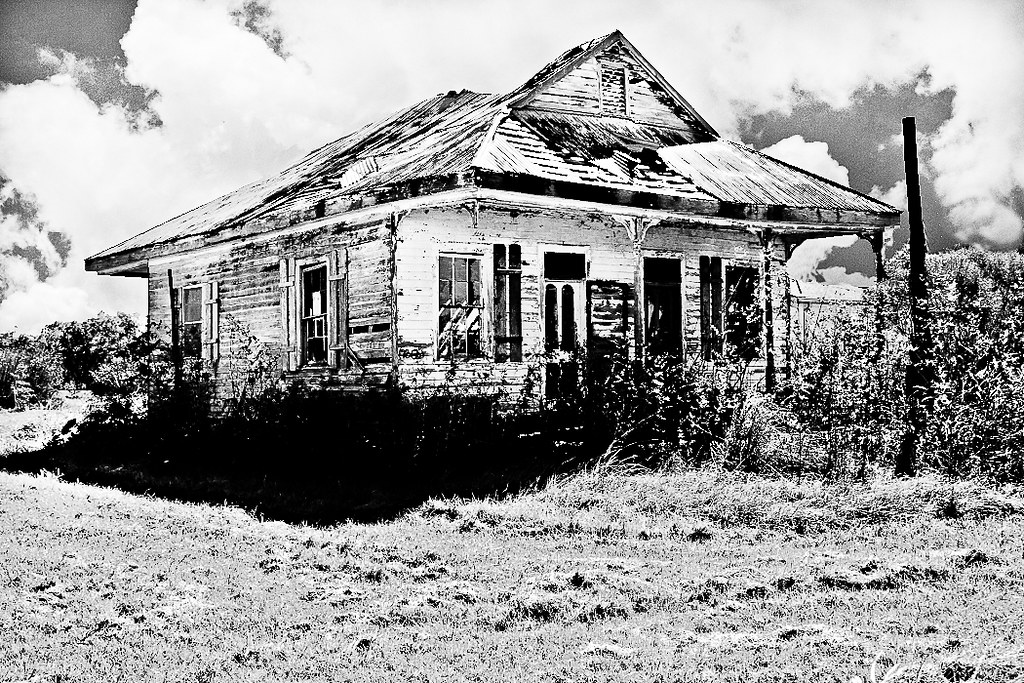
I worked on this shot for a good while but it's just not what i was hoping to get.

There are a couple of questions I have. First I added the sky from another photo and while I think it's okay for the most part the borders, especially around the trees give away. I selected the sky in the original then pasted the clouds into the selection. Is there a better way to do this?

Second, why does the color balance seem to be pretty good except for the blue tint to the shadows?

Any other comments or criticisms appreciated.
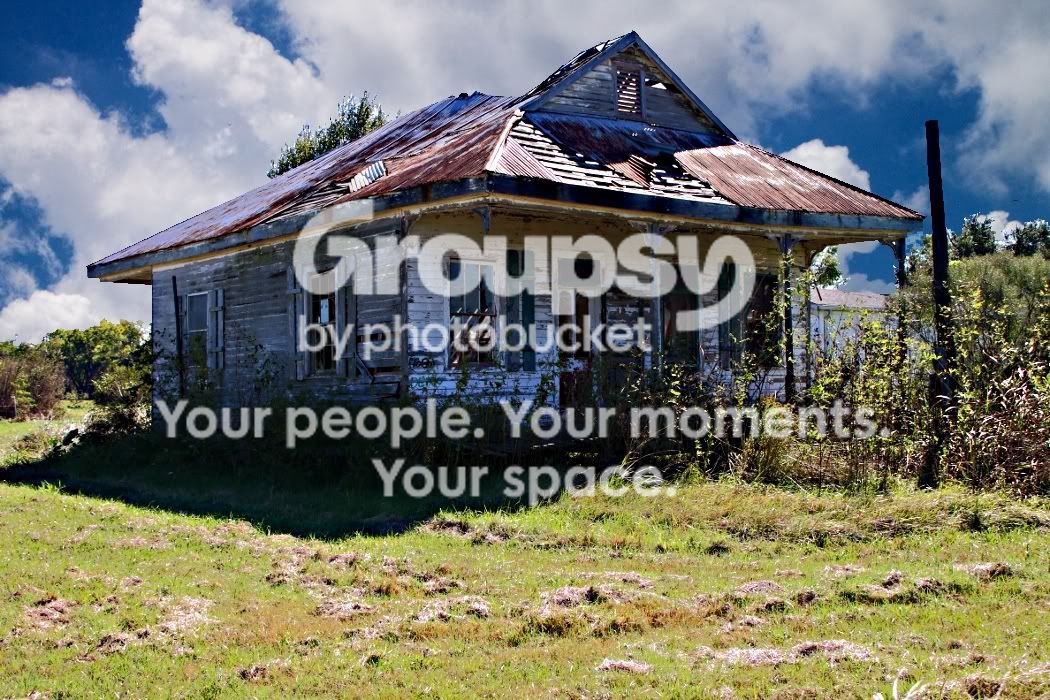
IMG_8112.jpg
 
Second, why does the color balance seem to be pretty good except for the blue tint to the shadows?
The scene has two areas of different temperature. You decided to set your WB to daylight, so the blue tint in the shaded section is inevitable straight out of the camera. (Conversely, if you had set your WB to shade, that section would not have had a blue tint... but you would've gotten a warm roof and a warm grass.)

You can always fix this in post, though.
 
Honestly, it probably looks funny because the sky you put in is not the real sky, and the lighting that is on the house doesnt quite match the lighting from the sky.

I might have liked to see the shot moved up maybe a foot or two, with a step to the right, and put the house a bit more into the right of the frame. It definitely has character, so I would think there is an excellent shot waiting to be found.

What was your aperture and shutter speed?
 
8TasUF
5173485199_0cd111b4a9_b.jpg


Quick edit.. Remove the trees that look bad, etc.. If you want color I would maybe try using the dodge tool (PS) to lighten the sky to make it look more natural and probably the house as well to make it stand out more..
 
...it's okay for the most part the borders, especially around the trees give away. I selected the sky in the original then pasted the clouds into the selection. Is there a better way to do this?
...

I've found a using a brush with 0% hardness and quick masks (cs2) are helpful in making less edgy selections. Also, burn in clumpy fringe areas.

-
 
For me there are to things you are fighting in the shot: the time of day and the acidity of the grass. With the time of day, the brightness seems out of place with the mood of the dilapidated house. With the grass, the colour is a green with a high yellow content. It doesn't look good against the sky, but not because of the masking. The disparity in brightness and saturation varies too greatly between these two regions, imo. It will be difficult to obtain the desired focus on the subject when the grass is stealing the show.
 
using PS if you just reduce the blue saturation you can remove the amount in the image. You sky did not go in that well. Difficult to do with trees, bushed, limbs and so out protruding into the sky. You can easily see where it was PS'd in.

this type of image also can make a great black and white, but not from this image. try the one without the sky shopped in.
 
I worked on this shot for a good while but it's just not what i was hoping to get.

There are a couple of questions I have. First I added the sky from another photo and while I think it's okay for the most part the borders, especially around the trees give away. I selected the sky in the original then pasted the clouds into the selection. Is there a better way to do this?

Second, why does the color balance seem to be pretty good except for the blue tint to the shadows?

Any other comments or criticisms appreciated.

IMG_8112.jpg


Hi...not very good in explaining...so i decided to show you the detail in the shadows...you can see slight color in the vegetation and I toned down the clouds more shadow detail and the shadows on the house you have more dtail showing

1097411394_y5QrT-L.jpg
[/quote]
 
Last edited:

Create an account or login to comment

You must be a member in order to leave a comment

Create account

Create an account on our community. It's easy!

Log in

Already have an account? Log in here.

New Topics

Back
Top Bottom