shayvidas
TPF Noob!
- Joined
- Jan 5, 2014
- Messages
- 15
- Reaction score
- 0
- Location
- Tel Aviv
- Can others edit my Photos
- Photos OK to edit
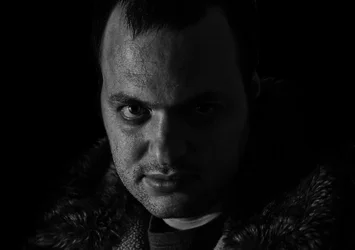
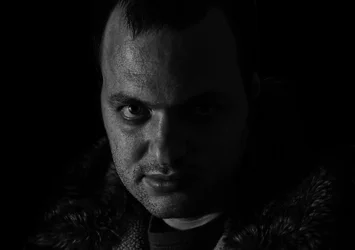
hi so i'm trying to achieve an effect such is in these two photos >
1.
View attachment 63710
2.
View attachment 63711
as i see it (and please correct me) there is 2 things for this photos to understand
1. is the AMAZING fecial details they manage to catch,
i understood you do it with taking an image in RAW mode then converting it to LAB in photoshop, and intensing the Lightning layer sharpness yea ?
2. the amazing amazing black and white lightning, Especialy done really nicely in picture 1.
a friend of mine said it's probebly all in photoshop and the original image is really totaly different, but even then does anybody know how it is done ?
it would be great if someone knows how to do thoghs two pictures..
b.t.w.
i'm new here this is my first post !!! been a photographer (begiiner for now) for a copple of years now
thanks allot in advance !!!
1.
View attachment 63710
2.
View attachment 63711
as i see it (and please correct me) there is 2 things for this photos to understand
1. is the AMAZING fecial details they manage to catch,
i understood you do it with taking an image in RAW mode then converting it to LAB in photoshop, and intensing the Lightning layer sharpness yea ?
2. the amazing amazing black and white lightning, Especialy done really nicely in picture 1.
a friend of mine said it's probebly all in photoshop and the original image is really totaly different, but even then does anybody know how it is done ?
it would be great if someone knows how to do thoghs two pictures..
b.t.w.
i'm new here this is my first post !!! been a photographer (begiiner for now) for a copple of years now
thanks allot in advance !!!
Last edited by a moderator: