syphlix
TPF Noob!
- Joined
- Jul 23, 2009
- Messages
- 687
- Reaction score
- 1
- Location
- NYC
- Can others edit my Photos
- Photos OK to edit
C&C is always welcome too... the sky looks like crap, but it was raining all day and overcast... is this angle/comp any good?.. if so i might try going back when the sky and light looks better...
This is a pano i took of the bridge - there are some parts where the photoshop photomerge is apparent... namely in the middle of the bridge there is a line where it goes from dark to light, and the clouds to the left of the 2nd pillar have the same problem...
how do i blend it so it doesn't look like that?
thanks!
link to other sizes
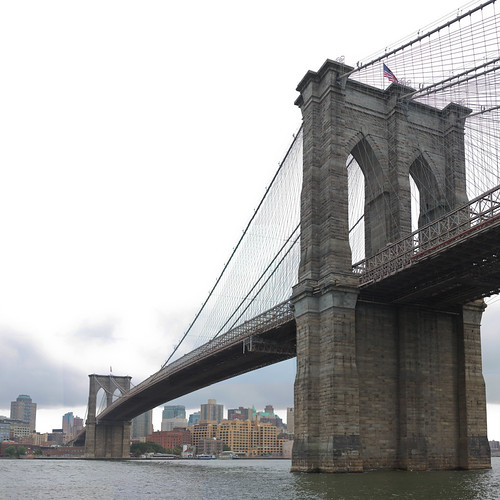
This is a pano i took of the bridge - there are some parts where the photoshop photomerge is apparent... namely in the middle of the bridge there is a line where it goes from dark to light, and the clouds to the left of the 2nd pillar have the same problem...
how do i blend it so it doesn't look like that?
thanks!
link to other sizes





![[No title]](/data/xfmg/thumbnail/32/32006-4103e122cb8d7b8d8e41a423124446b7.jpg?1734160802)