What's new

how to deal with gray areas on night party photographies

wilkerlucio

TPF Noob!
Joined
Apr 25, 2012
Messages
3
Reaction score
0
Location
Brazil
Can others edit my Photos
Photos OK to edit
Hi,

I'm brand new on photography at all, but I had studied most of the basics and understand a bit on exposure and that stuff.
Yesterday I went to a party with a friend and tried my first party shoots with my DSLR, well, it was most an experiment stuff, so I can see how my photos got on the way that I was shooting them (usually at ISO 100 f/5.6 30mm, using built-in camera flash (I plan to buy an external one later, but no money for that right now, hehe), them I realized that I should use a higher ISO to get more background, but that is fine).

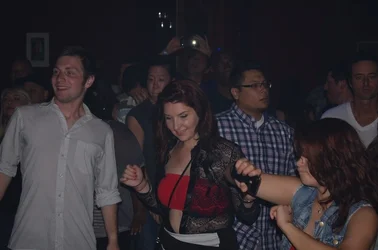
There is one thing that I don't liked much on the pictures and I really have no idea about how to fix it... That is the gray "background", I attached a picture to show what I mean by that, but, in basics, the walls behind people get a "gray tone" (that for me looks like some dead tone, which really kills the photo...), I wonder how can I get rid of that, or improve that, I would prefer if that is completely dark instead of that gray.

Any hints on this point? White balance configuration can make it better (I'm just guessing here, I have no idea about the good ways to fix it)?

Thanks :)
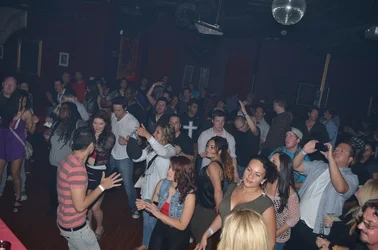
$DSC_0208.webp
 
Is that smoke?

maybe it wouldn't have shown if you'd have not butchered the blonde =)
 
they shoot misters there sometimes, but even on places without that I note this gray tone on night photographies with flash.

I'm posting another one here (on same party yesterday), I don't know if because there are close objects make this, but there it is:

$DSC_0210.webp

and just to say, I was also shooting with a shutter speed of 100 of a second.

any hints to make those shoots more "happy" (less gray)?
 
Second one is grossly underexposed
 
The problem is a simple one: Too little light. Unfortunately, while the fix is easy, it is expensive. You need to get more light on the sensor. To do this, you have to either add light to the scene with a flash (your built in flash is NOT sufficient for a large room), let more light through the lens (large, fast pro-level zooms or primes), or increase your ISO even further which will likely result in increased noise in the image, especially with consumer-grade bodies.
 
When using strobed light (flash), the ambient (usually background) exposure can be controlled separately from the flash exposure.

The camera's shutter speed controls the ambient light exposure. The faster the shutter speed, the darker the ambient light exposure.

By understanding how the camera works you can manipulate the settings to make that background completely black.

But, there is a shutter speed limit. The shutter has 2 curtains.

When the camera is held in the normal or horizontal orientation, both curtains move from the top of the shutter opening to the bottom of the shutter opening.

The front (Canon calls it first) curtain drops at the start of the exposure. The rear (second) curtain then drops to end the exposure.

At shutter speeds up to 1/200 or 1/250 of a second, both curtains are open during the exposure. this is known as the camera flasj X-sync speed.

At faster shutter speeds, the rear curtain begins closing before the front curtain is fully open, in effect making a slit smaller than the full shutter opening. The faster the shutter speed, the narrower the slit.

To use a faster shutter speed requires a camera and flash unit that can do what Nikon calls Auto FP flash sync (FP=Focal Plane)(Canon calls is HSS, or High Speed Sync)

 
Last edited by a moderator:
Thanks for you advice dudes, I'll try to use my ISO higher next time and a bit slower shutter speed, I was using ISO 100, so, I think on my Nikon D5100 using it at 800 will get a good job (without much noise). And when I get some money I'll buy a decent flash, that should help too :)
 
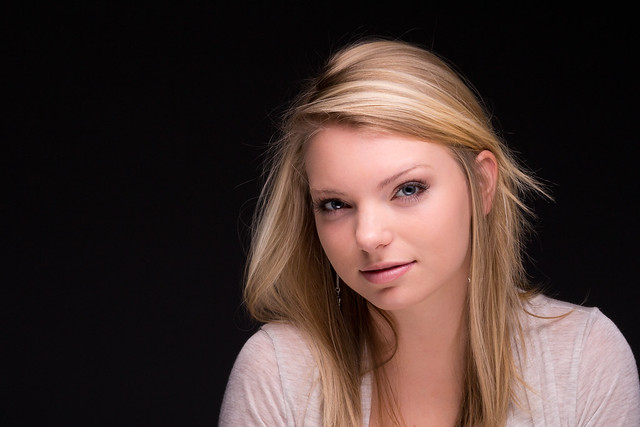
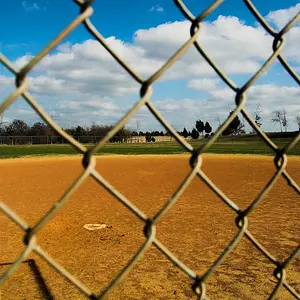
purchase a nice speedlight, SB800, SB600, or SB700 and so on, use it as a fill depending on your ambient light..what i usually do is run a test shot to see if my speedlight will be used as a fill or key light. I do this by setting up a normal shot, if my shutter speed is lower than 1/60 with my Aperture wide open, i set my camera to spot metering and use my speedlight as the main source and set your aperture depending on the subjects size and be careful with your shutter speed to prevent ghosting. I took the first image in complete darkness with one small ambient light above, which provided little to no light at all, and all i had was one speedlight setup to the models left and i sat a reflector on her lap..the second image was done at night outside with very little to no ambient light and my flash was onboard. if used correctly, a speedlight will be able to make any situation turn into a good one with very little work on your part. i usually carry my camera, one fast lens, one zoom and one speedlight, all of which should potentially cover any situation...as i do not own a 2k+ setup to where i can crank my ISO all the way up with little to no noise.


Studio 1 (1 of 1) by Jesse8784, on Flickr


Bicol54 (1 of 1) by Jesse8784, on Flickr
 
any hints to make those shoots more "happy" (less gray)?
I agree with EchoingWhisper: while a flash (to "bounce" whenever possible) will massively increase the quality of your night photos, if your main target is to get less grey photos, just increase the contrast (or deepen the blacks, which goes the same direction).
If you shoot raw, you can do it with either the wonderfully fast Lightroom or the horribly slow ViewNX if you have Nikon or other manufacturers' software (I don't comment because I don't know them). If you shoot jpeg, you can do it with the Picture Control (or Picture Style or whatever is called) in your camera. You can create a custom Picture Control and call it "smoky parties", with abnormally high contrast.

Ciao!
 

Create an account or login to comment

You must be a member in order to leave a comment

Create account

Create an account on our community. It's easy!

Log in

Already have an account? Log in here.

Back
Top Bottom