What's new

How to make this pop?

zbo2408

TPF Noob!
Joined
May 8, 2008
Messages
170
Reaction score
1
Location
Charleston, SC
Can others edit my Photos
Photos OK to edit
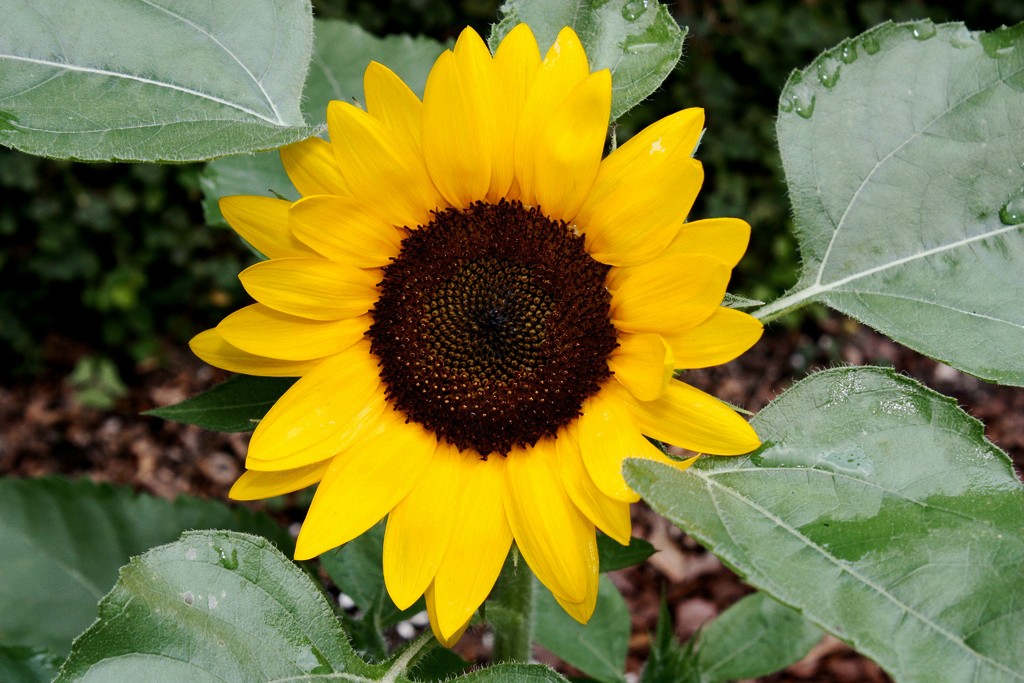
I took this last year and no longer have the original raw. I was going through my photos and noticed this one just looks really flat to me. I'm sure all I did when I imported it was auto enhance in aperture then converted to jpeg. Is there anything you can do to make it pop, look more vibrant? What should I have done to the raw or when I was taking it to make it more vibrant, more contrast, etc?
Thanks
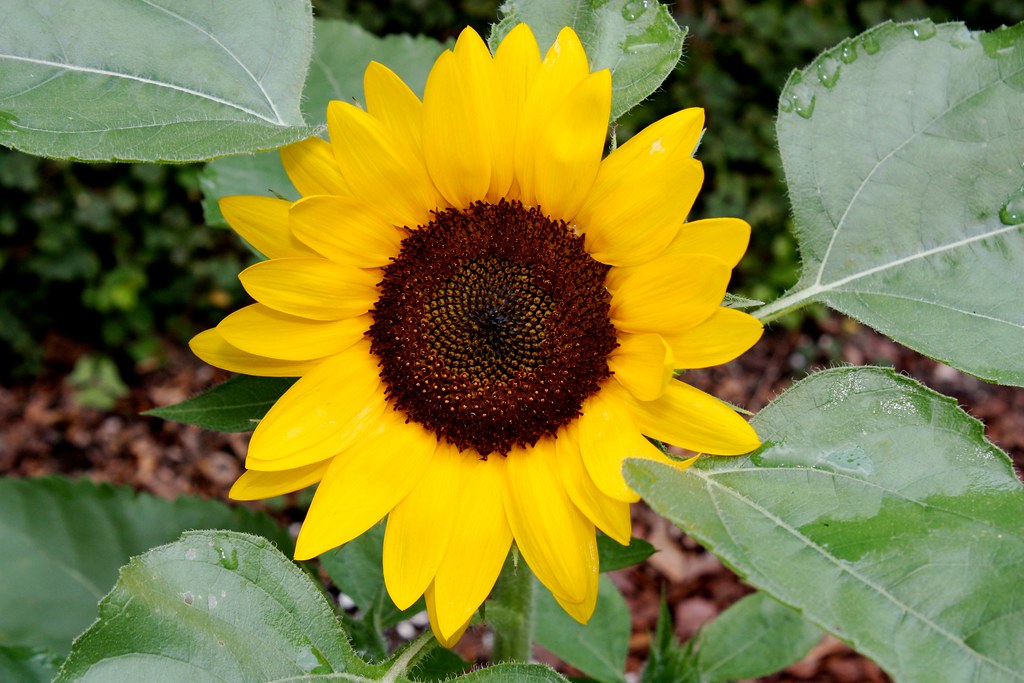

IMG_7204 (1) by z_man, on Flickr
 
What post-processing software do you use?

ETA: Oops... just re-read your post. You said Aperture. I agree with MLeek's assessment below. Also, in camera, if you had gotten it out of the dead center, that would have helped.
 
Last edited:
Not use auto enhance would be REALLY helpful. Instead learn how to use the curves to create the look/pop you want.
 
biggest, easiest thing would probably be pulling back the highlights so that the green leaves aren't as bright. Then upping the contrast (aperture ahs a pretty simple slider for that) then learning how to use curves.
 
@Pugs, I import my RAWs into Aperture (newest version) and 97% of what I do is just auto enhance or change to B&W - really really basic stuff then export .jpg into iPhoto
 
The problems you're seeing are three -- maybe fourfold. The red channel is pretty badly clipped. The tone response (luminosity channel) is compressed and the white balance is off. Looks like maybe some slight posterization as well in the flower petals which may be color space coercion.

I soundly second MLEEK's caution not to push the auto button in Aperture. Every problem here was likely caused by that algorithm. Apple should design an icon for that function that looks like a wood chipper.

Your original question; what should you have done? Use Aperture's exposure, white balance and contrast controls manually.

Your edit flag is green so I hope this OK; here's how the photo looks with those three problems corrected.

Joe


sunflower by apo lanthar, on Flickr
 
Here's what I would do: Download Gimp. It's free. Open the picture in Gimp, and then click: Layers, New From Visible. Then click: Colors, Desaturate, Average, OK. Then click your eraser tool, make sure opacity is at 100% and erase very carefully just over the yellow flower. Then set the opacity to 60% and with one click (click and drag) erase the entire image. You don't have to be careful around the flower, you can go right over it, won't change a thing.
 
OnSyo.jpg

How's this?
 
@Ysarex - that looks way way better than the one I posted! I can only imagine if you had the raw file and not the "wood chippered" one I posted haha.

@nickzou - it looks kinda flat still?
 
I am not that familiar with Aperture, but in photoshop, I would start with a curves adjustment and perhaps some dodging and burning. The exposure on the flower seems to be off to me. I would lighten the center part a bit and then mask off just the yellow petals. I would then use a saturation layer to adjust the luminosity, hue, and saturation of the yellows and greens. I would also use the Selective Color layer to adjust the black point of the yellows and greens to try and get better color contrast.

I think aside from the exposure, the main problem you will run into is that greens and yellows are very closely related. So you are trying to bring the flower out, and not everything around it ( which is hindered more by you overlapping the leaves in the foreground ) This requires you to get some more seperation between those colors which can be achieved in the ways I mentioned. You will have to see what tools you do and don't have on Aperture. Many of it will be trial and error though.

I am sure, given your tastes, you could do a million things with the shot. This is just one recommendation. Take it with a grain of salt.
 
@Ysarex - that looks way way better than the one I posted! I can only imagine if you had the raw file and not the "wood chippered" one I posted haha.

@nickzou - it looks kinda flat still?

I don't have a lot of experience with Aperture, I've logged some hours with it but not the most recent version. A friend of mine uses it in his studio. My initial impression was that's it's a very respectable RAW file converter -- good software.

The "auto button" is equally bad across the board. If we want to continue having fun with analogies, Photoshop's auto button is a garbage disposal and LR's auto button is a leaf mulcher, etc. None of them do anything but damage. Software can't see, in the end it's your job.

Joe
 
@Ysarex - that looks way way better than the one I posted! I can only imagine if you had the raw file and not the "wood chippered" one I posted haha.

@nickzou - it looks kinda flat still?

I don't have a lot of experience with Aperture, I've logged some hours with it but not the most recent version. A friend of mine uses it in his studio. My initial impression was that's it's a very respectable RAW file converter -- good software.

The "auto button" is equally bad across the board. If we want to continue having fun with analogies, Photoshop's auto button is a garbage disposal and LR's auto button is a leaf mulcher, etc. None of them do anything but damage. Software can't see, in the end it's your job.

Joe

Basically Aperture is on par with PS, until it gets to full on editing stuff out, correcting perspective distortion and the like. Color/light manipulation wise, i think they're pretty close. I use Aperture for most of my normal edits and organizing my library. I use photoshop for heavy edits, correcting perspective and lens distortions, etc. And obviously full on 'photoshopping' images in and out, photoshop is obviously the king there.
 
To me, from the getgo, the photo's tone is off. Did you use auto white balance? That can really make a photo pop more IMO. I'm new to photography though so I may sound like a complete idiot right now! lol!

I gave it a shot at an edit. Like people previously stated, the yellow/green go hand in hand almost. So trying to bring out the green without overdoing the yellow is hard.

6414737659_68bc189409_b.png
 

Create an account or login to comment

You must be a member in order to leave a comment

Create account

Create an account on our community. It's easy!

Log in

Already have an account? Log in here.

Back
Top Bottom