What's new

Hubby wanted some CC in HIS photos lol

Note- Posting Iphone photos online gives everyone who views them, GPS coordinates to where you be at. To include a map link. Just sayin.

Don't think it's possible because I think it's only done if you directly up load the photos from your phone. I put them on the computer, then photobucket, but I'll remove them just incase.


Note- Posting Iphone photos online gives everyone who views them, GPS coordinates to where you be at. To include a map link. Just sayin.

Don't think it's possible because I think it's only done if you directly up load the photos from your phone. I put them on the computer, then photobucket, but I'll remove them just incase.

again, thanks for posting this for everyone to see and not PMing.

Can you please edit the information from your last few responses?
 
Last edited:
Saving under "Save for Web" in Photoshop elements will strip EXIF data out such as addresses and other data added to a photos metadata. Also - most of us are using EXIF and data readers here of some kind or another (just goes with being on a photo site - we are snoopy things for settings like aperture and shutter speed ;))
 
Saving under "Save for Web" in Photoshop elements will strip EXIF data out such as addresses and other data added to a photos metadata. Also - most of us are using EXIF and data readers here of some kind or another (just goes with being on a photo site - we are snoopy things for settings like aperture and shutter speed ;))

Exactly, it's almost a habit to rick-click view Exif on photos. With the iphone photos it just happens to throw all that info down there for some reason.
 
I CAN'T SEE ANYTHING!!!!!!!!!!!!!!!!!!!!!!!!!! HELP!
 
Lightspeed - check the power cable to your computer screen and make sure its plugged in and the power switch is set to "on". From there check the on switch on the screen itself - if its not set to on (typically there is a little light next to it which shines when the screen is on) turn it on.

From there check cables from the screen to the computer.

If its a laptop - that just shows you should have got a desktop ;)
 
Lightspeed - check the power cable to your computer screen and make sure its plugged in and the power switch is set to "on". From there check the on switch on the screen itself - if its not set to on (typically there is a little light next to it which shines when the screen is on) turn it on.

From there check cables from the screen to the computer.

If its a laptop - that just shows you should have got a desktop ;)

Nothing like a good ole smart alec moderator, to make your day go better.
( facepalm)
 
:)
 
I don't have photoshop. Can I remove exif data in gimp or Corel?
 
Dominantly said:
Note- Posting Iphone photos online gives everyone who views them, GPS coordinates to where you be at. To include a map link. Just sayin.

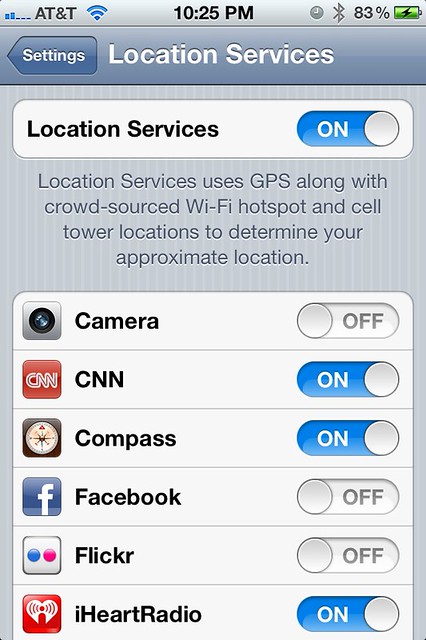
This can easily being prevented by turning the location services off completely or only on the apps you don't want to share your location.
6503087859_2f98652bdf_z.jpg


Sent from my iPhone using PhotographyForum app
 

Create an account or login to comment

You must be a member in order to leave a comment

Create account

Create an account on our community. It's easy!

Log in

Already have an account? Log in here.

New Topics

Back
Top Bottom