What's new

I learn better with critique :)

amatuerallie

TPF Noob!
Joined
Oct 30, 2011
Messages
56
Reaction score
5
Can others edit my Photos
Photos NOT OK to edit
I take bad critique well. I love it! It helps me learn from you pros on here.
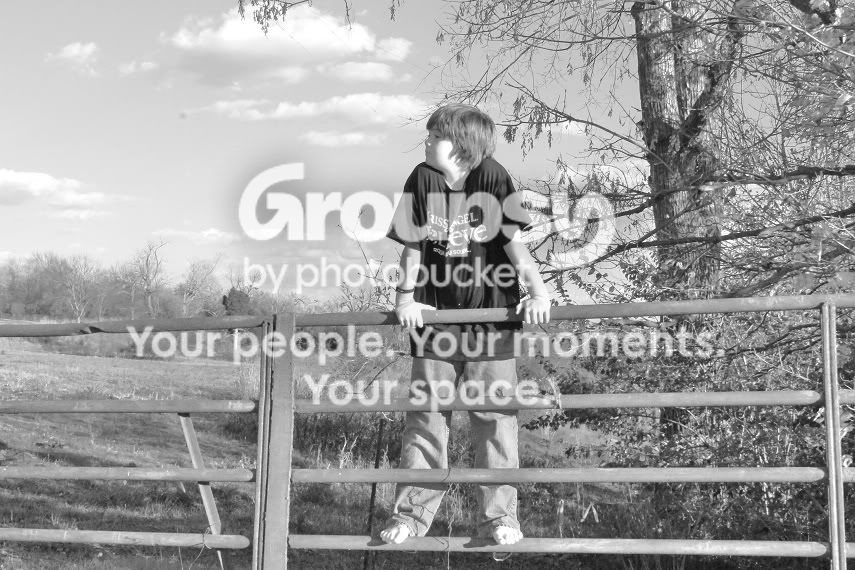
rynefall.jpg
 
It's always good to post the exif data with the photo when asking for critique/help. I have a add-on that shows it:
F20 1/200 ISO800

It looks like it was a bright sunny day, so ISO800 seems really high and unnecessary. Also I'd use larger aperture (smaller f-number) - well, maybe as large as your lens lets you. This way you would get shallower depth of field (in this case, blurred background). I also might have moved the boy away from the trees/bushes depending on what's there on the left.

Here are some thoughts. I hope they're helpful ^^

 
B&W tend to look better with less grey, so adjust your tone curve to make darks darker and lights lighter. Increasing the clarity a little can also add an extra 'punch'.

The highlights also look a little blown.

I'm not an expert by any means, but hope this helps. :)
 
amatuerallie said:
I take bad critique well. I love it! It helps me learn from you pros on here.


I agree that the ISO was probably too high. His skin looks blown out and/or hot on the side of the face and the arm. I think if he had been looking slightly forward it would have more impact. He could have still been looking off but so we could at least see his eyes better.

The black and white conversion isnt very good IMO. It's a little muddy. What does the color version look like?

If you are a complete newbie it's always better, IMO, to stay away from conversions (b/w, sepia) in the beginning and just learn how to do a clean edit. Clean edit = editing the image to its full potential without being noticeably edited (if that makes any sense).
 
Thanks so much for the tips! I will also bookmark the sites.
 
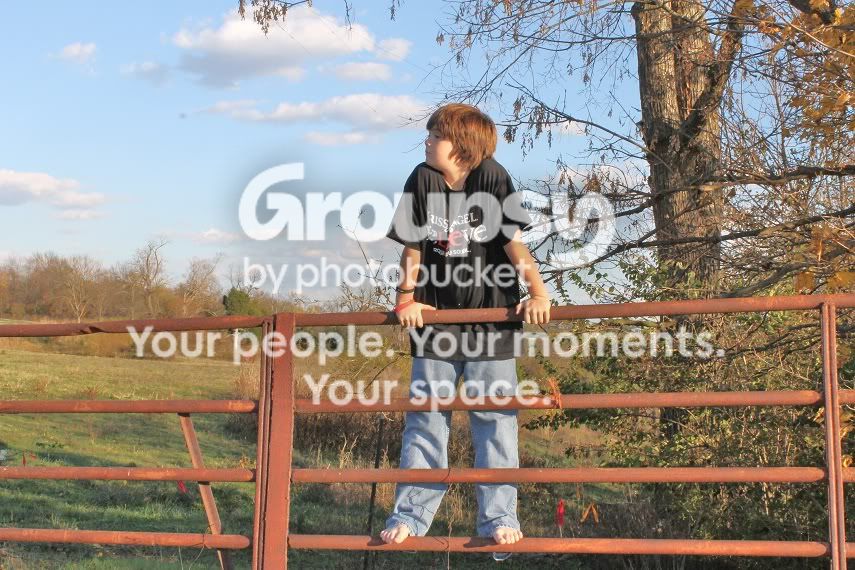
Oh, here was the color version.
fall2.jpg
 
I know we want it to be artistic at times by them looking away but I would have had the young one look my way. Watch that splotchy lighting as it is tough to fix in photoshop. Looking at the scene , behind him and to his right was the shadow area with no blotchy light (I would have sat him down there and took a few from the fence (supporting yourself and camera on fence to avoid camera shake) and maybe even a few using the fence as a frame etc.
-
Thanks for sharing and keep posting , shoot well, Joe
 
amatuerallie said:
Oh, here was the color version.

Skin looks a little hot in the colored version but it looks completely blown in b/w. Ithe colored one looks better IMO.
 

Create an account or login to comment

You must be a member in order to leave a comment

Create account

Create an account on our community. It's easy!

Log in

Already have an account? Log in here.

Back
Top Bottom