What's new

Image Size: 8X10 or Original Image Size

TheCameraLady

TPF Noob!
Joined
Jan 23, 2013
Messages
76
Reaction score
14
Can others edit my Photos
Photos OK to edit
------Most likely a stupid question alert-------


I am printing a lot of 8x10's and I was wondering if this is a good resolution for printing. It's at 300dpi and I was wondering for the most clarity in the prints if I should size it to be 8X10 or the 10X13 (the image size after cropping.)

AND

Should I save at the 8 High Quality, or 10 Maximum?


(this is just a random picture from my camera, not a shoot lol)
jo go tpf by SixNorthZines, on Flickr

image size by SixNorthZines, on Flickr
 
Last edited:
300 dpi is a fine printing resolution, and for 8x10 inches, 300 dpi means the suitable image dimensions are about 2400x3000 pixels
(8 inches x 300 dpi) x (10 inches x 300dpi) = 2400 x 3000 pixels.. This is how it works (it need NOT be precisely exact, but should be at least ballpark).

Either JPG Quality 8 or 10 will print OK. I usually choose 9 for printing. Archived files (that might be edited again someday) probably ought to be better however, but a temp JPG to be printed is not so critical.

I'm not certain of your term Original Image Size, and I get conflicts on the numbers.

I think you mean the image straight out the camera, with no resizing of any kind. I think you imply it comes out marked 300 dpi at 10x13 inches, which is near 12 megapixels, and about 4:3 aspect ratio (like a compact or cell phone). But you say D7000, which is 16 megapixels, and 3:2 aspect ratio. So I can't figure out what we are discussing. :) Is it the same camera?

What comes out of your camera is an image dimensioned in pixels. Period. These dimensions determine its size, and what you can do with it. The dpi number out of the camera is totally arbitrary, and not meaningful in any way to your own goals. The size in pixels is all important. You will resize (cropping, resampling, scaling) before your use, to be a proper image size (pixels) for your 300 dpi printing goal, at your goal of paper size in inches..
 
Last edited:
300 ppi is a general rule of thumb. A high quality 8x10 print can be made with as low as 150 ppi.

The correct term is ppi (print resolution or pixels per inch) is used by image editing applications like Photoshop. Look closely at the Image Size dialog box you posted. It says Pixels/inch (/ = per)
Several books about image editing also have small sections that note how frequently the term dpi is misused in reference to input files (like digital photographs) and devices. Dpi is an output device term.
FWIW - Image pixel dimensions are the image resolution. Image resolution and print resolution determine print size.
Ppi has no meaning for electronic display so regardless the ppi value set the image size does not change.

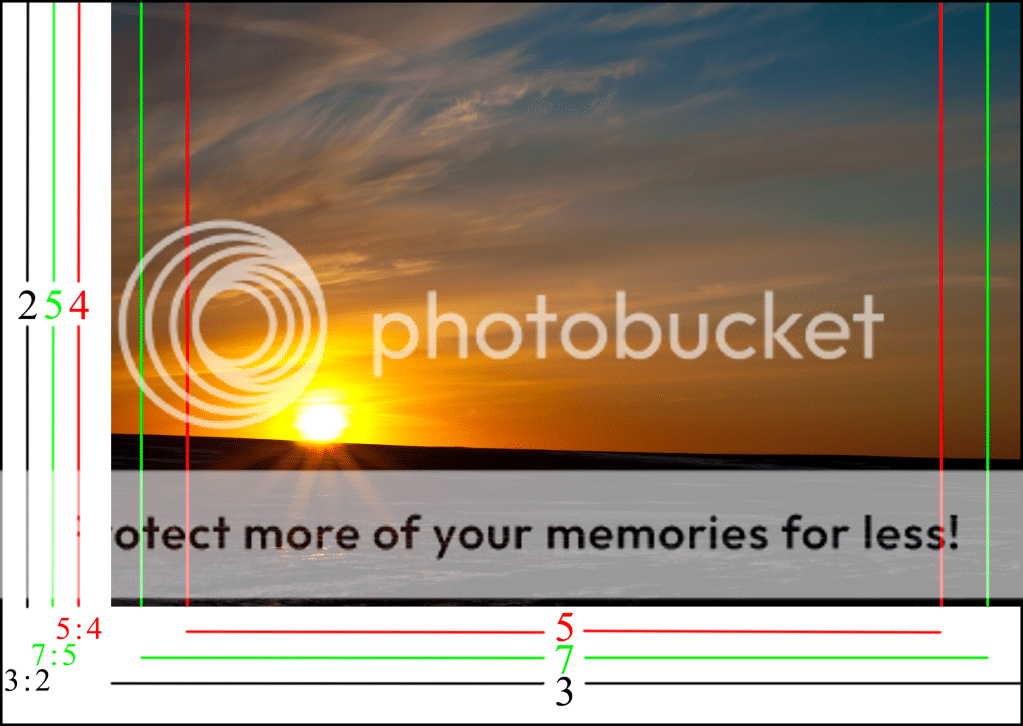
As mentioned your D7000 produces images that have a 3:2 aspect ratio (8x12)

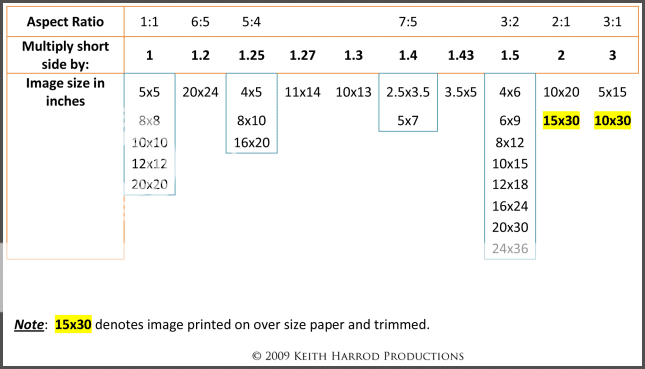
8x10 is a 5:4 aspect ratio and 10x13 is a non-standard aspect ratio.
In other words to get from a cropped 10x13 you will have to crop again to get to 8x10.
Here is the math:
10 / 8 = 1.25 The long side of the print is 1.25x longer than the short side of the print.
13/10 = 1.3 The long side of the print is 1.3x longer than the short side of the print.
To get the 10x13 to a 5:4 aspect ratio - 10 x 1.25 = 12.5 - you will need to crop an additional 1/2 inch off the long side of the 10x13 photo.

Note that cropping reduces an images resolution by discarding pixels and care needs to be applied to frame in the viewfinder such that excessive cropping is not needed to print the various popular aspect ratio prints.

AspectRatiocopy.png


AspectRatioChartv2-1.png
 
The correct term is ppi (print resolution or pixels per inch) is used by image editing applications like Photoshop. Look closely at the Image Size dialog box you posted. It says Pixels/inch (/ = per)
Several books about image editing also have small sections that note how frequently the term dpi is misused in reference to input files (like digital photographs) and devices. Dpi is an output device term.
FWIW - Image pixel dimensions are the image resolution. Image resolution and print resolution determine print size.

LOL. Obviously incorrect, wake up and look around you. Either term, dpi or ppi is commonly used to specify pixels per inch (printing resolution for digital images).. It may have multiple uses, but the term is, and always was dpi, so it used to always only be dpi, but now all the digital camera newbies have corrupted things. :)

So now, due to a few jumping in to shout "wrong" when they have no clue, now the new necessity is that what is actually becoming common in educational efforts is the new term "dpi/ppi" (trying to make it very clear that these are completely interchangeable terms).

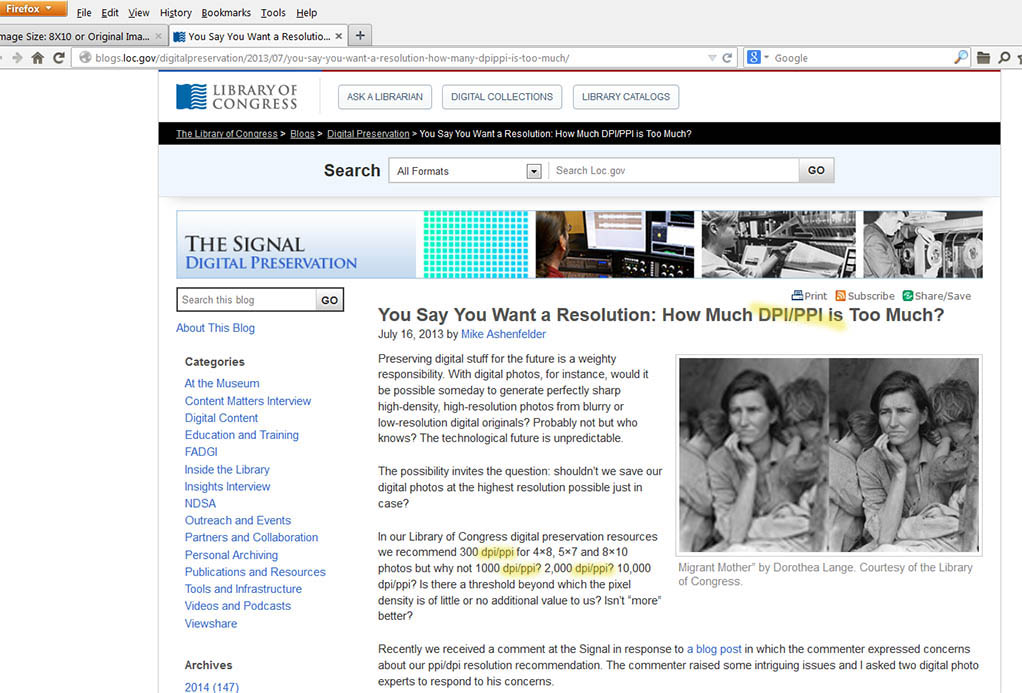
See for example, the Library of Congress recently:
You Say You Want a Resolution: How Much DPI/PPI is Too Much? | The Signal: Digital Preservation

Who are we to believe, the Library of Congress, or some anonymous voice on the internet? :)

Here are many more (5530) examples of the "dpi/ppi" term (from various .gov governmental agencies):
"dpi/ppi" gov - Google Search

Note that the term is dpi first.... dpi/ppi. :)

The facts are obvious, however, clearly not everyone here knows this. Of course they are interchangeable terms. I do it all the time. :) And I will continue doing so, because dpi has always been the name for image resolution (pixels per inch). Anyone not understanding this is going to have troubles understanding most of what they read.

dpi is extremely familiar to anyone using digital images (scanning) before digital cameras became popular, simply because that was always the only name of it.

The formal technical specifications at the very heart of our digital imaging definitions use dpi to mean pixels per inch of image resolution:

Repeating the obvious that is proven above, our most dear technical specifications obviously do use dpi for pixels per inch (because that has always been its name), and the Library of Congress too, so take your silly little problem to them. :)

But some newbies did have trouble differentiating between printer ink drops per inch, and image resolution pixels per inch, because both were called dots per inch, and they could not get the difference. Most words do have multiple meanings, defined by context. But some whippersnapper got the notion to invent the ppi term, and wanted to outlaw dpi for image resolution, I guess because they could not understand anything else. But not everyone agreed with the necessity, and use of dpi is sill of course extremely strong, rightfully so (that is the name of it). There is no issue understanding it, since the meaning of dpi is defined by context. If about printers, it means ink drops. If about images, it means pixels. Images have no ink drops in them. What's hard about that?

Scanner ratings also always call it dpi, also referring to pixels per inch of course. There are no ink drops used in scanners - scanners create pixels, and a scanner is rated maybe 4800 dpi. meaning pixels per inch capabilty.

Continuous tone printers
(dye-subs, and Fuji Frontier types) don't print discrete ink dots of three colors like inkjet printers must - instead they mix the color of the pixel directly, and they print actual pixels (called continuous tone). There are no dithered ink dots then, just pixels. But these printer ratings still refer to the spacing of those image pixels with the term dpi, simply because dpi has always been the name for "pixels per inch".

Consumer inkjets have somewhat given up the dpi term now, and now printing quality menus are usually marked Best, Better, or Good, instead of dpi numbers. They should have done that in the first place.


So, don't believe everything you hear in some forum on the internet. :) Check it out.


The importance to a newbie is they can use either term they prefer (dpi, ppi, interchangeable). But everyone else also uses whichever they prefer, so when reading, it is absolutely necessary to be able to understand it either way. Just how it is. Like it or not. :)

 
Last edited:
LOL. Obviously incorrect, wake up and look around you. Either term, dpi or ppi is commonly used to specify pixels per inch (printing resolution for digital images).. It may have multiple uses, but the term is, and always was dpi, so it used to always only be dpi, but now all the digital camera newbies have corrupted things. :)

So now, due to a few jumping in to shout "wrong" when they have no clue, now the new necessity is that what is actually becoming common in educational efforts is the new term "dpi/ppi" (trying to make it very clear that these are completely interchangeable terms).

See for example, the Library of Congress recently:
You Say You Want a Resolution: How Much DPI/PPI is Too Much? | The Signal: Digital Preservation

Who are we to believe, the Library of Congress, or some anonymous voice on the internet? :)

Here are many more (5530) examples of the "dpi/ppi" term (from various .gov governmental agencies):
"dpi/ppi" gov - Google Search

Note that the term is dpi first.... dpi/ppi. :)

The facts are obvious, however, clearly not everyone here knows this. Of course they are interchangeable terms. I do it all the time. :) And I will continue doing so, because dpi has always been the name for image resolution (pixels per inch). Anyone not understanding this is going to have troubles understanding most of what they read.

dpi is extremely familiar to anyone using digital images (scanning) before digital cameras became popular, simply because that was always the only name of it.

The formal technical specifications at the very heart of our digital imaging definitions use dpi to mean pixels per inch of image resolution:

Repeating the obvious that is proven above, our most dear technical specifications obviously do use dpi for pixels per inch (because that has always been its name), and the Library of Congress too, so take your silly little problem to them. :)

But some newbies did have trouble differentiating between printer ink drops per inch, and image resolution pixels per inch, because both were called dots per inch, and they could not get the difference. Most words do have multiple meanings, defined by context. But some whippersnapper got the notion to invent the ppi term, and wanted to outlaw dpi for image resolution, I guess because they could not understand anything else. But not everyone agreed with the necessity, and use of dpi is sill of course extremely strong, rightfully so (that is the name of it). There is no issue understanding it, since the meaning of dpi is defined by context. If about printers, it means ink drops. If about images, it means pixels. Images have no ink drops in them. What's hard about that?

Scanner ratings also always call it dpi, also referring to pixels per inch of course. There are no ink drops used in scanners - scanners create pixels, and a scanner is rated maybe 4800 dpi. meaning pixels per inch capabilty.

Continuous tone printers
(dye-subs, and Fuji Frontier types) don't print discrete ink dots of three colors like inkjet printers must - instead they mix the color of the pixel directly, and they print actual pixels (called continuous tone). There are no dithered ink dots then, just pixels. But these printer ratings still refer to the spacing of those image pixels with the term dpi, simply because dpi has always been the name for "pixels per inch".

Consumer inkjets have somewhat given up the dpi term now, and now printing quality menus are usually marked Best, Better, or Good, instead of dpi numbers. They should have done that in the first place.


So, don't believe everything you hear in some forum on the internet. :) Check it out.


The importance to a newbie is they can use either term they prefer (dpi, ppi, interchangeable). But everyone else also uses whichever they prefer, so when reading, it is absolutely necessary to be able to understand it either way. Just how it is. Like it or not. :)


Hmmmmm, checked it out, and don’t believe it. Anonymous (KmH) wins!


21luxw8.jpg
 
Hmmmmm, checked it out, and don’t believe it. Anonymous (KmH) wins!


Not hardly. :) You must have seen some temporary problem, it works fine for me.


loc.jpg
 
Interesting, when I read the page you've linked to, pretty much all the references (aside from the initial one) seem to use the terms "PPI" and "DPI" correctly. Also, leave us not forget that there is a difference between a common consumer misuse of an industry specific term and the misuse of that term by someone in the industry.
 
Interesting, when I read the page you've linked to, pretty much all the references (aside from the initial one) seem to use the terms "PPI" and "DPI" correctly. Also, leave us not forget that there is a difference between a common consumer misuse of an industry specific term and the misuse of that term by someone in the industry.


? Except for the first few paragraphs, you are of course reading various comments posted there by internet readers. Even so, an actual count on the full page is dpi 33, ppi 30. That seems interchangeable. :)

Misuse? What about the actual technical specs for JPG and TIF file formats, and image Exif? These say dpi. The term PPI is not in any of them. Not once. That defines misuse.

I do not argue about which term you should use. I could not care less what you do, and you should use which ever you prefer to say. However, you also absolutely should not tell me which I should prefer. Especially not when my use agrees with the formal specifications. :)

I do merely point out the reality that obviously does exist (and always did), which is plenty of proof for my preference.

What I do argue is that anyone unable to understand it either way, won't have understanding that will take them very far.

Jumping in and shouting Wrong does not help newbies understand what they see everywhere (for one thing, it certainly is NOT wrong). Instead, we need to help newbies with the reality, that the terms are used interchangeably today, and they absolutely need to understand it either way.
 
Well, I'm guilty of using dpi and ppi fairly interchangeably. Sometimes they are the same and sometimes they are different. It would be helpful if we always understood our words and used them correctly but humans aren't like that. Sometimes the technology isn't like that either.

I've seen a pixel referred to as the smallest picture element. We speak of our cameras as having 8 mega-pixel sensors (or pick some number you like better), yet sensors have photo-sites, with a Bayer filter over them and software is used to figure out how to create pixels by looking at values from, and positions of, several photo-sites. Unless you have one of the special sensor cameras that don't use the Bayer sensor, in which case a pixel and a photo-site might be the same thing.

Monitors used to be mostly 72 dpi devices back in the days they were mostly used for text. Then they changed to 96 dpi, some time in the late 1980's, I think. Then the technology changed again and we got flat panels, which don't seem to have any consistency. I just got a new monitor so I was looking at a bunch of 27 inch units. The specs are confusing, partly because there are different technologies involved but also because the resolution of the monitor does not seem to match the diode count. I would accept the claims if there were a lot more diodes than the resolution stated, I have trouble believing they can get resolution from fewer diodes.

Printers used to put out a dot of ink for each pixel. Possibly some still do. But now, the specs seem to say the input file should be 300 ppi and the output on the page will be 1440 dpi, because they can make really fine dots to blend ink better. Again, different printers have different sized dots and the numbers here are somewhat random. Some printers do different numbers of dots horizontally and vertically.

The version of Photoshop I'm using has a section for cropping controls, Width, Height and Resolution are all fields you can enter values into. Resolution units can be chosen, either pixels/inch or pixels/cm. Sometimes I leave the Resolution field blank. Sometimes I have it set to 240 or 300. Lately I have set it to 600 when making up files to put on the Internet. 1024 by 763 at 600 ppi has no effect on display in your browser, but if you try to print it, you might get a very small print. Since I started doing that, I have had one person ask for a print because they couldn't get the photo I posted to print properly. If I start uploading larger images, I will have to increase the Resolution number to mess up printing. I wonder how high it can be set before printing software stops paying attention to it.

The Library of Congress has it wrong. Pixels matter when storing digital files. Resolution is meaningless until you want to print something, because Resolution tells some output devices how large the image from those pixels should be. Resolution can be assigned or re-assigned later and as long as there are enough pixels the image will look good.

I wonder if the confusion happens because a pixel is a kind of dot, but not all dots are pixels.
 
The version of Photoshop I'm using has a section for cropping controls, Width, Height and Resolution are all fields you can enter values into. Resolution units can be chosen, either pixels/inch or pixels/cm. Sometimes I leave the Resolution field blank. Sometimes I have it set to 240 or 300. Lately I have set it to 600 when making up files to put on the Internet. 1024 by 763 at 600 ppi has no effect on display in your browser, but if you try to print it, you might get a very small print.

I am not disagreeing with any of your post, but will comment on a couple of points.

Changing subject, but be careful, the Photoshop Crop tool works differently if you enter a dip value. If dpi is blank, it simply crops, as expected. If you enter a dpi number, it crops, and then resamples to give you the paper dimension specified, at the X dpi. When necessary to do that, this can involve interpolation to make the pixels dimensions much larger than they are (not a good thing, but it will do what you specify, including senseless things). The Resize resample tool does same resample (less the crop), but makes this action more clear to realize. The latest version of Photoshop is a little different Crop tool.

The Library of Congress has it wrong. Pixels matter when storing digital files. Resolution is meaningless until you want to print something, because Resolution tells some output devices how large the image from those pixels should be. Resolution can be assigned or re-assigned later and as long as there are enough pixels the image will look good.

I don't see them saying pixels don't matter. They are of course concerned with future print reproduction. Generally their jist is that 300 dpi is sufficient, and likely future proof - Added by me here, unless our eyes evolve. :)

I wonder if the confusion happens because a pixel is a kind of dot, but not all dots are pixels.

Of course. No doubt dpi was jagon, but it was the formal name adopted. And always has been the name for image resolution. No worse sin than calling ink drops dots. But inexpensive scanners and esp digital cameras brought in vast hordes of newbies, some of which simply don't try to learn anything, and couldn't get it. Things got a little jumbled. :) But ppi works too, same thing. Possibly might have been the better name, but it wasn't the name.

My one big point before is, instead of incessantly standing up and shouting "dpi is wrong" (when clearly, it isn't), we should instead be instructing newbies that the world uses both terms, dpi and ppi, as interchangeable, meaning the same thing, and we are certainly and obviously going to see it both ways. They need to know to expect to see it both ways.

So the important thing is, we should understand it both ways, when seen either way. because we will see it. If we don't, we don't understand much.
 
There is image resolution, which is the pixel dimensions of a digital photo.
There is print resolution which is the pixel per inch value. PPI and image resolution define print size - pixels / ppi = inches

For electronic display the print resolution value (ppi) is meaningless. A 3000 x 2000 px, 1 ppi digital photo and the same 3000 x 2000 px digital photo set to 1000 ppi will display at the same size on an electronic display. Note: a 1 ppi photo would be huge. A 1000 ppi photo would be tiny.

Digital images are made using the additive RGB color model - Wikipedia, the free encyclopedia When red, green, and blue light are combined they make white light.
Digital images are input files. Digital image files have pixels.

Since the image sensor pixels cannot record color, in most digital cameras a Bayer filter placed in front of the image sensor is used to later interpolate the color of the light that was recorded by each pixel - a process known as demosaicing.
That interpolation determines the color of the light that entered a single pixel. The interpolation is done using a software algorithm that takes adjacent pixel recorded values into consideration. How many pixels are sampled for the interpolation varies by Bayer filter type and the Raw conversion software used to do the interpolation. When JPEG or TIFF image file types are made in the camera the Raw converter software is in the camera.

Prints are made using the subtractive CMYK color model. When cyan, magenta, and yellow ink are combined they make black. Prints are output files. Inkjet printers spray colored dots to make a print. Several dots of ink are sprayed together so they mix together to print a single pixel.

The simplest color inkjet printers have to spray at least 3 dots of ink to print a pixel. Since combining a dot of cyan, a dot of magenta, and a dot of yellow don't produce a very black black most color inkjet printers use black ink too to produce nice dark blacks.
Note: Chromogenic prints (C-prints) are made by projecting a digital photo onto light sensitive photo paper that has 3 light sensitive layers - 1 each sensitive to cyan, magenta, and yellow light. The paper is then chemically treated to make the image visible on the photo paper.

The print heads in today's drop-on-demand inkjet printers often have well over 100 nozzles to spray ink. There is 1 print head for each color cartridge in the printer.
Some print heads have extra nozzles that get pressed into service as original nozzles clog up.
High quality inkjet printers have as many as 12 color cartridges and use the CcMmYK color model.
So if the color of a single pixel requires the use of all 12 colors and each print head has just 1 nozzle it would take 12 dots of ink to print just 1 pixel. To print 300 pixels per inch would require 3600 dots per inch.
 

Create an account or login to comment

You must be a member in order to leave a comment

Create account

Create an account on our community. It's easy!

Log in

Already have an account? Log in here.

Back
Top Bottom