What's new

Issue with Blown Out Skies

Juga

No longer a newbie, moving up!
Joined
Jan 18, 2013
Messages
1,291
Reaction score
400
Location
Charleston, SC
Can others edit my Photos
Photos OK to edit
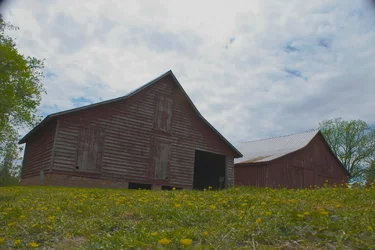
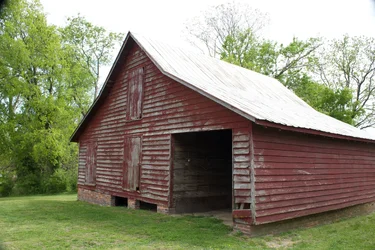
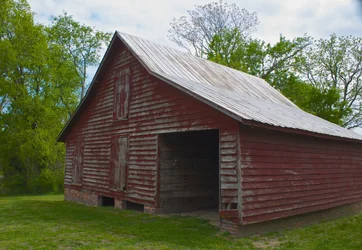
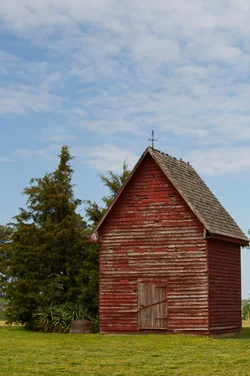
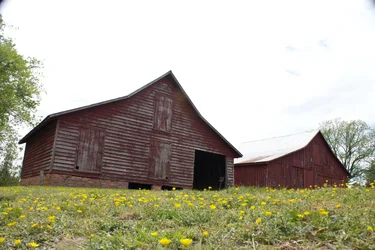
So I have been have an reoccurring problem with blowing out the skies in pretty much all of my photos even though my meter reads a correct exposure. I have changed the metering to spot, evaluate, center-weight, I have tried everyone and still the same result. It doesn't happen all the time but it happens often and I am starting to think that it is just the time of day that I am shooting at but sometimes I don't get to decide what time to shoot (ie family trips like this one.) With some extreme editing I can get the sky where I want it but then everything else looks...bad. I am posting originals with edits except for the last one where the sky turned out fine. Thanks in advance.
$IMG_3566.webp
$IMG_3566.webp
$IMG_3572.webp
$IMG_3572.webp
$IMG_3583.webp
 
Are you using a tripod? If the scenes luminosity is to wide to capture in a single image you may need to bracket 3-9 images at different exposures and combine them in post to produce a single image with a wider dynamic range.
 
Are you using a tripod? If the scenes luminosity is to wide to capture in a single image you may need to bracket 3-9 images at different exposures and combine them in post to produce a single image with a wider dynamic range.

So HDR? I have in camera HDR and produced a similar image but I unfortunately don't have software to do that. :(
 
Agree with Jake; HDR is probably the best solution.


Why not a GND filter? Or PP?


The OP doesn't have any software.

OP, look into GIMP and see if that software is something you could use. It's free and has many of the same features as Photoshop Creative Suite. It is just not as user friendly.
 
You only need 2 exposures: 1 correct for the sky, the other correct for the rest of the scene.
HDR is used when there are more than 2 major areas in an image that have a high dynamic range.
Spot metering mode is then used to sample the various areas in the scene to determine how many EV steps are needed to record the entire dynamic range. The samples also determine the value for the EV steps and the point in the EV steps the 0 EV point needs to be (it's not always in the middle of the range).

The issue is the scene has a dynamic range greater than the image sensor in your camera can record.
The image sensor does not work like human eyes do.

Understanding Dynamic Range in Digital Photography
 
What time of day were you taking the photos? In the first one you're shooting up towards the sky from a lower vantage point which would probably work better with different existing light (maybe evening). In the second one you could frame it differently without so much sky, so the building and trees are included and have the top of the photo framed just above the top of the building.

I shoot film (and digital) and I tend to lower the camera to meter then reframe the shot so I'm not metering with the camera facing directly up into the light so much. If need be I sometimes bracket shots - take more than one shot and adjust the aperture and/or shutter speed each time to make sure I have one with a usable exposure.

Since a camera's recording light, if this is how the existing light looks that's what your camera is trying to record. If the image looks like this on your viewscreen don't release the shutter yet, think about how you can adjust your settings to get a better exposure and better looking sky.

(I too would try using a polarizing filter.)
 
Last edited:
Nobody has yet explained the problem. You need to understand dynamic range. Dynamic range is the number of stops between the brightest highlight and darkest shadow the camera can record. You need to calibrate your camera to find its exact DR but 5 stops is a safe assumption. A "correct" meter reading means the camera has figured out how to expose the main subject as a medium tone. It doesn't mean the camera understands the scene or what you want to do with it. In your example, that means to expose for the barn the camera sacrifices some detail in the sky because the difference in brightness between the sky and barn is too great for the camera to contain. HDR is a solution, but it's more work and you have to decide if the image is really worth it. I don't see any light worth capturing in the barn images. The barn probably isn't going anywhere. Wait for magic conditions and then shoot, and look for details vs. cramming the whole scene into the frame.
 
What exactly is your problem? Take two exposures or more and merge them in post... :no smile:

Maybe like this?
$exposure_test1.webp
 
What exactly is your problem? Take two exposures or more and merge them in post... :no smile:

Maybe like this?
View attachment 43281
Yes, exactly like that but I can't because I don't have software to do that. As I stated before I have in camera HDR but the results were...blah!

I have a CPL on my lens that took the original albeit that it is a cheap one. It helps a bit but I still get the same problem sometimes.

As for shooting at a different time...I can't choose my time of day all the time particularly when this location is 2 hours away...with my 6, 4 and 4 month old...things get crazy!

I appreciate everyone's feedback and it looks like HDR is my answer in post process and I will have to invest in some software to be able to do HDR PP rather than in camera. I will look into GIMP as Jake suggested until I can invest in something more powerful.
 

Create an account or login to comment

You must be a member in order to leave a comment

Create account

Create an account on our community. It's easy!

Log in

Already have an account? Log in here.

Back
Top Bottom