What's new

Jess

jeytee

TPF Noob!
Joined
Feb 22, 2016
Messages
67
Reaction score
28
Can others edit my Photos
Photos OK to edit
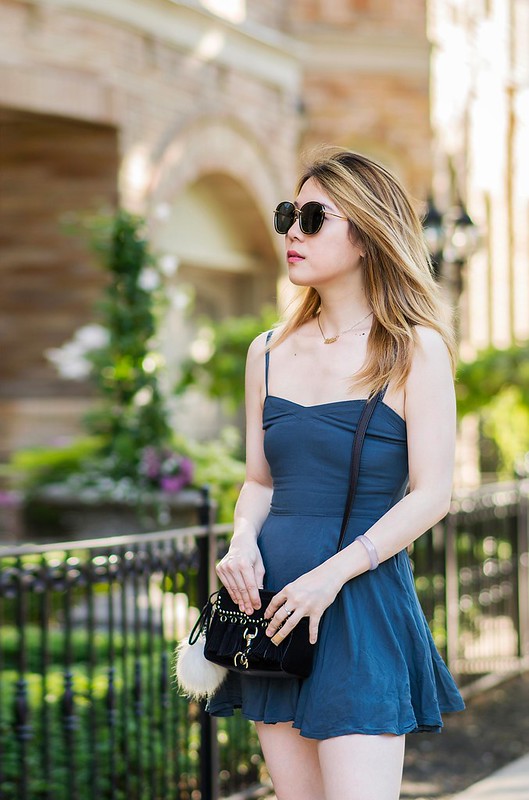
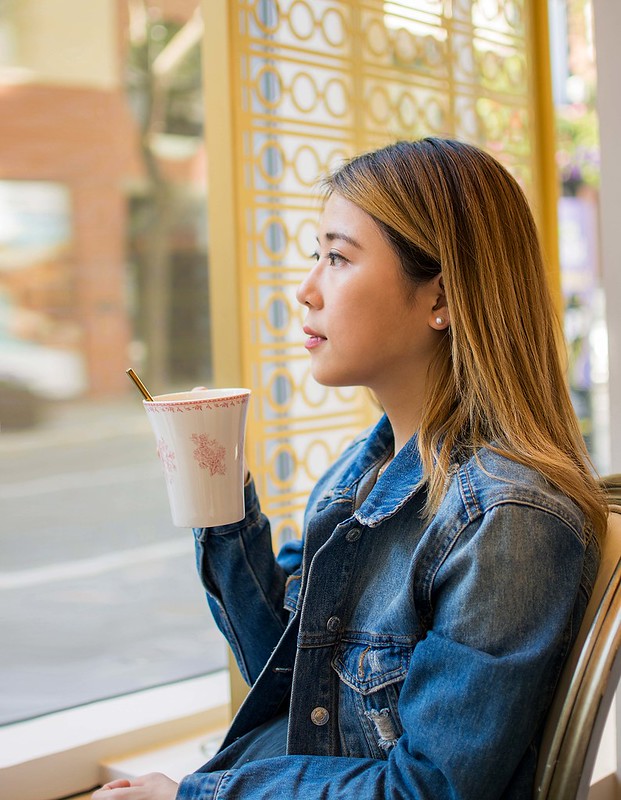
Recently went for some coffee with my friend and took some photos with her! Any comments and critiques are appreciated :) Trying to practice my use of natural lighting so its not too harsh on the face. I think in number 3, the background is too bright and maybe number 4 a bit too busy, but I'd love to hear what everyone thinks. Thanks. (I noticed her dress is a wrinkled too, but it was too much work to fix in PP haha)

1.


2.

3.


4.
 
Last edited:
Nice set. Very flattering light on the young lady in #1. Would agree with you on the background in #3&4. Also, would personally prefer a tad more room on the left side in #4.
 
You may already know this but something I learned recently that has helped a lot for bright backgrounds. In Lightroom using the adjustment brush I brush over the background area and even overlapping the subject or any other area. Then turn on range masking and set to luminance. You can then adjust the luminance scale until only the bright areas you want to darken is masked. This makes for very fast seemless masking so you don't get any halos around the subject or anything else.

Anyways probably something most people know but was new to me. You can also do colour range masking as well to isolate a certain colour you want to adjust.

By the way nice images.
 
Nice set. Very flattering light on the young lady in #1. Would agree with you on the background in #3&4. Also, would personally prefer a tad more room on the left side in #4.

Thanks for the comment! yeah ill have to be more careful when im shooting next time. A bit careless on my part haha
 
You may already know this but something I learned recently that has helped a lot for bright backgrounds. In Lightroom using the adjustment brush I brush over the background area and even overlapping the subject or any other area. Then turn on range masking and set to luminance. You can then adjust the luminance scale until only the bright areas you want to darken is masked. This makes for very fast seemless masking so you don't get any halos around the subject or anything else.

Anyways probably something most people know but was new to me. You can also do colour range masking as well to isolate a certain colour you want to adjust.

By the way nice images.
Wow this might help alot for those pictures that I really like, but mess up the exposure! Thanks for the advice and comment :)
I use mainly Photoshop CS6 so I guess ill look a tutorial for that
 
I use mainly Photoshop CS6 so I guess ill look a tutorial

Even easier using the Camera Raw filter. You can use either a brush or graduated filter to adjust the luminosity, color or both.
 
The third shot is excellent. She has natural beauty and the candid pose seems to fit her personality.
 
I use mainly Photoshop CS6 so I guess ill look a tutorial

Even easier using the Camera Raw filter. You can use either a brush or graduated filter to adjust the luminosity, color or both.

Yep just downloaded the camera Raw filter. Just trying to get to properly install is the next trick haha. Do you happen to have a link to the actual file that I can just copy paste into the directory? I can't seem to get it to install properly.
 
The third shot is excellent. She has natural beauty and the candid pose seems to fit her personality.
Thank you! That one was my favorite as well :)
 
I use mainly Photoshop CS6 so I guess ill look a tutorial

Even easier using the Camera Raw filter. You can use either a brush or graduated filter to adjust the luminosity, color or both.

Yep just downloaded the camera Raw filter. Just trying to get to properly install is the next trick haha. Do you happen to have a link to the actual file that I can just copy paste into the directory? I can't seem to get it to install properly.


Fyi you can only install up to version 9.1.1 on CS6, if you're trying to install a later version that may be your problem. Here's a link that might provide reference Keeping Photoshop Up-To-Date and a link to instructions and installer app Camera Raw plug-in installer
 
Nice set. Very flattering light on the young lady in #1. Would agree with you on the background in #3&4. Also, would personally prefer a tad more room on the left side in #4.

I agree with this. I might try compensating by cropping a bit off of the top of the frame, and a tiny bit off of the right hand side of the frame, which will have a similar effect, namely creating more space for her to "look into" and "move into", visually., And also, I think a slightly more-blockly and less-tall aspect ratio would improve the shot. I think frame 2 could also use the same treatment...it has just a little bit too much top space, in my opinion. I like the light and bright, airy feelign these photos project. She's beautiful, and that always make the photos easier to make.
 
Nice set. Very flattering light on the young lady in #1. Would agree with you on the background in #3&4. Also, would personally prefer a tad more room on the left side in #4.

I agree with this. I might try compensating by cropping a bit off of the top of the frame, and a tiny bit off of the right hand side of the frame, which will have a similar effect, namely creating more space for her to "look into" and "move into", visually., And also, I think a slightly more-blockly and less-tall aspect ratio would improve the shot. I think frame 2 could also use the same treatment...it has just a little bit too much top space, in my opinion. I like the light and bright, airy feelign these photos project. She's beautiful, and that always make the photos easier to make.
I played around with the crop and transform tool in PS to extend the background and since its decently OOF, it's relatively easy to cheat this way haha. What do you think? Is this what you had in mind?


I played around with the crop and transform tool in PS to extend the background and since its decently OOF, it's relatively easy to cheat this way haha. What do you think? Is this what you had in mind?

To me it looks better, seems more balanced. I unfortunately have some experience with "stretching" LOL
 
The first and second are very nice. I wish she´d removed the sunglasses. A big part of "pretty girl" is the eyes. I will never let a girl I photograph wear sunglasses covering her eyes.
 
Is she a blogger or social media influencer? These are some great shots that I think would be very valuable to a social media influencer. They have a great lifestyle feel to them.
 

Create an account or login to comment

You must be a member in order to leave a comment

Create account

Create an account on our community. It's easy!

Log in

Already have an account? Log in here.

Back
Top Bottom