What's new

Kristen

frommrstomommy

Been spending a lot of time on here!
Joined
Feb 3, 2010
Messages
2,345
Reaction score
1,003
Location
florida
Can others edit my Photos
Photos OK to edit
Last edited:
You have gotten INFINITELY better since I last looked at one of your posts.

Which was probably a long time ago.

'Cause I'm not here much.

But still.

Good job, lady! Keep it up! :sillysmi:
 
You have gotten INFINITELY better since I last looked at one of your posts.

Which was probably a long time ago.

'Cause I'm not here much.

But still.

Good job, lady! Keep it up! :sillysmi:

Thanks :) Definitely a compliment coming from you.
 
Oh... and I totally missed the "CC Welcome" part so...

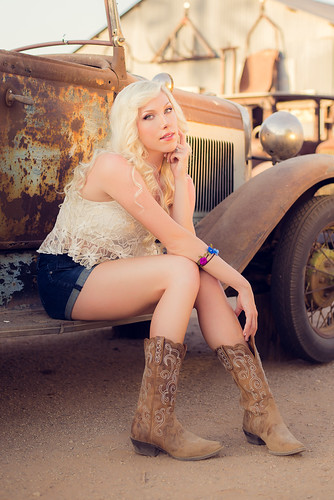
1. I love this shot. I have no complaints. Your framing is great, the model is great, lighting is great.

2. I'm not sure how I feel about the framing in this one. I feel like it's asking to be either tighter, or wider, but it's sitting in this weird in-between place.

I'm also curious what you used to skin smooth, but something feels a little off about it to me, especially in the second shot.

But overall, good job. :)
 
Like Emily said great work!

Also like emily said the framing on the first image has me wanting a bit more its at a weird inbetween stage where I am left wanting to see more of the car :) So getting wider on the scene would satisfy that, or tighter in would put the character more as the main subject.
 
I was really torn on the crop for the last.. these were just shot tonight so I have not played with but a few images from the shoot and I really loved her face on this one for whatever reason. I cropped way in from how this was shot actually because I didn't love it full body, something was just really off about it to me. I edited entirely in LR5 on #2. I smoothed with a tweaked version of lr's skin softening brush or whatever that preset brush is called.. at like -70 clarity, +25 sharpening and then like +.14 exposure I think I have it set to. I erased whatever I may have accidentally smoothed over as far as eyes, mouth and that was it I think... same brush used head to toe. I usually don't smooth the body with -70 and bump it to -50 ish but I just went with it. lol
 
Like Emily said great work!

Also like emily said the framing on the first image has me wanting a bit more its at a weird inbetween stage where I am left wanting to see more of the car :) So getting wider on the scene would satisfy that, or tighter in would put the character more as the main subject.

Actually, I said the framing on the first one was great.

It's the framing on the second that is iffy.

I don't want to see more of the car. The focus is on the model, where it should be. I see just enough of the car to get the idea. -- I think that shot is great, as is. :sexywink:
 
I was really torn on the crop for the last.. these were just shot tonight so I have not played with but a few images from the shoot and I really loved her face on this one for whatever reason. I cropped way in from how this was shot actually because I didn't love it full body, something was just really off about it to me. I edited entirely in LR5 on #2. I smoothed with a tweaked version of lr's skin softening brush or whatever that preset brush is called.. at like -70 clarity, +25 sharpening and then like +.14 exposure I think I have it set to. I erased whatever I may have accidentally smoothed over as far as eyes, mouth and that was it I think... same brush used head to toe. I usually don't smooth the body with -70 and bump it to -50 ish but I just went with it. lol

Yeah, that brush can do weird things if you're not careful.

You can't really use the same setting throughout, and when doing things like that you need to do it in layers -- As in a low flow, so you can paint over a spot more than once to increase the effect, rather than having a one-shot opacity. Different areas of the face need different amounts of softening... different parts of the body need different amounts of softening. :sillysmi:
 
Like Emily said great work!

Also like emily said the framing on the first image has me wanting a bit more its at a weird inbetween stage where I am left wanting to see more of the car :) So getting wider on the scene would satisfy that, or tighter in would put the character more as the main subject.

Actually, I said the framing on the first one was great.

It's the framing on the second that is iffy.

I don't want to see more of the car. The focus is on the model, where it should be. I see just enough of the car to get the idea. -- I think that shot is great, as is. :sexywink:

Fair enough maybe I am too much of a gear head :)
 
I think I went over the under eye area maybe twice? I don't know. Definitely super quick edits and I'll have to reassess it when my munchkin drifts off to sleep in a bit! lol I know I'll have more to share too. I didn't take a whooole lot but will definitely have more!
 
it seems like no body care so don't mind me... but I find the angle of the shot and the pose in #2 hm... how do you said that...not so appropriate... I keep looking between her legs... and trust me, I don't want to do that :)
 
I think I went over the under eye area maybe twice? I don't know. Definitely super quick edits and I'll have to reassess it when my munchkin drifts off to sleep in a bit! lol I know I'll have more to share too. I didn't take a whooole lot but will definitely have more!

Actually, to be honest, it was her legs and arms in that one that gave it away. They have an unnatural glow to them. :lol:
 
Haha maybe I will post an unedited version.. the light was seriously GORGEOUS in that spot right in that moment so I wouldn't put it past the light to have been the main cause for any glowing effects. lol
 
Haha maybe I will post an unedited version.. the light was seriously GORGEOUS in that spot right in that moment so I wouldn't put it past the light to have been the main cause for any glowing effects. lol

Yeah, if you get a chance, I'd be curious to see an unedited version :sillysmi:
 
I'll try to remember to save one when I get back on the computer I edit on. My editing computer has no internet access (don't ask.. lol) so its a PITA pulling images to share.
 

Create an account or login to comment

You must be a member in order to leave a comment

Create account

Create an account on our community. It's easy!

Log in

Already have an account? Log in here.

New Topics

Back
Top Bottom