What's new

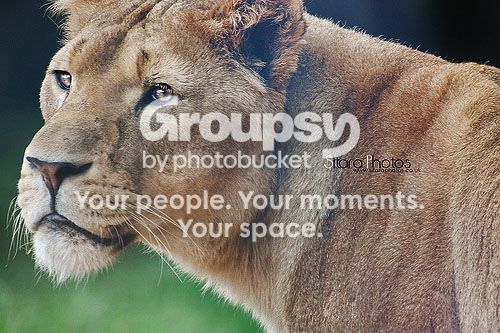
Lioness photo in ZSL Whipsnade zoo UK

SitaraPhotos

TPF Noob!
Joined
Mar 17, 2013
Messages
14
Reaction score
2
Location
Buckinghamshire UK
Can others edit my Photos
Photos OK to edit
So I took this picture along with a few others when I went to the zoo. I'm really disappointed about the frame, the lioness ears are cut, if only I had got fully in the image :( it was just so busy and there were people shoving and pushing everywhere.
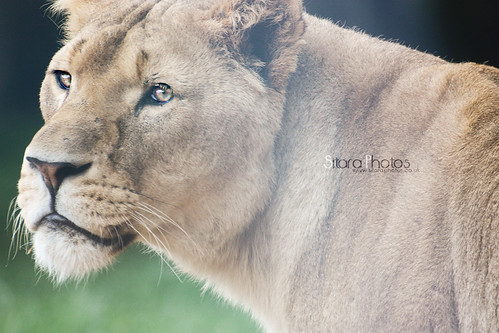
7853947594_6a0ba32289.jpg
 
I know how it is, people got no respect when you are standing with a camera. I understand children, but grown ups act the same way. I think the shot came out great anyway! :-) I like it!
 
I agree with you, I wish the ears weren't cut but it's still beautiful. You actually were able to capture emotion in the lioness' eyes.
 
Agreed, you caught the moment itself and framed it nearly perfectly barring the ears - sadly animal ears are a nightmare (as are antenna on bugs!)

That and you've got a wire line going right down the middle of the shot, thankfully its fairly weak. Try selecting that area alone and using layer masks whilst boosting the contrast of that hazy zone. Normally it will pull things right back into order without much trouble.
 
Agreed, you caught the moment itself and framed it nearly perfectly barring the ears - sadly animal ears are a nightmare (as are antenna on bugs!)

That and you've got a wire line going right down the middle of the shot, thankfully its fairly weak. Try selecting that area alone and using layer masks whilst boosting the contrast of that hazy zone. Normally it will pull things right back into order without much trouble.

Hi, thanks for such a nice comment.

Unfortunately when she looked my way as soon as i got the camera ready to take the shot I manged to get only a few the rest were extremely blurry because of the pushing and shoving. The line? There was no metal fencing it was glass, maybe it's haze?
 
Ahh it might well be haze from the glass, though it also looks similar to the effect that out of focus wire can make with pens - either way the contrast boosting over that local area should counter the haze effect.

As for the push and shove a lot can vary on when you go to the zoo. Weekends during holiday seasons are bad times - whilst weekdays (Esp mondays) offseason are often the best since the crowds are much smaller.
 
As for the push and shove a lot can vary on when you go to the zoo. Weekends during holiday seasons are bad times - whilst weekdays (Esp mondays) offseason are often the best since the crowds are much smaller.

Yep, weekday mornings especially. I went out to the wildlife park here a while ago early on a Monday morning and I was practically the only person there. Granted, it's generally probably not as busy as the one you visited Sitara. Often the animals are more active in the morning as well.
 
Yep, weekday mornings especially. I went out to the wildlife park here a while ago early on a Monday morning and I was practically the only person there. Granted, it's generally probably not as busy as the one you visited Sitara. Often the animals are more active in the morning as well.

I think I did go at a busy time, it was half term, kids all over the place.

Ahh it might well be haze from the glass, though it also looks similar to the effect that out of focus wire can make with pens - either way the contrast boosting over that local area should counter the haze effect.

As for the push and shove a lot can vary on when you go to the zoo. Weekends during holiday seasons are bad times - whilst weekdays (Esp mondays) offseason are often the best since the crowds are much smaller.

Any ideas on how I may be able to fix that haze??

I will definitely consider going to the zoo again on a monday :)
 
I had a play with the photo, although at reduced size and data from the JPEG here it was difficult, the larger version might well provide more data and be an easier adjustment.

That said:

1) Contrast - a new contrast layer with the contrast increased all the way helped initially with restoring the lost element to the hazy area. That said you will need to use a layer mask so that you're only adjusting the contrast in the middle of the photo where the hazy effect is affecting the shot.

2) Enhance - Adjust lighting - Shadows/highlights; removing all the default brighten shadows and then increasing the value of darkening the highlights to 100% or there about. This dramatically restored the affected area and whilst the end result still isn't perfect it helps a lot.

3) Reducing saturation - set the colour channel to yellow only and reduce it a little just because the above two processes will have increased the apparent saturation and changed the colour of the cat to a much richer, darker hue. Reducing the yellow channel only by a little helps to bring things back a little closer to the starting colours.


Note if you worked with a RAW photo you might find that adjusting the settings on the RAW editor to best present the hazy area and then editing the RAW photo again for the outer areas and then blending the two results together gives you a much stronger starting position. You might also be able to get a more faithful colour to the cat with more work

lioncopy_zps21ea535a.jpg


is what I got - the clone/heal tools might also be of us just to adjust and fix up the few black areas where its not fully restoring.
 

Create an account or login to comment

You must be a member in order to leave a comment

Create account

Create an account on our community. It's easy!

Log in

Already have an account? Log in here.

Back
Top Bottom