What's new

Michaela - First Time Trying Portraiture - Please Critique!

GabeW

TPF Noob!
Joined
Feb 11, 2014
Messages
12
Reaction score
1
Location
United States
Can others edit my Photos
Photos OK to edit
The other day I had a friend of mine to model for me so I could try some portraiture photography. It was my first time really taking it seriously. The photography teacher at my school was kind enough to let us use a pair of 500w lights, however only one of them had a diffuser so we had to get a little ghetto with the lighting. I was using my beloved canon t2i and cheap as heck but still great 50mm f1.8 lens. One mistake I think I made was keeping the aperture too wide, I had it all the way at 1.8 for the whole shoot. It made it really hard to get good focus, so most of these are less than super sharp. Still I was quite happy with the results.
I edited them all in photoshop. It was my first time doing skin retouching, so any comments on how I did would be super useful. Too much, too little, good, bad, advice etc.

Please leave any feedback you feel would be constructive.

Thanks for looking!

#1


#2


#3


#4


#5


#6


#7
 
Last edited:
Very sorry, I lack the bandwidth to download and view these 7 photos. How big are they?
 
Not too bad for a first attempt, HOWever... You missed focus on all of them. You focused on the nose, and the goal with portraiture is to have the eyes in focus. The lighting doesn't look too shabby. The light on three, for example, is pretty good, but be careful of your highlights-they're a touch too hot (and you ended up losing detail).

Also, for future posts, try and limit your image selection to a 2 or 3 at most, as it allows for more directed and accurate critiques.

Best,
Jake


Sent from my iPhone using Tapatalk
 
Very sorry, I lack the bandwidth to download and view these 7 photos. How big are they?

Huge.

They are all very very VERY red and out of focus.

I appreciate the range of expressions that you got, but your cropping could use some work too.

First and foremost, work on getting sharp focus on the eyes. I don't think you nailed the focus in a single one (and I got a good look at them since they loaded at 1,000,000% before scaling down to a viewable size, ha).

Make sure your white balance in camera is appropriate for the light you're shooting in. Or if you're shooting in RAW make sure you fix the white balance while processing.
 
It's not the cropping that needs work: it's the FRAMING, which happens in the studio or in the field. Try turning the camera to vertical framing orientation next time. In most of these shots, 40 to 60 percent of the frame is a plain, boring, empty, meaningless monotone background that adds nothing, and that is a direct consequence of orienting the camera in horizontal capture mode.

Because the camera was close to her, and held in a horizontal orientation, you lopped off the top of her head, you know, so as to include more empty background. It's a matter of making sure that the FRAMING of the picture with the camera, is in harmony with the subject. She is sitting upright, but the camera is cutting the top of her head off, and her chin is very close to the bottom edge of the frame, so she is presented as a "floating head", with no visible means of support, no torso, no shoulders, just a tiny peek of the neck showing. These lack what is called a "base". The head is shown without enough neck or shoulders, and the effect is not pleasing.

Again, this is not a cropping issue, this is a FRAMING issue, a composing issue.If you shoot this tightly and with the camera oriented as if it were a movie camera, there is no way to fix this in post. The shoulders are not there. There is no neck.

These all would look better with deeper depth of field. Having the nose sharp is a good thing, but having the eyes and the lips be out of focus really is not a good look. At this close distance, there is NOT much depth of field until the lens is closed down to a medium-range f/stop, like say f/5.6, 6.3, or 7.1. These are close-ups, and would have looked better with a vertical framing decision, and deeper depth of field on most of them, or even letting the nose go out of focus, but nailing the focus on the eyes.

Your range of expressions captured is very nice, and because the lighting was bright, her irises are constricted quite a bit,km so her beautiful greenish eye color really comes through, very nicely. The sculpting of the facial shape and her features, based on how you posed her and how you aimed aimed the lights, is pretty good on a few of these. The lighting effect is overall, nice, but not spectacular. There's plenty to build on, but also a pretty doggone good job for a first time, at least on expression, rapport with subject, and lighting effect and "mood".
 
Reuploaded at smaller size XD My bad

Thanks for the critique!
I totally agree that the focus needs improving. As someone who normally does macro work it drives me crazy when the focus plane isn't where it should be, and that is the case for most of these. Like I said next time I will be sure to stop the lens down.
As for the color balance, the first two were supposed to be about neutral or slightly warm, but the last few I intentionally left them a redder. I liked the warm feeling it left with the backlighting and the slightly dyed-red hair, but if it is too blaring that is good to know. I'll make it subtler next time.
 
You make a good point about framing. I hadn't really noticed it until you pointed it out but they are all cropped a little close. Part of that was pragmatic in that we were shooting in a tiny room with the lights literally right next to her. The lights were actually in all of the shots but I edited out of most (expect for a few where I left it in because I liked the effect). I'll have to make sure I do some of the portraits in portrait orientation next time (isn't that a novel idea)., or find a more interesting background other than the that white wall.

Thanks for taking the time to write such long comments everyone! Really helpful!
 
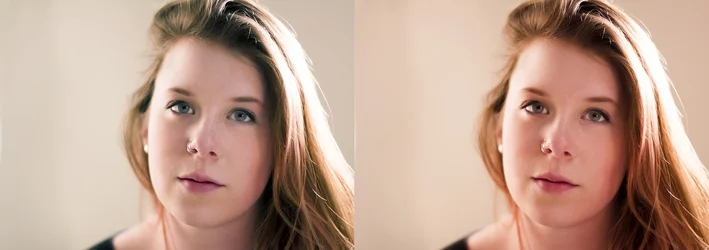
$IMG_a0001 copy.webp

So here is a quick recolour for one of the shots. You see how the colour is a little more balanced and the colour of the eyes and skin is probably more realistic. If you have editing software, you may also choose just to brighten the eyes a little and possibly smooth the skin a tiny bit and see if it just makes the face a little more striking.
 
You need to stop the camera down and work on the lighting.
 

Create an account or login to comment

You must be a member in order to leave a comment

Create account

Create an account on our community. It's easy!

Log in

Already have an account? Log in here.

Back
Top Bottom