What's new

Model - Shirin (CC Please)

boomer

No longer a newbie, moving up!
Joined
Jul 11, 2007
Messages
381
Reaction score
55
Location
Peoria, AZ
Can others edit my Photos
Photos OK to edit
Hey all!

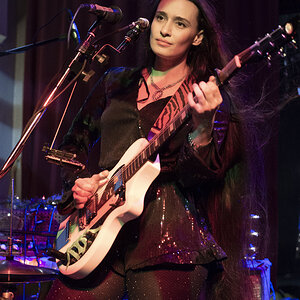
Did this shoot yesterday afternoon with a friend. She was a super fun to shoot as she was pretty awesome at posing and updating poses after each shot. Please let me know what you think of the set. I went for pretty neutral toned edits. What do you think of the edits (was thinking about warming them up a bit)?

Any other CC about this set would be much appreciated!!!


JB2_4207 by Jim Boomer Photography, on Flickr


JB1_5363 by Jim Boomer Photography, on Flickr


JB2_4236 by Jim Boomer Photography, on Flickr


JB2_4259 by Jim Boomer Photography, on Flickr


JB2_4324 by Jim Boomer Photography, on Flickr


JB2_4380 by Jim Boomer Photography, on Flickr


JB2_4442 by Jim Boomer Photography, on Flickr
 
Last edited:
A few too many for which to provide detailed C&C. In general, the skin tones look just a bit cool, but the monitor I'm using is not calibrated, so take that with a grain of salt. The model looks good, focus is appropriate, and exposure is good, but the lighting is very flat and there are lots of blown/overly bright backgrounds which really pulls the eye away from model. That, and the lack of significant catchlights rather leads me to believe you didn't use any supplemental light in these. A couple of speedlights would have taken these from nice to 'great'!
 
A few too many for which to provide detailed C&C. In general, the skin tones look just a bit cool, but the monitor I'm using is not calibrated, so take that with a grain of salt. The model looks good, focus is appropriate, and exposure is good, but the lighting is very flat and there are lots of blown/overly bright backgrounds which really pulls the eye away from model. That, and the lack of significant catchlights rather leads me to believe you didn't use any supplemental light in these. A couple of speedlights would have taken these from nice to 'great'!

I think I can agree with everything you said. Thank you for the input. I was hoping for a more colorful sunset. We have been having some amazing sunsets in Phoenix the past few weeks. But yesterday ended up being pretty hazy. I will be trying some changes later and I'll update the thread to see what you think.

Any other opinions?
 
Really not much to say. You obviously know what you're doing. These are fine as-is. Just sort of thinking out loud. Thoughts"

A little bit of heaven on earth.

Yes, a bit warmer on WB or tint would be okay. She has good modeling skills. I'm not really a fan of the tilt on the first two shots, and I think I'd crop off a good deal of the left side of the first frame. The light is steady, and I think you could bring the light "down" a bit, so it looks a bit more like late afternoon backlighting in open shade. and these would still have a nice effect, but with the shaded side a bit darker, that very soft rim-lighting from the skylight behind would look more prominent. These look a lot like modern catalog fashion, from like Alloy or one of the other junior's/young women's clothiers.
 
I went for pretty neutral toned edits. What do you think of the edits (was thinking about warming them up a bit)?
The temp looks great with the black garments, adds even more presence/impact. Maybe the others could be a bit warmer (?). Very nice pictures!
 
Thanks for the input guys! Much appreciated. Even if it seems like I know what I'm doing, I always like to see if there's anywhere I can improve :)
 
image 3 to me looks like shes got a bad underbite but its just her pose, that looks bad, photo 7 i like the most she looks really pretty the rest are fine but that's just my opinion
 
I wish my friends were that good looking.
 
Jim,

This is a NICE set--the only thing missing are CLOSE-UPS--I sure hope you did some--she has great features!

My wife--my expert poser--would immediately say," ooooh, watch those thighs!" The last two images really highlighted and increased the width of her thigh nearest the camera--women DO NOT LIKE THAT!

To correct this all you need to do is: 1. Raise your camera height so you don't show the underside of her thigh.
2. And/or have her roll on that thigh towards the camera--putting it's bulk away from the camera's view. To do this in that small space you just have her reseat herself a little farther to the far edge of the 'sill placing her body weight on the near bun and roll on it. We do this all the time with our models and they love the results!

Another posing tip for the last image: If you have her drop her near hand down to the 'sill you will not only reduce that thigh thickness but open her up so you can see some WAIST--the ladies always like that!
 
Great shots. I know it's the style of clothes she is wearing but when I look at the ones in the black outfit all I can think of is where are her pants/bottoms?
 
Jim,

This is a NICE set--the only thing missing are CLOSE-UPS--I sure hope you did some--she has great features!

My wife--my expert poser--would immediately say," ooooh, watch those thighs!" The last two images really highlighted and increased the width of her thigh nearest the camera--women DO NOT LIKE THAT!

To correct this all you need to do is: 1. Raise your camera height so you don't show the underside of her thigh.
2. And/or have her roll on that thigh towards the camera--putting it's bulk away from the camera's view. To do this in that small space you just have her reseat herself a little farther to the far edge of the 'sill placing her body weight on the near bun and roll on it. We do this all the time with our models and they love the results!

Another posing tip for the last image: If you have her drop her near hand down to the 'sill you will not only reduce that thigh thickness but open her up so you can see some WAIST--the ladies always like that!


All great info! noted! Yes, I have so many pictures from this session. So many keepers too.

Here is a closeup:


JB2_4226 by Jim Boomer Photography, on Flickr
 
Last edited:
I have ugly friends.

Anyways the tones are cool as mentioned but some vibrancy increase and a bit of WB should clear that right up.
 
Ok, I warmed the pictures up just a bit and updated my posts. I think they look a little nicer now. It's weird, my 27 inch IPS ASUS monitor is calibrated to the default 6500K, but it seems to still be slightly warmer looking compared to most other displays I use. Maybe that's why I edit slightly towards the cool side...

image 3 to me looks like shes got a bad underbite but its just her pose, that looks bad, photo 7 i like the most she looks really pretty the rest are fine but that's just my opinion

I also replaced image 3 with a different pose :)
 
These all look a bit too bright and magenta to me. I didn't see the originals, did you warm with magenta? If so you should probably warm more with red and yellow.
But not a big deal. In general wonderful captures.
 

Create an account or login to comment

You must be a member in order to leave a comment

Create account

Create an account on our community. It's easy!

Log in

Already have an account? Log in here.

Back
Top Bottom