What's new

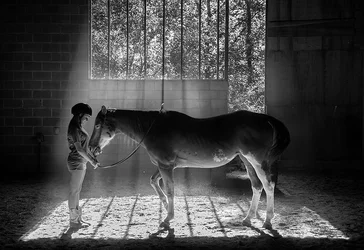
Moment of Communion

jenko

TPF Supporters
Joined
Mar 4, 2013
Messages
1,106
Reaction score
652
Location
NC
Can others edit my Photos
Photos OK to edit
A shot of my daughter and her favorite horse, "Nugget." Nugget had a cyst on her chest several weeks ago. It ruptured one day after riding -- the saddle and pressure. So, she had a deep, open wound for weeks that did not look good at all. Fortunately, it did not get infected, so my daughter took her for her first ride yesterday after many weeks of being on rest. The shot was taken a few moments before my daughter mounted her. She had to ride her bareback, which is why there is no saddle.

 
I like this a lot. My only quibble is that the "window" is kinda distracting. Maybe blow it out or do some cropping.
 
REALLY cool capture. I feel like it's a little soft (could be the resize), but I'd like to see you play with the contrast a little more. And I wonder what a crop at her and its face would look like.

the window doesn't distract me at all. It's the horse foot that's moving...
 
Bravo! Amazing light.
 
Perhaps a bit off the brightness, a clone on the left, a slight crop on the right. As always, just another opinion, neither better or worse, just different.

$9680490198_94ace69e3c_o.webp
 
This is a great shot! You capture a profound moment, and I really like the light coming through the window, just right amount of dusty haze and shadow from the window mullions.
 
Appreciate all the comments and ideas! I may play around with the given suggestions. Also, forgot to mention that Nugget did really well on her ride!
 
This is a pretty simple edit to make. Take your original and make it two stops darker. Then, take your original and copy/paste it over the darker image, add a white mask and then do a gradient black to clear over the top of the image (on this image, I did a pull from the top to the top of the horse and a pull from the bottom to the girls feet). You can vary the density of the fill either in the initial pull or via the layer adj. I generally have a tendency to go easy and work my way up to where I'm comfortable. If you go too much you can use a white brush to ease back in some of the light on the mask or use the eraser tool, soft brush, and gradually increase the amount you are removing by changing the brush opacity. Flatten and do your other edits, or do a control, alt, shift E to make a new layer combination, control j to copy that layer and work the edits there. The latter is the non-destructive way to work the image.
 
If you're worried about the window dominating, and I am not, burn and dodge the girl and the horse to deepen the chiaroscuro on them, bright the light tones and and the dark tones down. They'll pop a trifle more, and draw the eye more. The window is already low contrast and tends to fade back, but I do see the argument that maybe it doesn't enough.

Really well done. I love every single thing about this.
 
Great shot and pretty dramatic lighting. Somehow it reminds me "Sword in the Stone" scene. When destiny happens.
 

Create an account or login to comment

You must be a member in order to leave a comment

Create account

Create an account on our community. It's easy!

Log in

Already have an account? Log in here.

New Topics

Back
Top Bottom