What's new

More birds

wackii

No longer a newbie, moving up!
Joined
Mar 11, 2012
Messages
375
Reaction score
140
Location
Southern California
Can others edit my Photos
Photos NOT OK to edit
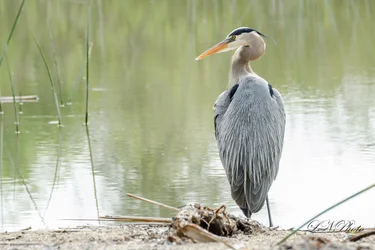
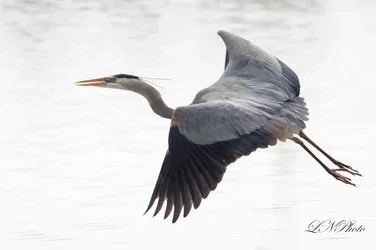
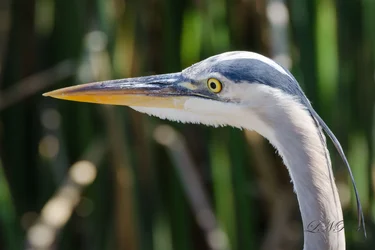
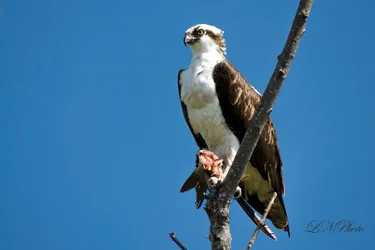
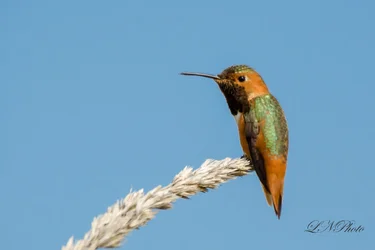
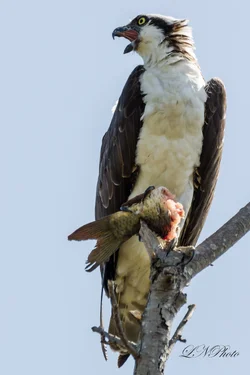
A few shots that I captured today. C&C are welcome! I need some help on post processing for these. Any tips?

Thanks,

1. $Blue Heron 1.webp
2.$Blue Heron 2.webp
3.$Blue Heron 3.webp
4.$hummingbird.webp
5.$Osprey 1.webp
6.$Osprey 2.webp
7.$parrot resize.webp
 
Nice shots. I am not sure what your concern is with post-processing - maybe a bit more contrast in #1 and 2. Would you care to expand?

WesternGuy
 
I'm having trouble finding anything here that needs to be changed.

Nice shots!
 
Thank, WesternGuy. I am just looking for more ways to improve with post processing as I am not good at it. Thanks for the tip about more contrast. When you do post processing, how do you know how much contrast is needed, etc... For example on #2, that shot was against the sun therefore the reflecting on the water was so bright/burn out. I was using Aperture Priority mode when shooting that with +2/3 EC. The image of the Heron was kinda dark. I have to crank up the exposure during the post processing. But when I do that, the background is basically burn-out.

Nice shots. I am not sure what your concern is with post-processing - maybe a bit more contrast in #1 and 2. Would you care to expand?

WesternGuy
 
Thank, WesternGuy. I am just looking for more ways to improve with post processing as I am not good at it. Thanks for the tip about more contrast. When you do post processing, how do you know how much contrast is needed, etc... For example on #2, that shot was against the sun therefore the reflecting on the water was so bright/burn out. I was using Aperture Priority mode when shooting that with +2/3 EC. The image of the Heron was kinda dark. I have to crank up the exposure during the post processing. But when I do that, the background is basically burn-out.

Nice shots. I am not sure what your concern is with post-processing - maybe a bit more contrast in #1 and 2. Would you care to expand?

WesternGuy

I think the first thing to ask, is whether or not you are doing post-processing with a calibrated monitor. If you aren't then that is the first thing you have to do - calibrate your monitor. I am going to assume that you are working on a calibrated monitor. As far as knowing how much contrast is needed - hard to say - it is a "feeling" that comes with experience about what constitutes a "good" image, or perhaps the better terminology is a "well-processed image. If I can bring the image on my monitor close to what I remember of the scene, then that is what I shoot for. I also make a lot of use of my histogram when I am "developing" an image. I use Lightroom for my post-processing and I could probably spend a lot of time in detailing how I use it, but I am not sure that would be of any use to you. I also use Nik's Color Efex Pro 4 Detail Extractor filter and their Viveza 2 software to assist in the post-processing. If you tell us what you use for your editing software, then maybe someone can help answer that question.

As far as image #2 having a "burned-out" background, I really wouldn't worry too much about that as long as the subject is in focus and the detail is there in the bird - which it is. Of course, you are always better off with the sun behind you, but then you knew that - ;). Hope this helps a bit.

WesternGuy
 
I calibrated my laptop screen to the best I can. I am using lightroom 4 to do post processing. I guess I will just keep on practicing it. Thanks, WesternGuy.

Thank, WesternGuy. I am just looking for more ways to improve with post processing as I am not good at it. Thanks for the tip about more contrast. When you do post processing, how do you know how much contrast is needed, etc... For example on #2, that shot was against the sun therefore the reflecting on the water was so bright/burn out. I was using Aperture Priority mode when shooting that with +2/3 EC. The image of the Heron was kinda dark. I have to crank up the exposure during the post processing. But when I do that, the background is basically burn-out.

Nice shots. I am not sure what your concern is with post-processing - maybe a bit more contrast in #1 and 2. Would you care to expand?

WesternGuy

I think the first thing to ask, is whether or not you are doing post-processing with a calibrated monitor. If you aren't then that is the first thing you have to do - calibrate your monitor. I am going to assume that you are working on a calibrated monitor. As far as knowing how much contrast is needed - hard to say - it is a "feeling" that comes with experience about what constitutes a "good" image, or perhaps the better terminology is a "well-processed image. If I can bring the image on my monitor close to what I remember of the scene, then that is what I shoot for. I also make a lot of use of my histogram when I am "developing" an image. I use Lightroom for my post-processing and I could probably spend a lot of time in detailing how I use it, but I am not sure that would be of any use to you. I also use Nik's Color Efex Pro 4 Detail Extractor filter and their Viveza 2 software to assist in the post-processing. If you tell us what you use for your editing software, then maybe someone can help answer that question.

As far as image #2 having a "burned-out" background, I really wouldn't worry too much about that as long as the subject is in focus and the detail is there in the bird - which it is. Of course, you are always better off with the sun behind you, but then you knew that - ;). Hope this helps a bit.

WesternGuy
 

Create an account or login to comment

You must be a member in order to leave a comment

Create account

Create an account on our community. It's easy!

Log in

Already have an account? Log in here.

Back
Top Bottom