What's new

My first Group Shoot:Pic heavy

JustJazzie

Been spending a lot of time on here!
Joined
Jan 21, 2013
Messages
3,793
Reaction score
1,732
Location
Bailey, Colorado
Can others edit my Photos
Photos OK to edit
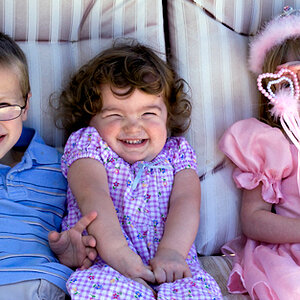
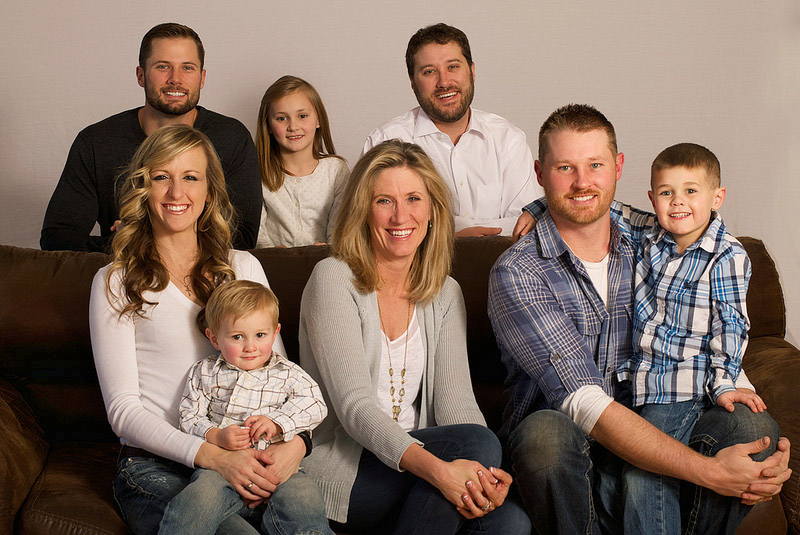
Well, this was my first time shooting a group (Other than our family pictures, which I was in and was a crap shoot anyways) They told me at starting time, that we had exactly one hour to shoot, since one brother had a Skype interview lined up, and needed the kids quiet and to be at the computer. So unfortunately I rushed through the group pose not knowing how much time it was going to take. The baby was DONE before we even started, and couldn't even be bribed with candy, too little I guess.

I HAAATE muslin. I forgot my spray bottle, and I tried to stretch out the wrinkles but it didn't work. My friend used her steam iron to help get the big ones out, but it was still a struggle.

All of these were lit with a strobe shooting through a double shower curtain hung on a boom stand, with a large soft box for fill camera left.

Anyways, I know there are quite a few here, but I would TRULY appreciate c&c on any one that catches your eye!

1)
16079703546_b962d309bb_c.jpg

2
15483158004_721365d770_c.jpg

3)
15483150694_33c41acea7_c.jpg

4)
15918186380_d2dec995c5_c.jpg

5)
15485787213_fa23ec0a8b_c.jpg

6)
15483153754_73c6abd9a6_c.jpg

7)
15918053538_f0bd6b288c_c.jpg

8)
16105458025_955e0d3f34_c.jpg

9)
16079692006_d1f357f0b9_c.jpg

10)
16079691056_4730c09fca_c.jpg

11)
16105462295_7e5f9ef279_c.jpg
 
Last edited:
Seems all your worrying/planning/anxiety attacks paid off in the end.


I think they could all stand to use some shadow recovery.

a few could use a gradient exposure bump from left to right.

most could use a complete bump in a exposure a good 1/4 to 1/2 point.

the hue is a touch red for my liking, I'd like to see the back wall more gray.
 
Seems all your worrying/planning/anxiety attacks paid off in the end.


I think they could all stand to use some shadow recovery.

a few could use a gradient exposure bump from left to right.

most could use a complete bump in a exposure a good 1/4 to 1/2 point.

the hue is a touch red for my liking, I'd like to see the back wall more gray.
Thanks! I did use a gradient on the group shot as you suggested.

I actually had my fill light down pretty far , since I wanted more shadow. Perhaps that was a mistake?

I see what you mean about the reds. I was playing with my white balance a bit and couldn't get it right. Mind showing me an edit with what looks right to you?
 
When I'm home, I'll bring one in LR and play.
 
I like em ... good job getting everybody together, keeping em patient and getting the job done! :) Congrats on first group shot completed with success!!! And Merry Christmas Jazzieiieieieieie!!!
Thank you!!! Merry Christmas to you too!
 
Just a quick tweak in Photoshop. Dropped the red channel about 11 points, overall exposure increase of 1/2 stop, minor curves bump, and some light dodging in the shadows. Working on a raw file in LR would definitely produce better results.
jzz.jpg
 
Just a quick tweak in Photoshop. Dropped the red channel about 11 points, overall exposure increase of 1/2 stop, minor curves bump, and some light dodging in the shadows. Working on a raw file in LR would definitely produce better results.
jzz.jpg
Wow! Thanks! I guess I need to start posting my SOC first. I've already done a ton of background work so all I have left to work with are PSD without starting completely over. :-/

Ps. How do I "drop the red channel 11 pts?"
 
(In PS CC):
Image > Adjustments > Colour Balance

Move the top slider (Cyan-Red) to the left until you see '-11' in the window. The 11 was just an arbitrary number and where the faces seemed to look 'right' to me. What was your working WB?
 
(In PS CC):
Image > Adjustments > Colour Balance

Move the top slider (Cyan-Red) to the left until you see '-11' in the window. The 11 was just an arbitrary number and where the faces seemed to look 'right' to me. What was your working WB?
I didn't set one before hand, since I always edit it in post.
Aperture says it was set to 7286 for blue yellow, and 21 for magenta green

Will I loose so much quality working in pad that it's worth starting over?
 
Oh jeeze. I keep wondering WHY everyone is saying brighten the picture. I just realized my monitor brightness got turned up all the way. *sigh*
 
I didn't set one before hand, since I always edit it in post.
Aperture says it was set to 7286 for blue yellow, and 21 for magenta green
I've never used aperture, so I'm precious little help there; since your shoot was essentially all strobe lite, something around 5500K should be close (depending on how much your shower curtain effects things).

Will I loose so much quality working in pad that it's worth starting over?
Ehhhh???? "pad"?
 
I didn't set one before hand, since I always edit it in post.
Aperture says it was set to 7286 for blue yellow, and 21 for magenta green
I've never used aperture, so I'm precious little help there; since your shoot was essentially all strobe lite, something around 5500K should be close (depending on how much your shower curtain effects things).

Will I loose so much quality working in pad that it's worth starting over?
Ehhhh???? "pad"?
Sorry ,psd.

The shower curtain does warm things a little.
 

Create an account or login to comment

You must be a member in order to leave a comment

Create account

Create an account on our community. It's easy!

Log in

Already have an account? Log in here.

Back
Top Bottom