What's new

My first "photo shoot" of my 2 boys

Photo_Mama2

TPF Noob!
Joined
Jan 8, 2013
Messages
47
Reaction score
1
Location
Ohio
Can others edit my Photos
Photos OK to edit
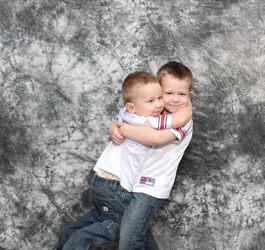
$IMG_0990_edited-1.webp$IMG_0991_edited-1.webpIm not sure why I cant upload any of the ones I didn't edit, but it says the file is too large... That being said, I only cropped these in pse 11... Please let me know what you think
 
They're a good start, and you have captured a couple of cute family memories. As scrap-book shots, they're great. As portraits, well, there are a few issues.

In the first (In future, please number your images to facilitate response) you've got a good a good moment & expression, but your subjects are much too close to the background. Try for at least 6-8' of separation. Your exposure isn't bad, but it's a tad hot. The specular highlights on the shirts are blown in some areas. I think overall, dropping by about 1/3 stop would help. Lastly is the composition. Why a square crop and one which cuts them off at the knees? A portrait orientation could have reduce the empty space above and on the sides as well as capturing all of their legs.

The second unfortunately is very soft. I'm not sure if you missed focus or it's motion blur (I can't access EXIF data right now), but regardless, it's badly out of of focus. Exposure is just a bit under in this case, and again, the child is too close to the background.

Keep shooting; when you've got built-in models, there's no reason not to get LOTS of practice!

Just my $00.02 worth - your mileage may vary.

~John

 
What John said covers it pretty well. Cute boys, but why must you force them to wear those Ohio State jersey's? (LOL)
 
What John said covers it pretty well. Cute boys, but why must you force them to wear those Ohio State jersey's? (LOL)

Thank you!!! And as far as the OSU jersey goes... My oldest son looks at it and says "This is the good ones" lol... This is a "home Studio" that I take down after each use due to it being set up in my living room... I will try to move them away from the backdrop but it is a 10x12 so I will see what I can do... Thank you for the input and will be posting more soon... Another question... I have my camera set on The L format... Is that why it is to large to upload the ones not edited? is that a good format? I have a SanDisk Extreme 16GB
 
Digital storage is cheap; I always recommend shooting in the highest .jpg resolution possible (yes, that's why your files are so large) as well as in RAW to ensure maximum image data; usually "RAW+JPG".
 
Sorry, but I really dislike this busy backdrop. Those pics would have look much nicer on a plain white one IMHO.
 
This is my first time ever doing anything like this... I bought my first dslr (canon t4i with 18-55mm lens) on the 8th... I have ordered some "studio equipment" such as 2 strobes, backdrop support with 3 muslin backdrops (thee one in the pic, black, and white) I have not yet received my strobes. I also bought a Yongnuo YN-565ex... So this is not professional... Just trying to learn by trial and error... Thank you so much for your input, and I see what you mean by the background being busy... But I can not seem to get my white or black backdrop to look right
 
This background will look a LOT better if you can get farther away from it. Having a 6-8' separation and using long glass with a large aperture will help to greatly reduce the "busy-ness" of the muslin.
 
This is my first time ever doing anything like this... I bought my first dslr (canon t4i with 18-55mm lens) on the 8th... I have ordered some "studio equipment" such as 2 strobes, backdrop support with 3 muslin backdrops (thee one in the pic, black, and white) I have not yet received my strobes. I also bought a Yongnuo YN-565ex... So this is not professional... Just trying to learn by trial and error... Thank you so much for your input, and I see what you mean by the background being busy... But I can not seem to get my white or black backdrop to look right

Don't discount your setup. I think you have obtained some nice stuff, and you are practicing with it, so good for you! The gray backdrop (as well as the other ones) will work better when you move your subjects farther away from it. You're doing just fine, so keep at it.
 
The second unfortunately is very soft. I'm not sure if you missed focus or it's motion blur (I can't access EXIF data right now),

~John

Exif on #2

[PhotoME]
PhotoME version: 0.79R17 (Build 856)

[Overview]
URL: http://www.thephotoforum.com/forum/...t-photo-shoot-my-2-boys-img_0991_edited-1.jpg
File type: JPEG
File size: 1,360 KB
Creation date: 2/14/2013 11:40
Last modification: 2/20/2013 15:46
Make: Canon (Canon Global)
Camera: Canon EOS REBEL T4i
Software: Adobe Photoshop Elements 11.0 Windows
Dimension: 4212 x 3432 px (14.5 MP)
Focal length: 47 mm
Aperture: F5.6
Exposure time: 1/80"
ISO speed rating: 400/27°
Program: Manual
Metering Mode: Spot
White Balance: Auto
Flash: Flash fired, compulsory flash mode
 
This is my first time ever doing anything like this... I bought my first dslr (canon t4i with 18-55mm lens) on the 8th... I have ordered some "studio equipment" such as 2 strobes, backdrop support with 3 muslin backdrops (thee one in the pic, black, and white) I have not yet received my strobes. I also bought a Yongnuo YN-565ex... So this is not professional... Just trying to learn by trial and error... Thank you so much for your input, and I see what you mean by the background being busy... But I can not seem to get my white or black backdrop to look right

Don't discount your setup. I think you have obtained some nice stuff, and you are practicing with it, so good for you! The gray backdrop (as well as the other ones) will work better when you move your subjects farther away from it. You're doing just fine, so keep at it.

Thank you very much!!! I just got my new lens today as well... so I will try it out tomorrow... I might send it back tho.. I got the Canon 75-300mm USM (?) lens and im not sure if the USM(?) is worth almost $100... But thanks again for you complements ;)
 

Create an account or login to comment

You must be a member in order to leave a comment

Create account

Create an account on our community. It's easy!

Log in

Already have an account? Log in here.

New Topics

Back
Top Bottom