What's new

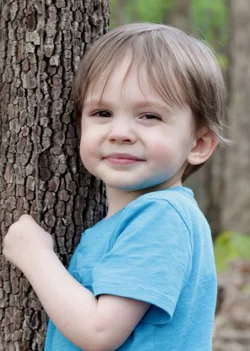
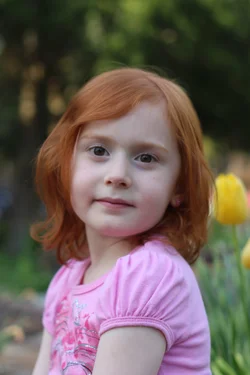
My kids.

lmlitz

TPF Noob!
Joined
Apr 9, 2014
Messages
20
Reaction score
4
Location
United States
Can others edit my Photos
Photos OK to edit
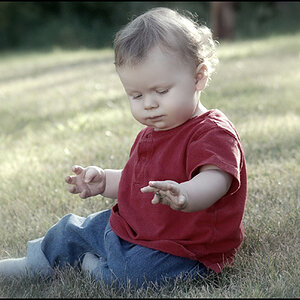
I got to edit my son's pic but I couldn't upload my daughter's pic unless it was unedited. I had it a bit brighter and colorful than it is now. The file was just too big I think.
 

Attachments

  • $green mountain april 20 easter 2014 174.webp
    $green mountain april 20 easter 2014 174.webp
    289.8 KB · Views: 83
  • $green mountain april 20 easter 2014 027.webp
    $green mountain april 20 easter 2014 027.webp
    598.8 KB · Views: 92
The shot of your daughter has missed focus. You can see you got her arm, but since the aperture was too large, and thus DOF too narrow, her face is completely out.

The shot of your son is an awkward pose as well as face. It looks soft throughout.

Both could use some processing to add sharpness, vibrancy, and warmth.
 
The file was just too big I think.

When you export from your editing software, you can save it as a different file size and type, if desired.
 
Stop using the 'modes' on your camera; then you can adjust the f stop to get the depth of field you want.
Read about 'resizing'
Read about sharpening
Read about white balance
 
We live in Alabama. 70 degree weather here!
 
I'm very limited on editing programs right now. I don't have photoshop or anything like that. (my husband is going to help me with that soon) I have no idea how i keep getting the focus off so much. I really can't see it. My son has a weird way of smiling, i know. It's not natural. haha.
 
I'm very limited on editing programs right now. I don't have photoshop or anything like that. (my husband is going to help me with that soon) I have no idea how i keep getting the focus off so much. I really can't see it. My son has a weird way of smiling, i know. It's not natural. haha.

I would reallllllly consider Adobe's Lightroom as your first specific editing and cataloging tool. Photoshop is great, but HONESTLY, for a beginner at editing, it's too complicated, and does NOT offer the kinds of things a beginning editor really needs. The problem is we have a core group here that rants and raves about Photoshop, Photoshop,Photoshop, and "editing at the pixel level". But that's all wayyyyyyy more complex than it needs to be for the beginning editor. You want some Lightroom pre-sets, and EASY adjustment brushes, and a SIMPLE control interface. I've owned Photoshop since version 2.5, in 1992 when I got my first version of PS. Photoshop is just way too complicated for day-to-day editing and adjusting of photos, and it's slow and tedious until you have years' worth of training and understanding. After 20 years, I bought my first version of Lightroom and was INSTANTLY in awe of how much FASTER it is to get done what I need done.

I do not need to "edit at the pixel level" except on maybe 1% of my photos...Photoshop's abilities are massive overkill for 99% of what I actually WANT to do on a daily basis!

Apple developed Aperture, and Adobe responded to the first REAL challenge they ever had, and they developed Lightroom.

Photoshop has become more and more bloated and yes, much more capable over the past 20+ years, but it's not a very beginner-friendly place to start, and neither is Photoshop Elements. Get Lightroom, and get the help you need in both adjusting, and organizing, and web-gallery creating, and publishing/printing.

 
Last edited:
I've heard rave reviews about lightroom. My laptop won't handle it though, and I don't know if my husband has a strong enough computer for it either. I was planning on using Raw Therapee. My husband has Gimp 2.8 but I really want to start shooting in RAW. I have to save up for a better PC. (I would love an IMac)
 

Create an account or login to comment

You must be a member in order to leave a comment

Create account

Create an account on our community. It's easy!

Log in

Already have an account? Log in here.

Back
Top Bottom