What's new

My Newborn (looking for feedback)

AlexDc2T

TPF Noob!
Joined
May 16, 2015
Messages
7
Reaction score
0
Location
Midwest
Can others edit my Photos
Photos NOT OK to edit
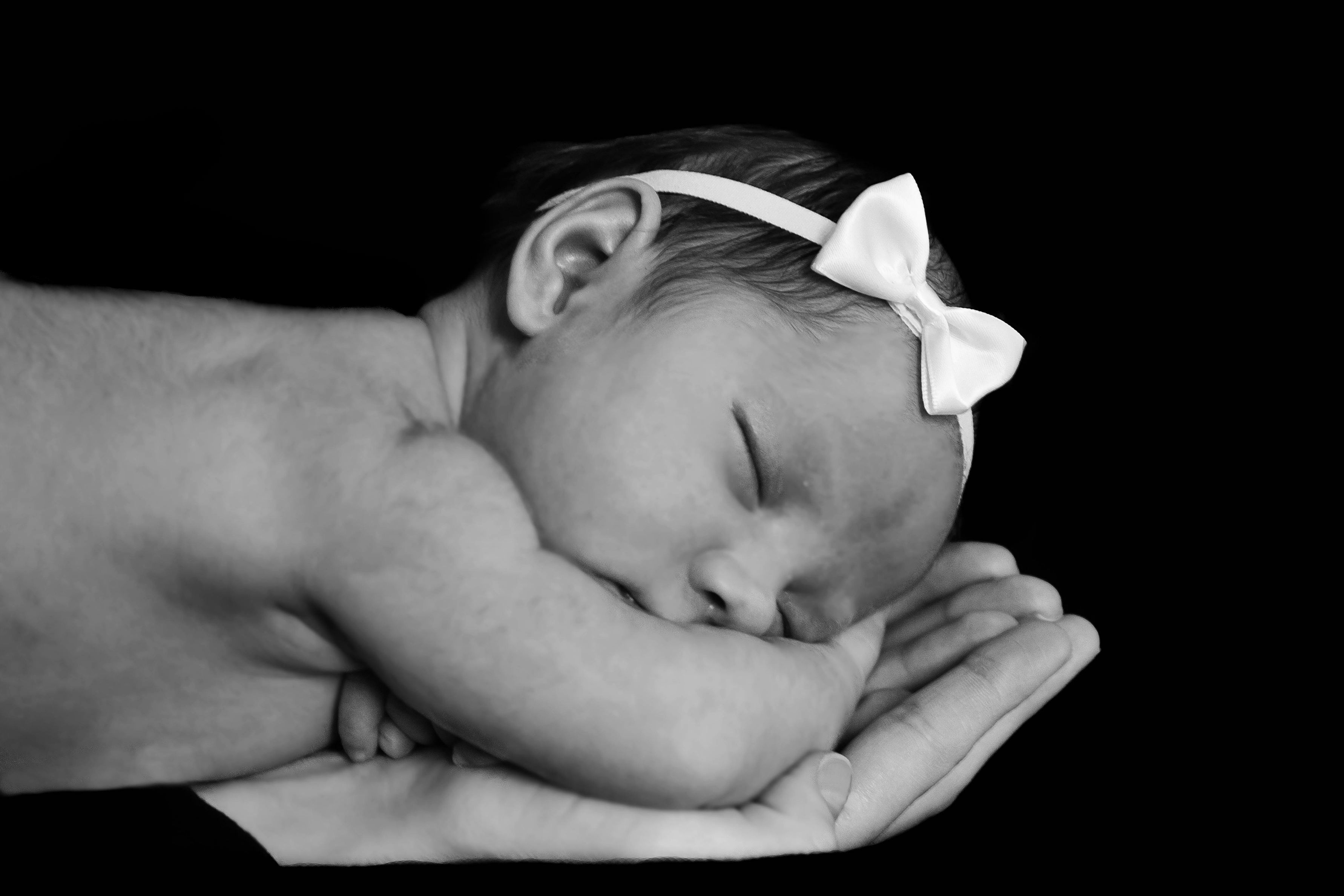
Hi there folks. I am in the process of taking some photos of my daughter, and Im looking for some constructive criticism to help improve the quality of my photos both before and after processing. Here is the info for the pictures.

I am using a Canon T1i with the Canon 24-105 F4 lens. It was about 11am on an overcast day, so I didnt get the amount of light I wanted. I kicked the ISO up a bit to compensate because the F4 wasnt really helping me out, and I couldnt really bring down the shutter time without compromising image stability.

As far as orientation went, it seemed the general consensus for newborn photos was 45 degrees to the source of light, so thats what I went for.

ZFTxz_L6_Gqq_H5u_TGNZVyew13a2_Ndv_Bjq7v_MVB_x_Qcg_Ys_Sx_TT.jpg


RING1.jpg


Ill add more to this thread as I finish processing them.


Thank you for looking.
 
So I wasnt happy with the first picture. I felt it was a little flat. After digging through some videos and tutorials, I decided id try a highpass filter to try and gain some more depth and volume to her little face and body. The results were a little better, though I managed to pick up a little noise in the process. With the file being as big as it is, I wonder how badly this will turn out in print at a smaller size (not looking to do a 24x36 by any means). I also did a little more editing on the photo itself, removing a few things.

4neUc7n.jpg


Feedback is appreciated folks. Thank you.
 
Cute kid.

What were your settings? From what I gather, f/4? What about ISO and shutter? If you wanted to gain depth, you should shoot at a smaller aperture. This may mean that you'll have to either have better lighting (i.e., strobes, flash, etc) or a slower shutter, especially if you don't want to increase your ISO. (I have a Canon Rebel XSi, so I completely understand not wanting to go too high. I avoid 800 and 1600 when I can, but 800 should be usable.)

For the future, maybe think about some additional lighting? The back of the head is fading into the background. Both images are also quite soft.

I think the processing could use some work... Did you soften the skin? Did you remove the background? There's a considerable amount of noise on the ear, around the hair, baby's fingers, woman's fingers, nose, eyes, but all other skin is quite blurred. The line is fairly distinct and is distracting.

Also, I don't quite understand the second image with the baby feet and the wedding rings. Those two don't really go together, at least for me; they seem like two separate topics/subjects. Is there some back story that you're trying to convey that is unknown to the viewer?

That said, the diamond ring looks ok, but the reflections in the man's ring are quite distracting.

What size do you want to print to?
 
Cute kid.

What were your settings? From what I gather, f/4? What about ISO and shutter? If you wanted to gain depth, you should shoot at a smaller aperture. This may mean that you'll have to either have better lighting (i.e., strobes, flash, etc) or a slower shutter, especially if you don't want to increase your ISO. (I have a Canon Rebel XSi, so I completely understand not wanting to go too high. I avoid 800 and 1600 when I can, but 800 should be usable.)

Ill have to take a look at the exif data when ive got more time, but real quickly, I was shooting with the 24-105, I believe at about 35mm at F4.

I wanted more depth to and detail to the areas of her face and body, and not just a flat looking photo.

For the future, maybe think about some additional lighting? The back of the head is fading into the background. Both images are also quite soft.

Absolutely! As mentioned before, I relied on natural lighting from the window in her room. Unfortunately, it was an overcast day, and I didnt achieve the lighting I wanted, thus, I had to shoot at a higher ISO and slower shutter value to achieve decent lighting for the pictures.

I am ok with the softness of the photos, but perhaps they are a tad too soft?

I think the processing could use some work... Did you soften the skin? Did you remove the background? There's a considerable amount of noise on the ear, around the hair, baby's fingers, woman's fingers, nose, eyes, but all other skin is quite blurred. The line is fairly distinct and is distracting.

Agreed, my PP work can definitely use some practice! Thats why ill keep shooting and tinkering. I agree with the noise. I dont know if thats a post processing flaw or the result of a higher ISO. Ill compare to the original and see.

And yes I did both, removed the background and softened the skin. The background was actually just a dark blanket.

Also, I don't quite understand the second image with the baby feet and the wedding rings. Those two don't really go together, at least for me; they seem like two separate topics/subjects. Is there some back story that you're trying to convey that is unknown to the viewer?

That said, the diamond ring looks ok, but the reflections in the man's ring are quite distracting.

I havent seen a photo like this until last year, and it may actually be more popular than you think.

IMO, the rings and a babies toes go together. When I see those two rings, for me, it symbolizes relationship between a couple that loves each other and the vows they made to each other, and how all of that can be tied to a child, another symbol of love and commitment between them.


Thank you for the feedback, it was just what I needed.

What size do you want to print to?[/QUOTE]
 
Unsure of what size I will print to at the moment, and also, an external flash is on the "to buy" list for this year
 
I am ok with the softness of the photos, but perhaps they are a tad too soft?
Only you can decide that based on your end product.

Agreed, my PP work can definitely use some practice! Thats why ill keep shooting and tinkering. I agree with the noise. I dont know if thats a post processing flaw or the result of a higher ISO. Ill compare to the original and see.

And yes I did both, removed the background and softened the skin.
The noise is likely from high ISO, and possibly from sharpening. The reason I brought it up was not to say that you need some practice! Sorry! Didn't mean that.

Perhaps you could try to soften the edge of the skin softening... or reduce some of that effect. Like I said, there is a distinct line that is clearly visible.

I havent seen a photo like this until last year, and it may actually be more popular than you think.

IMO, the rings and a babies toes go together. When I see those two rings, for me, it symbolizes relationship between a couple that loves each other and the vows they made to each other, and how all of that can be tied to a child, another symbol of love and commitment between them.
As I said, for me, there's no connection. (And just because something is popular, doesn't mean I'll agree with it, haha.) I absolutely understand your explanation, but that's a stretch for me. It sends a different message to me. Aaaand, I'm going to stop now before I get myself in trouble or go too far off topic. :D

an external flash is on the "to buy" list for this year
There are some cheap, good beginner flashes out there if you don't want to or have the money to spend on the Canon line. Yonguo are pretty darn good. I've heard good things about Neewer, as well. Ask the question on here before you buy, and I'm sure you'll get a good response from the folks here. :)
 
I am ok with the softness of the photos, but perhaps they are a tad too soft?
Only you can decide that based on your end product.

Agreed, my PP work can definitely use some practice! Thats why ill keep shooting and tinkering. I agree with the noise. I dont know if thats a post processing flaw or the result of a higher ISO. Ill compare to the original and see.

And yes I did both, removed the background and softened the skin.
The noise is likely from high ISO, and possibly from sharpening. The reason I brought it up was not to say that you need some practice! Sorry! Didn't mean that.

Perhaps you could try to soften the edge of the skin softening... or reduce some of that effect. Like I said, there is a distinct line that is clearly visible.

I havent seen a photo like this until last year, and it may actually be more popular than you think.

IMO, the rings and a babies toes go together. When I see those two rings, for me, it symbolizes relationship between a couple that loves each other and the vows they made to each other, and how all of that can be tied to a child, another symbol of love and commitment between them.
As I said, for me, there's no connection. (And just because something is popular, doesn't mean I'll agree with it, haha.) I absolutely understand your explanation, but that's a stretch for me. It sends a different message to me. Aaaand, I'm going to stop now before I get myself in trouble or go too far off topic. :D

an external flash is on the "to buy" list for this year
There are some cheap, good beginner flashes out there if you don't want to or have the money to spend on the Canon line. Yonguo are pretty darn good. I've heard good things about Neewer, as well. Ask the question on here before you buy, and I'm sure you'll get a good response from the folks here. :)


No offense taken, my Photoshop skills need work and I need mistakes pointed out to me. Your opinions bring good perspective on things I should focus on and it's appreciated.

I'll probably shoot for a 430ex or 580ex depending on my budget. I've used a 580 and it was nice.

Thanks again
 
I'll probably shoot for a 430ex or 580ex depending on my budget. I've used a 580 and it was nice.

Yeah, those are good. I have the 430 and like it. I like it more than the Yongnuo and Aperlite flashes I have. But, for the price of that, I could have bought 2 Yongnuo flashes, 2 sets of Yongnuo transmitters, and a cheap umbrella kit. It all depends on what you want for the money. I figured I'd get more for less, figure out how to use it, and then buy more expensive gear when I reach the limit of my current setup.

This is why I still have an XSi, but I'm definitely ready for an upgrade. Just can't afford it. :(
 
I failed to mention before, that these shots I am editing are going to all be black and white, just the theme im going for in my home.

Here is another

xJeS4Ft.jpg
 

Create an account or login to comment

You must be a member in order to leave a comment

Create account

Create an account on our community. It's easy!

Log in

Already have an account? Log in here.

New Topics

Back
Top Bottom