What's new

My turn for CC at one of mmy fav places to shoot!

Joined
Aug 7, 2011
Messages
740
Reaction score
84
Location
South Range, WI
Can others edit my Photos
Photos OK to edit
Hey guys!

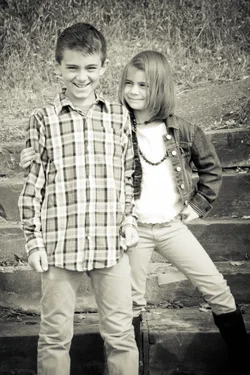
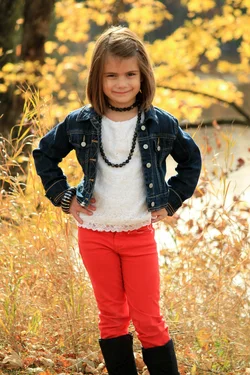
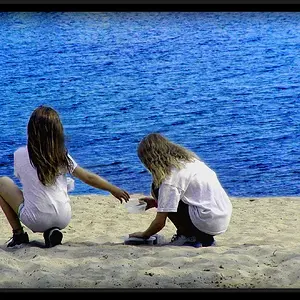
Its been quite some time since I posted some photos for CC from the ol' pros :) Here's a recent shoot I did for a gf of mine and her 2 kiddos! We had a blast that day! This is one of my favorite places to photograph and these were in pretty much taken in full sun right off lake superior... Well as always folks Thanks for the CC!

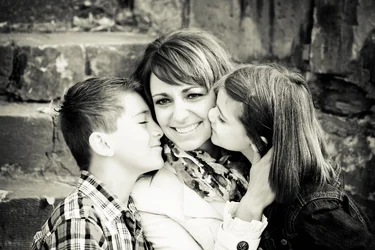
The one area that I see myself struggling in at this point is Im using the same ol' compositions I need to read up in that area and get more creative. Photo #2 is an example of me getting out of my "norm", that could've easily been true portrait and called it a day. Any good reads anywhere that yal know of?

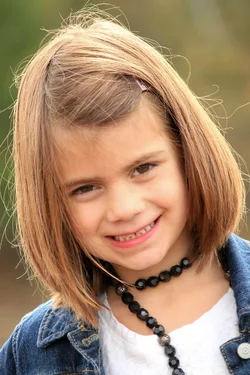
$IMG_0902-2.webp$IMG_0923-2.webp$IMG_0940.webp$IMG_0952-2.webp$IMG_0988-2.webp

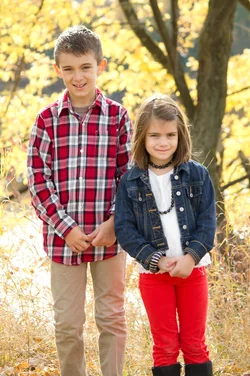
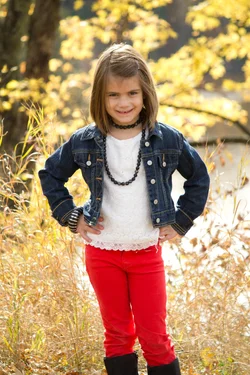
I normally upload to flickr but i see times have changed. I will number these from left to right 1-5

1) 1/200, f4.5, iso200
My white balance is off I see.... I find it to be too much on the magenta side. Easy fix pp.

2) 1/80, f5.6, iso 200

3) 1/250, f4.5, iso 100

4) 1/250, f 4.5, iso 100
Wish this was more straight on not how I am standing on an angle...

5) 180, f5.6, iso 100
Def my favorite of the bunch. She was such a little diva super easy to photograph!
 
Last edited:
There is no consistency here in the processing.
 
What do u mean? 2 and 5 are pretty much socc with just a tweak of contrast. Same processss for 3,4 and 1 is def the odd ball I never ever use that preset I tried it out for *hits and giggles ;p
 
I agree with Joe; the WB is different in all three of the colour images (too warm in varying degrees) and the two monochromes have drastically different appearances.
 
I've been struggling with finding that happy medium I feel like images are too cold at like 5000 and boost it up but then maybe I just need to leave 5000 be. Ill set them back and repost tomorrow (sadly already in bed and honestly way past my bed time lol)
 
What are you using as a white point in the images? The white shirt the young girl is wearing should be close enough to get you in the ball-park. You may also want to consider investing in a tool such as the Expodisc which will let you set a custom and very acurate WB. There are also lots of WB targets you buy and include in one image which will allow you to set it correctly.
 
White balance can easily range from 2,600 degrees Kelvin to 12,000 degrees Kelvin...it always,always,always "depends". Do not get hung up on the specific number...go with the white balance that looks GOOD for the picture being worked on. I seldom worry about an accurate white balance, but rather one that is "pleasing". In the case of the three color photos you show here, I think your WB and tint are both too warm...a little bit on one shot,m and far too warm on the other two shots. On the portraits; I say, keep plugging away, keep working, keep shooting, keep getting better and better. The children seem to not be intimidated by you, so that's a plus.
 
Thanks for advice guys!

So I redited them and used the dropper instead of just my "eye" and gauged off of her shirt....

$IMG_0902.webp$IMG_0923.webp$IMG_0988.webp

Here are the 3 with just wb edited... is this better? the 2nd one didn't really change much at all. Its def a little bit of me and the camera settings for white balance and me and "post processing" Now that I look at the difference I def see how "off" those were, I'm going to go re edit the whole set now. The first could use some tweaking as far as fill light and exposure etc etc.
 
What are you using as a white point in the images? The white shirt the young girl is wearing should be close enough to get you in the ball-park. You may also want to consider investing in a tool such as the Expodisc which will let you set a custom and very acurate WB. There are also lots of WB targets you buy and include in one image which will allow you to set it correctly.

The problem was I wasn't using a white point. I was just looking at the photo and manipulating the sliders. I'll look into the expodisc! Thanks for the great advice guys! Always greatly appreciated!!
 
What are you using as a white point in the images? The white shirt the young girl is wearing should be close enough to get you in the ball-park. You may also want to consider investing in a tool such as the Expodisc which will let you set a custom and very acurate WB. There are also lots of WB targets you buy and include in one image which will allow you to set it correctly.

The problem was I wasn't using a white point. I was just looking at the photo and manipulating the sliders. I'll look into the expodisc! Thanks for the great advice guys! Always greatly appreciated!!

Thats sorta' Ok if they are consistent, but the WB settings in this set are all over =)
 
The second group of pictures is much closer to what most experienced shooters would tell you is the correct white balance range, yes!
 
As far as the post processing for the b/w conversions do yal have any reccomendations on what I can do better to make them look more consistant? I edited all these in lightroom 3 and I found this preset that I really like but a lot of the time it over exposes it. So I take the brightness, and exposure slider and slide it down alot. How do I go about doing this? Just sit and compare the 2 to make sure they are?
 
Here's a few more from the set. These are just white balance edited. Are these ok? I find the boy to be harder. This family naturally has tan/olive complexion especially the mom! I zoomed in on his shirt and tried finding a point that was closest to white which wasn't too hard. Are these more consistent?

$IMG_0878.webp$IMG_0882-2.webp$IMG_0886.webp$IMG_0887-2.webp Sorry I do not know how to get rid of that attached photo? at the bottom? I saw it didnt' go well with the others and re edited it.
 

Attachments

  • $IMG_0885-2.webp
    $IMG_0885-2.webp
    1.6 MB · Views: 136

Create an account or login to comment

You must be a member in order to leave a comment

Create account

Create an account on our community. It's easy!

Log in

Already have an account? Log in here.

New Topics

Back
Top Bottom