What's new

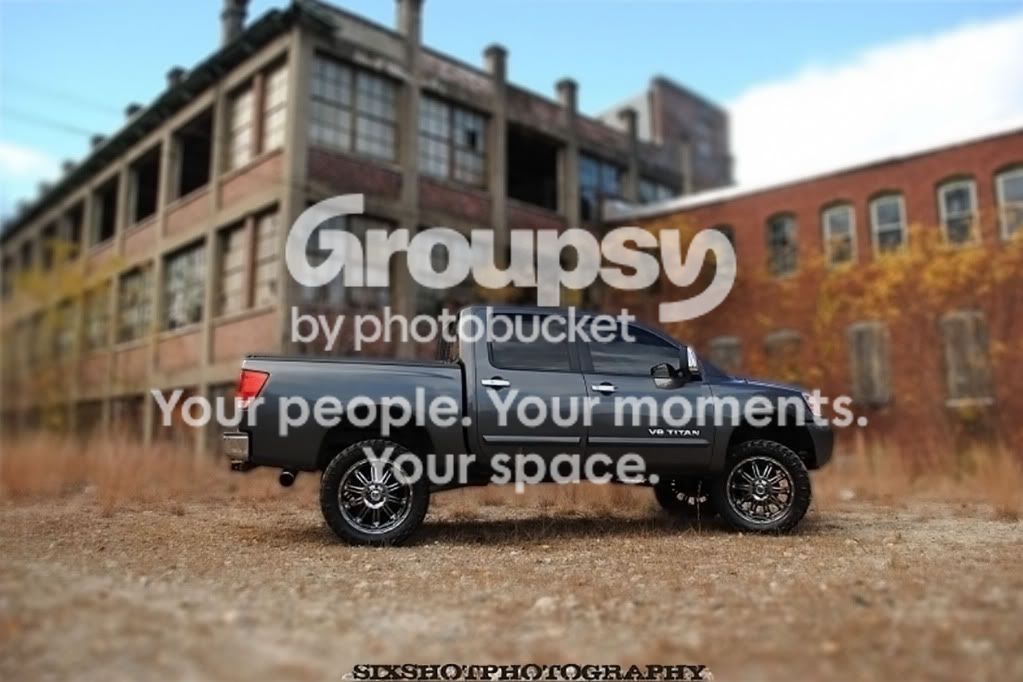
Need help STOOOPID Edit!

Old mac man yes somehting like that!

If you need this done, send me the file. If you want to do it yourself, then:
- duplicate the layer (photoshop)
- apply a Gaussian blur. I cannot provide a specific setting as it will vary with the dimensions of the image.
- mask the new layer
- apply a gradient up to the wheels
- mask the truck
- done.
 
The problem with not doing correctly in camera is well...photoshop will make it look fake. If you are doing this as a favor for someone, tell him it needs to be reshot, or just to forget it.

BTW, it's a no no posting a pic that is not your own.
 
Last edited:
The problem with not doing correctly in camera is well...photoshop will make it look fake. If you are doing this as a favor for someone, tell him it needs to be reshot, or just to forget it.

For most casual viewer's, they might miss the fact the the photo he is trying to emulate (motorcycle) is a photoshop blur. Take a look at the missed masking around the rear wheel.

Sometimes the effects aren't just about what can happen photographically, but what you want to achieve compositionally. What is the compositional benefit of background blur? It provides focus contrast to help make the subject your focal point.

There are other things to be more critical of than just the lack of planning on the OOF area. The leading lines of the building could be used to better draw attention to the truck. Personally, I would have cloned out the power lines. The sky has a bit of a hot spot which draws attention. The building, even when OOF, provides a lot of visual distraction. The thing is, this is the beginner's forum and he asked if a OOF area could be applied. Yes it can.

Here is an edit with a lens blur and a depth map. IMO, you would be hard pressed to say it is faked OOF unless you know the image is being manipulated up front.

xjgsw8
 
The problem with not doing correctly in camera is well...photoshop will make it look fake. If you are doing this as a favor for someone, tell him it needs to be reshot, or just to forget it.

BTW, it's a no no posting a pic that is not your own.


they are both mine.
 
Old Mac Thnaks!
 
The problem with not doing correctly in camera is well...photoshop will make it look fake. If you are doing this as a favor for someone, tell him it needs to be reshot, or just to forget it.

For most casual viewer's, they might miss the fact the the photo he is trying to emulate (motorcycle) is a photoshop blur. Take a look at the missed masking around the rear wheel.

Sometimes the effects aren't just about what can happen photographically, but what you want to achieve compositionally. What is the compositional benefit of background blur? It provides focus contrast to help make the subject your focal point.

There are other things to be more critical of than just the lack of planning on the OOF area. The leading lines of the building could be used to better draw attention to the truck. Personally, I would have cloned out the power lines. The sky has a bit of a hot spot which draws attention. The building, even when OOF, provides a lot of visual distraction. The thing is, this is the beginner's forum and he asked if a OOF area could be applied. Yes it can.

Here is an edit with a lens blur and a depth map. IMO, you would be hard pressed to say it is faked OOF unless you know the image is being manipulated up front.
xjgsw8

I think you did a decent job, but it still jumps out at me as fake. Particularly on the part of the building above the truck's tailgate. With it being as sharp as it is at the point, I don't see how it could be on the focal plane.

Don't get me wrong, it's a decent job. Just not photo realistic.
 
Yes, depth of field is directly related to your aperture, and distance from your subject. I suggest you read your camera's manual before you reshoot also.
I don't think he would be able to achieve that certain level of DOF seen in the bike shot, unless you have a uber long and fast lens which not everyone can afford. Plus, with so much DOF, parts of the bike would probably be blurred (I think). What he wants is to know how to achieve such post-processing results, not how to take picture with shallow DOF.

And also, sometimes people want to have pseudo-DOF results to achieve certain effects, which obviously cannot be achieved in real-life.

I will try to have a go with the edit and see how it turns out... :mrgreen:
 
foreground select, invert foreground/background, gaussin blur. That's what I would do. You just have to carefully select the foreground. It helps to zoom in pretty tight. ****edit sorry someone beat me to it. ********
 
Peacock exactly thanks!
 

Create an account or login to comment

You must be a member in order to leave a comment

Create account

Create an account on our community. It's easy!

Log in

Already have an account? Log in here.

Back
Top Bottom