What's new

Need help !

Capeesh

TPF Noob!
Joined
Aug 29, 2010
Messages
152
Reaction score
16
Location
Dundee
Can others edit my Photos
Photos OK to edit
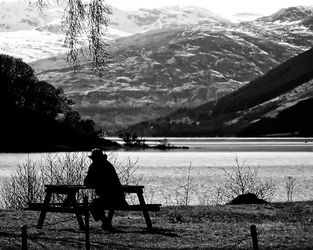
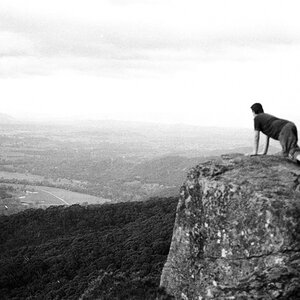
Being a newbie, I was trying to edit this pic I took yesterday, as it was one that caught my eye, but the background doesn't cut it for me. Any ideas on how to improve this pic, or should I bin it ?
Thanks in advance for any feedback.

2qcjo8k.jpg
 
Looks like underexposed by two stops at least. Looks like sun was at sharp angle to the axis of the lens, detail in shadows and far plan is lost. I think even digital magic cannot help here.
 
Under exposed for the foreground, but that's good if you are going for the silhouette look. But it's over exposed for the background washing out the mountains.

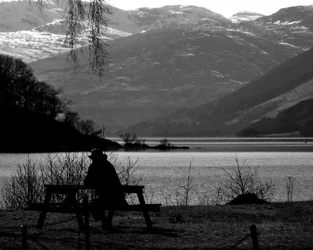
copied and played with the" Highlight/shadow" tool and a tweek on the highlights using"curves" a bit to add contrast to the overexposed background...

406220189.jpg
 
yep.. probably not salvageable...

I selected the background... and cranked it hard... but not a keeper... ugly

$ddddddddddddddddd.webp
 
Last edited:
Having a quality Skylight 1A filter on the lens would likely have helped cut some of the background haze.
B + W 58mm Skylight 1A Coated Glass Filter (KR1.5)
A quality Circular Polarizing (CPL) filter may also have been helpful.
Putting a Skylight 1A in front of a CPL would have been even better.

I wonder? Did you use the camera's monochrome setting, or did you covert a color image to B&W post process?
What metering mode did you use?
 
Is what you posted your edited version? if so it's possible that more could be got out of the original, out of camera image.
 
Is what you posted your edited version? if so it's possible that more could be got out of the original, out of camera image.

yep.. good call! If OP has the RAW... ?
 
Here`s the original.... Thanks for the input guys.....

2z3yuzd.jpg
 
What don't you like about the background, specifically?

Is it that it's so light? So fuzzy?

I quite like the first version. I'm not sure it can be successfully made into a different image, but the image is IS is has some stuff going for it. I might push the silhouette a bit harder, but otherwise it is what it is quite successfully.
 
Cheers amolitor, I thought it was to bright and hazy in the background and tried to get the background to pop out a bit, but failed miserably. I do like the pic, not sure why, if that makes sense.....

Cheers KmH, Yes I converted post process.

I thought I posted the original pic but it appears to be the same size as my edited pic ? I used Tinypic to post pic...
 
Last edited:
Bright and hazy ain't bad, though. Painters tie themselves in knots trying to paint that sense of distance well, that hazy feeling ;)

I like it specifically because of that sense of distance and light. I get a much better feeling of the depth in the scene. Sure the highlights are blown to hell, but so what? It looks "bright" not nasty chunky digital blown highlights, so it pretty much works for me.

But, I am well known in these parts to care a lot less about technical details than most of the other people around here.
 
$2z3yuzd-003.webp

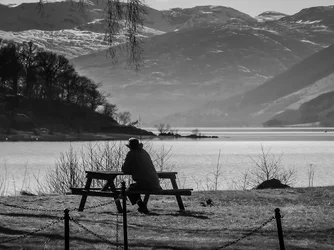
This is an edit of your original, done in Lightroom. Shadows and highlights are preserved a bit more than in your edit.

What editor were you using?
 
Much appreciated Benco, I only have Microsofts standered photo editing for adjusting pics !!!! I will need to get a proper photo editing programme. Many thanks for all the replys.
 
$2qcjo8k.webp
Duplicated image and changed blending mode to multiply, applied layer mask and brushed away the top portion of the trees.
 
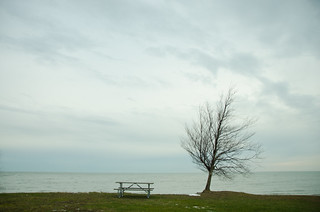
FWIW, IMO, I really like your original version. I attempted to take a similar photo but, my background was boring unlike yours. I like the compositional idea of someone looking off into the distance at a beautiful scene. The only thing that I would liked to have seen more of is a wider crop.

Just put a person on the bench and that was my photo.

Bench and tree by the lake by Shefjr, on Flickr
 

Create an account or login to comment

You must be a member in order to leave a comment

Create account

Create an account on our community. It's easy!

Log in

Already have an account? Log in here.

New Topics

Back
Top Bottom