What's new

Need some help please...

tanya7x

TPF Noob!
Joined
Jul 12, 2012
Messages
64
Reaction score
5
Location
Deming, New Mexico
Can others edit my Photos
Photos OK to edit
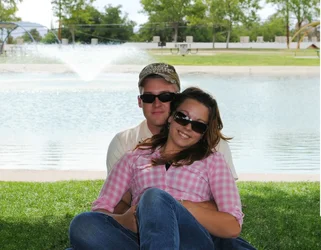
I'm not very good at photo shop but I was wanting to make the fountain in this photo pop. Im wanting to give this picture to my friend as a wedding gift and I feel like if I could just get that fountain to show up better and maybe be a little more blue it would be great. So I was just wondering if anybody out there knew how to do this? And could maybe give me some tips about photo shop.
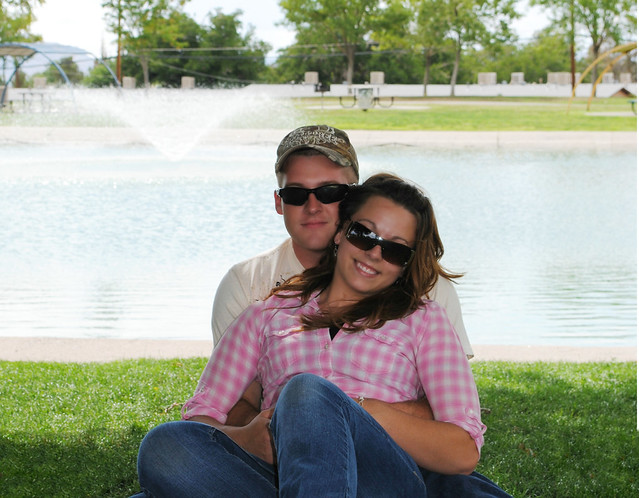


Marlowe&Jeremy by tanya7x, on Flickr
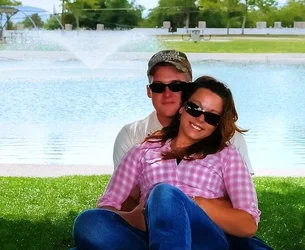
 
That is a very hard fountain to make pop. I made everything ELSE pop! lol.

$FFTP.webp
 
I'm not very good at photo shop but I was wanting to make the fountain in this photo pop. Im wanting to give this picture to my friend as a wedding gift and I feel like if I could just get that fountain to show up better and maybe be a little more blue it would be great. So I was just wondering if anybody out there knew how to do this? And could maybe give me some tips about photo shop.


Marlowe&Jeremy by tanya7x, on Flickr
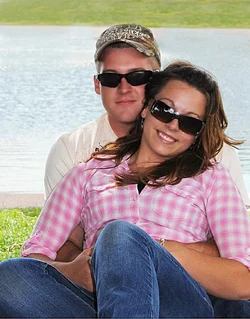
So you want to make a background object that is to bright to start with, POP.... and take even more attention away from the subjects? I would get rid of the fountain entirely.. and crop this to portrait to get rid of the ugly background. Put the emphasis on your friends.. not the fountain!

$dddd-1.webp
 
Last edited:
To crop an image is not s rocket science in adobe photo shop, just simple use crop image tool in adobe. after the go to image adjustment and adjust saturation contrast and brightness.
If you want to gift hard copy go to some printing shop and give them full image they have more professional tool than adobe to edit photos that can make your photo more stand out on hard copy.

Really?
 
There are several things that can be done on an image; Some may be complex, some may be simple- the result is important and not the complexity. I thing Charlie (cgipson1) has done the best with that image. I am sure that couple will be very happy to see this cropped image. In such a bright sunny day, including a fountain wouldn't help the image much.
 
Making the fountain stand out is of questionable use, since it's out of focus and there's not much detail there.

However.

Using masks and layers I broke the image up into the fountain itself, everything in the background EXCEPT the fountain, and the foreground (beach, grass, the happy couple).

Then I brightened and blued the fountain, very slightly. It's almost pure white anyways, but what the heck.

Then I darkened the background, slightly, to make the fountain stand out against it.
 

Attachments

  • $foo2.webp
    $foo2.webp
    127.1 KB · Views: 92
Now, when the OP gets back we'll find the winner of the best crop award. Is my tie straight? :-P
 
To crop an image is not s rocket science in adobe photo shop, just simple use crop image tool in adobe. after the go to image adjustment and adjust saturation contrast and brightness.
If you want to gift hard copy go to some printing shop and give them full image they have more professional tool than adobe to edit photos that can make your photo more stand out on hard copy.


Really?

Do you think it is tough?

We really need a rolling eyes smiley
 
:roll: <- this one, Rick? Just type : roll : (without the spaces) and voilà! :D
 
:roll: <- this one, Rick? Just type : roll : (without the spaces) and voilà! :D

Thank you...That could come in very useful on here :lol:
 
I'm not very good at photo shop but I was wanting to make the fountain in this photo pop. Im wanting to give this picture to my friend as a wedding gift and I feel like if I could just get that fountain to show up better and maybe be a little more blue it would be great. So I was just wondering if anybody out there knew how to do this? And could maybe give me some tips about photo shop.


Marlowe&amp;Jeremy by tanya7x, on Flickr
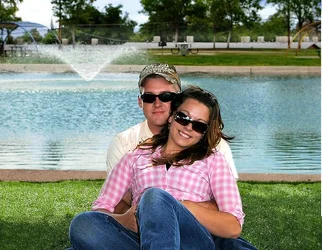
So you want to make a background object that is to bright to start with, POP.... and take even more attention away from the subjects? I would get rid of the fountain entirely.. and crop this to portrait to get rid of the ugly background. Put the emphasis on your friends.. not the fountain!

View attachment 20756


The only reason I hadn't thought to do this is because the main reason the girl in the photo chose this place was because of that fountain. . She was absolutely in love with it. I do however like this crop and may just go ahead and use it!! Thanks everybody for all of your input ;)
 

Create an account or login to comment

You must be a member in order to leave a comment

Create account

Create an account on our community. It's easy!

Log in

Already have an account? Log in here.

Back
Top Bottom