What's new

Need tips on panoramas

summeryjoy

TPF Noob!
Joined
Mar 21, 2012
Messages
3
Reaction score
0
Location
Cairo, Egypt.
Can others edit my Photos
Photos NOT OK to edit
Hello everyone,

I'm new here, and this is my first post. I sure could use your help.

My question is simple. How do you take a pano? I've seen the other thread about when and when not to take a pano, but it doesn't answer my question. I'm more interested in the technical details of how. Like, for instance, are there preferred angles to use? How do I make sure that the exposure in all shots to be stitched together is the same? What should I take into account to produce the best DOF? Are there differences between day panos and night panos? How many shots do I take, and how much should each two adjacent ones overlap? Also, is there any good panorama software? I usually stitch the shot "manually" using Photoshop, which is very exhausting and not always accurate.

Any tips? :)
 
Hello everyone,

I'm new here, and this is my first post. I sure could use your help.

My question is simple. How do you take a pano? I've seen the other thread about when and when not to take a pano, but it doesn't answer my question. I'm more interested in the technical details of how. Like, for instance, are there preferred angles to use?

Whatever angle fits the scene.

How do I make sure that the exposure in all shots to be stitched together is the same?

Shoot in Manual

What should I take into account to produce the best DOF?

Use a smaller aperture, just like any other image.

Are there differences between day panos and night panos?

Exposure times.

How many shots do I take, and how much should each two adjacent ones overlap?

30% overlap is a minimum. I generally use a 10mm on a DX camera in portrait orientation, so my horizontal FOV is ~72. I strive to shoot every 10°, so I end up overlapping ~85%. That may be considered overkill, but if I have a frame that the software doesn't like for some reason, I can remove it from the process and still have plenty of data available from the adjacent frames.

Also, is there any good panorama software? I usually stitch the shot "manually" using Photoshop, which is very exhausting and not always accurate.

Any tips? :)

I use AutoStitch.
 
Alright! Thank you :)

I'd like more elaboration on the exposure though. I do use manual setting. My question is, do I set each shot to it's own zero exposure setting, or do I use that exact same settings (let's say the ones that give zero exposure in the middle shot) for all shots?
 
Alright! Thank you :)

I'd like more elaboration on the exposure though. I do use manual setting. My question is, do I set each shot to it's own zero exposure setting, or do I use that exact same settings (let's say the ones that give zero exposure in the middle shot) for all shots?
DO NOT change the exposure in anyway. The ONLY thing that should change from shot to shot is the FOV.
 
DO NOT change the exposure in anyway. ....

Ditto.

Sweep the camera across the scene, and watch your meter. Some areas will be overexposed, some under according to the meter. Try to find the middle ground, set the camera to that, and then take your frames.
 
Just to disagree a bit with sparky, you can use aperture priorty, so the DOF remains the same regardless of what the shutter speed may be.

Other than that, he has given you some good tips.

Autostitch is very good alto lately I have been using Kolor's Autopano
 
Summer Joy,

To answer your questions:
Angle - straight and level - L to R or vice versa, wont make a difference in stitching, attempt not to include powerlines or parallel lines to your movement.

Exposure - manual, same setting for all shots

DOF - a pan is no different from a regular single frame - choose your focus point and keep it the same for all shots

Day pan, night pan - no differnce other than the difference from a day single and night single, same applies

How many - take as many as you think will cover the field of view. Typically for me, landscape horizontal shots, overlap approx 20%, vertical more, 160 deg 10 shots

Software - photoshop is my choice, I merge, flatten to a single layer then transform stretch to correct corners and process as a single image

Panoramas do not have to appear as panoramas meaning you can do a pan and the dimensions of the image can be that of a single frame. I do that for a lot of my mechanical and building work, but for regular stretched pans, see below

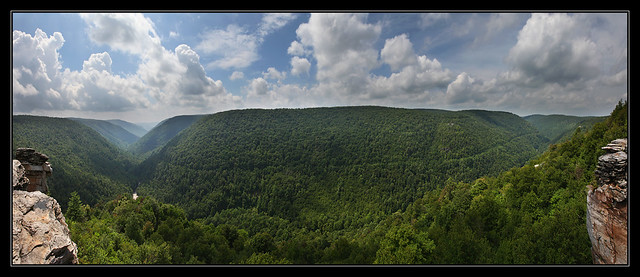
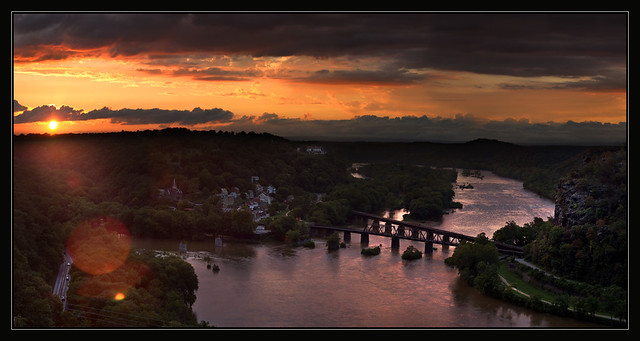
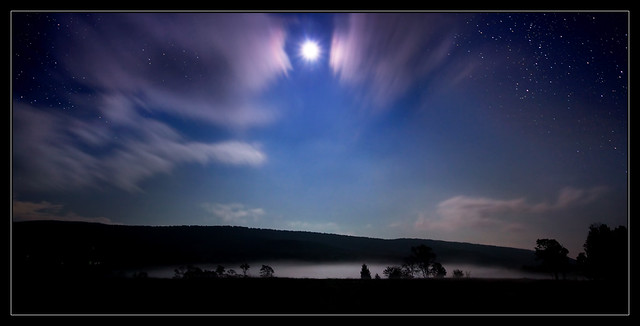
examples and I even included a night time - on flickr, you can see some details


West Virginia's Grandest View by Joey Ricard, on Flickr


History Rocks! by Joey Ricard, on Flickr


Moonlite and desire! by Joey Ricard, on Flickr
 
Just to disagree a bit with sparky, you can use aperture priorty, so the DOF remains the same regardless of what the shutter speed may be.

Other than that, he has given you some good tips.

Autostitch is very good alto lately I have been using Kolor's Autopano

If you're in aperture priority, and you end up with different shutter times, won't there be seams between frames? or at least some kind of anomaly due to the difference in exposure? I've even noticed artifacts from natural lens vignette in certain instances...


Also, hugin, is a nice open source pano app, to add to the list.
 
Just to disagree a bit with sparky, you can use aperture priorty, so the DOF remains the same regardless of what the shutter speed may be.

Other than that, he has given you some good tips.

Autostitch is very good alto lately I have been using Kolor's Autopano


Aperture priority will change the shutter speed, so the frames will be exposed differently across the scene.
 
Just to disagree a bit with sparky, you can use aperture priorty, so the DOF remains the same regardless of what the shutter speed may be.

Other than that, he has given you some good tips.

Autostitch is very good alto lately I have been using Kolor's Autopano


Aperture priority will change the shutter speed, so the frames will be exposed differently across the scene.

I like Microsoft's free Image Composite editor........... drag and drop here's the flickr group for it
Flickr: Microsoft Image Composite Editor
 
I have never had a probem with the exposure changing that rapidly. A pano does take but a few minutes. Even the one I took with over 28 shots was about 2 minutes if that.
 
I have never had a probem with the exposure changing that rapidly. A pano does take but a few minutes. Even the one I took with over 28 shots was about 2 minutes if that.
As you pan, the sky can become lighter, for example, thus, if you are in AP, the the shutter will speed up and your exposure will be different between the two adjacent shot. I dont think that would be preferred. Shoot in maual so all shots are exposed the same and make any needed corrections in PP.
 
I have never had a probem with the exposure changing that rapidly. A pano does take but a few minutes. Even the one I took with over 28 shots was about 2 minutes if that.

It's not an issue of whether the lighting changes. It's an issue of using some form of auto exposure. Panning the camera from one part of the scene to another can easily change the EV.

Aim your camera at the north side of the street, the buildings are in bright sunlight. Pan 180° to the buildings on the south side, and they're all totally shaded..... two different EVs.
 

Create an account or login to comment

You must be a member in order to leave a comment

Create account

Create an account on our community. It's easy!

Log in

Already have an account? Log in here.

New Topics

Back
Top Bottom