What's new

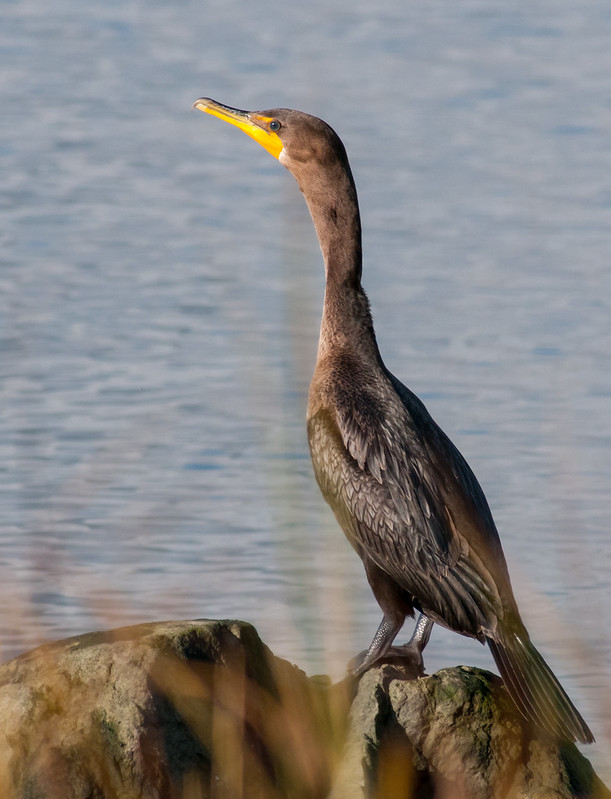
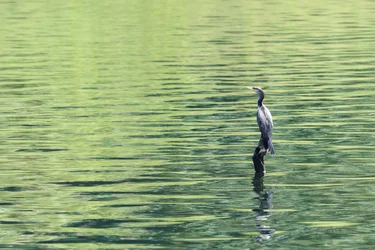
Neotropical Cormorant in Costa Rica - C+CCamera: Sony SLT-A77V Lens: Sony SAL1855 Foc

jfrabat

No longer a newbie, moving up!
Joined
Apr 15, 2012
Messages
595
Reaction score
60
Location
Panama, Central America
Can others edit my Photos
Photos OK to edit
I tried to save this shot; I know it is not TACK sharp (I took it from a moving boat), but the question, is, is it good enough to keep?

Shot details:

Camera: Sony SLT-A77V
Lens: Sony SAL70300G
Focal Length: 300mm
Exposure: 1/90 Sec
ISO 200
Aperture: f/8

It is originally taken in portrait, but I cropped it for a better look...
$DSC6798.webp

Felipe
 
I happen to like Cormorants. I think they are very interesting. Your composition is good, but I personally like to get much closer to the bird to show off feather detail. Next time you are in a moving boat use a faster shutter speed (crank up your ISO). It might help with the sharpness. I think your camera has anti-vibration something (not familiar with Sony) .

Unfortunately I shot this one through some reeds.

Cormorant basking in the sun by krisinct, on Flickr
 
It has lovely composition and spacing and placement of the bird within the frame. No, it's not killer-sharp...but it is pleasant. it's not a high-detail file. Perhaps you could work the file a bit, to create a more "impressionistic" look, maybe even a watercolor-like, or oil painting-like look to it? Maybe you could up-rezz the original file, then sharpen the dickens out of it in multiple very small passes??? There *is* a very simple picture there. You just need to finesse the file a bit I think.
 
Thanks for your reply, coastalconn! And getting advice from a photo of the month winner is certainly something to take to mind!!! Congrats, by the way! I was using my longest lens (300mm), and I even ask the boat guy to get in as close as he could, but no dice! I realised about bumping the ISO when I got home, so I guess that's a rookie mistake right there! But, you live, and you learn... I guess at least I managed to salvage part of it by composing like this... hanks for your reply once again, and I will keep the ISO in mind next time!!!

Derrel, thanks for your post! I feel I am now moving in the right direction, as it seems I have something to work with here... I will take your advice, process the file a bit more and see if I can squeeze a better shot out of it!!!
 
Derrel,

What would you recommend for up-rezzing the original file? Also, what would you recommend to sharpen? I will keep the composition, as I do not have enough to blow up the bird, but I like the negative space anyway, and I think it ads to the scene... But I do need advise on how to best process this shot to salvage it!

Felipe
 
Genuine Fractals for up-rezzing. Or, just increase the size in Photoshop using bicubic interpolation, and do it in multiple steps of up-sizing. YOU DO NEED plenty of negative space, and the way the shot is frame is pretty good, with the bird placed off to the side, and the reflection pattern on the water being about right. I would try increasing the height and width of the image like 10%, in multiple steps, pass after pass. For sharpening, like a high percentage, like 150%, at .15 pixel radius, and a low threshold of 4, and then hit Fade>Unsharp Mask, and reduce it down to 40%, then RE-APPLY THE SAME settings, and fade.

Multiple, very small,incremental up-rezzes, and then at the end, a few (three?) uses of Unsharp Masking and fading, with the effect done in three steps, each one very slight.

Genuine Fractals has been re-named. here is the web site: Perfect Resize 7 Pro - onOne Software
 

Create an account or login to comment

You must be a member in order to leave a comment

Create account

Create an account on our community. It's easy!

Log in

Already have an account? Log in here.

Back
Top Bottom