What's new

New toy, White Flat Sheet

Photographiend

No longer a newbie, moving up!
Joined
Jul 31, 2012
Messages
1,234
Reaction score
188
Can others edit my Photos
Photos OK to edit
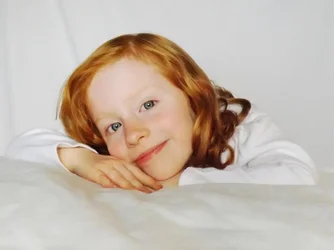
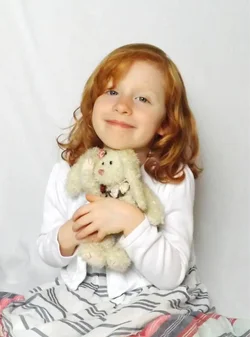
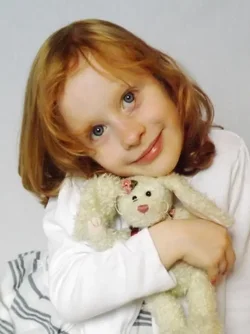
Completely unplanned but after getting the sheet and getting it steamed I couldn't wait until Sat when I had planned at shooting in ideal ambient light. Instead I opened the blinds and made it work. Had to brighten it a bit maybe a little too much...

But this is what I got today.

The lesson in todays shoot: Make sure their hands are clean before. She has marker all over her hand. I did my best to retouch it out but her fingers still look odd to me.
$602227_10151308297232373_466553553_n.webp

$389857_10151308297237373_1803295397_n.webp

$254497_10151308297512373_87232062_n.webp
 
Can you post your settings ?

I'm not sure if you want any CC, since you didn't specifically ask for it. But I just wanted to say that the focus is off on all of these.
I'd say the second looks the best as far as exposure goes. In the first her face is un-evenly lit, brighter at the forehead area. And the third, it may be your white balance that's a bit off.

She's a cute kid and you are lucky to have her pose for you. Many kids are not as cooperative.

Knowing your settings would help determine why the focus is off on these.
 
I see what you mean.

It was all automatic. I finally got a bridge to replace my $60 point and shoot but it is pretty limited in its manual functions and attempting to use them slows down the camera. Even then it doesn't have a manual focus. Maybe when I do more pics I should have my point and shoot ready to go as well. It doesn't have manual adjustments available but it does have other settings I can utilize that the bridge does not.
 
It was all automatic./QUOTE]

How are you going to get the images you want unless you control the camera. Auto features are good but but cameras still cannot read minds.

Like the previous comment said the focus is definitly off.
 
SLRs cost a lot of money. I just upgraded to a bridge from a $60 point and shoot. Even still the bridge I got was only like $150. I will have a camera with more control one day. For now I just got to work with what I have.
 
SLRs cost a lot of money. I just upgraded to a bridge from a $60 point and shoot. Even still the bridge I got was only like $150. I will have a camera with more control one day. For now I just got to work with what I have.

Look into a used one. They can often be had for much less
 
I may end up getting something used at some point. It will be a while before I can put that much into this hobby though. In the mean time I am going to do what I can to improve as far as staging and planning a shoot.

That shadow on her chin is bugging me esp since I am pretty sure it was my own shadow. *grumbles* also the residual discoloring of her fingers from the marker I tried to retouch out...
 
It is always better to get such details right the first time around then to remove and retouch them during editing.
I learned this the hard way too way back when I first started out.

To be completely honest, I wouldn't spend any time trying to fix these images. The focus is just that far off. I would re-shoot instead.

You know, I had a bridge camera before I bought my first DSLR. It did, however, have manual controls. Manual focus is not as necessary in my opinion, but you should be able to set exposure manually. I learned to expose manually with my bridge and by the time I had my DSLR, I already had this portion covered.

Does your camera have this ability? What model/make is it?
 
Fujifilm FinePix S4250.

I tried playing with it. The ISO (64 - 6400) the Aperture (only 3.1 and 8) and the Shutter Speed (1 - 1/2000) are all adjustable. However when you attempt to adjust them it makes the camera sluggish and it develops a delay in recording images.

At any rate, I was able to view the specs on what settings the camera went with for the shots. f/4 and 1/34 no flash used... I am thinking the shutter speed could be the issue here. I could always try using my tripod next time. The down side to that though is the limited mobility.
 
I would suggest practicing manual exposure on a non-mobile subject. Read a few tutorials on manual exposure and practice as much as you can.

In the images you posted, it is the shutter speed that is responsible for the blurriness of your photos. That speed is way too slow for photos of people. Even if they are completely still (which most kids are not, even when they try), you can get blur in your photos from camera shake introduced by hand holding the camera as such a low shutter speed.

I wouldn't take pictures of kids at that speed even with a tripod. You really need to get your shutter speed up. But you can't achieve this by leaving the camera on auto.
 
Yeah. I just went to the setting for just adjusting the shutter speed. Unfortunately they only let you choose between 400 and 800 ISO for that one. It really is quite limiting. I thought if I set it to a higher shutter speed maybe the camera was capable of getting a larger aperture than 3.1 when left on Auto but no such luck there either. Ah well, with an 800 iso and an adjustable shutter speed I may be able to get better pics the next time around.

Will play around with it some more. Wish me luck.
 
I do have some experience with manual exposure. I had the luxury of getting to use an SLR for a few months when I took a photography course and a friend let me borrow theirs. That was years ago but it is hard to go back to automatic after having so much control over your images.
 
It really sounds like this may not be the right camera. Not sure how long ago you upgraded, but would you consider returning it to purchase a used DSLR, or even a more capable bridge. I also own a Canon bridge as my P&S and it costa little more than this one, and it is far more capable of obtaining great shots.

Just my 2 cents.
 
Just to give you an idea of what's out there ...

This is the bridge I own ... Amazon.com: Canon PowerShot SX20IS 12.1MP Digital Camera with 20x Wide Angle Optical Image Stabilized Zoom and 2.5-Inch Articulating LCD: Camera & Photo
I bought it refurbished for $250. It takes great pictures considering it is not a DSLR, and it has full manual capabilities. It even takes an external flash. I bought it because I hate being limited to auto, even on a P&S, so it would be a great learning camera for anyone not ready for a DSLR.

Here is an older Canon DSLR w/ kit lens on Amazon, selling used for $225.
Amazon.com: Canon Rebel XS 10.1MP Digital SLR Camera with EF-S 18-55mm f/3.5-5.6 IS Lens (Black): Electronics

Even though it is a much older model and long discontinued, it will still take photos far superior to those taken by a camera with limited features such as the one that you own.

If you decide that swapping this camera out is not an option, I'd like to suggest taking the camera out of auto mode and at the very least using the 'shutter priority' mode. This way you at least have control over the shutter speed in your shots. I would set it no lower than 1/60 to 1/100, and you should reduce the amount of completely out of focus shots by a significant number. The camera will then choose the aperture and ISO combination to get the correct exposure. If the photo is too dark with this mode, then you likely don't have enough light to get a decent exposure as the camera will likely be maxing out the other settings in order to get the most light into your shots.

I hope this helps a bit. :)
 

Create an account or login to comment

You must be a member in order to leave a comment

Create account

Create an account on our community. It's easy!

Log in

Already have an account? Log in here.

New Topics

Back
Top Bottom