What's new

one flash portrait help

kharp

TPF Noob!
Joined
Mar 5, 2012
Messages
65
Reaction score
11
Location
Arkansas
Can others edit my Photos
Photos OK to edit
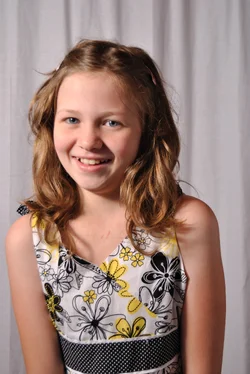
I'll have a chance to re-shoot these tomorrow. I took this with one flash with a shoot through umbrella and a reflector. Any advice for tomorrow? Very little post processing done.
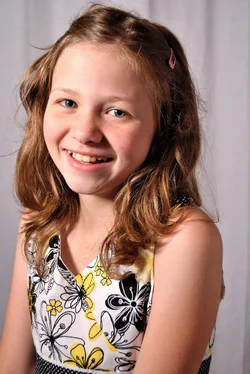
$DSC_0400_01.webp
 
some light from the right side, too!?
It looks ok to me, maybe you should move a little to left, so you see less of the shadows.

Anyway, maybe she should keep shoulders a little bit backward.
 
To expand a little on pisicel's post, I would start by posing her such that her shoulders were about 30 degrees off of the lens axis rather that the current 70, and have her looking directly into the lens. I would raise the key light a little higher and move it about 30-40 degrees off the lens axis and use a large reflector 90 degrees to on the subject's unlit side. I would also drop your shooting position slightly so that you were looking into her eyes, not down on them. Be sure to post the result of the reshoot!
 
put more space between subject and background, if possible
 
Thanks, everyone, for the tips. I'll keep these things in mind when I reshoot later. I used a reflector on her unlit side. I put her as far from the background as I could. It's a very small room. One thing I had some trouble with is that when I use the flash, my pictures are blurry. This is one of the few that weren't blurry. Does anyone know the reason for this and how I can prevent it next time? I used auto focus.
 
I used auto focus.

Don't.
If this is a sitting portrait there is no reason to have it refocus.

Can you move the umbrella back at all? Is it just me or does that side seem a little hot?
If not maybe drop the power of it down a half a stop.
 
Thanks, everyone, for the tips. I'll keep these things in mind when I reshoot later. I used a reflector on her unlit side. I put her as far from the background as I could. It's a very small room. One thing I had some trouble with is that when I use the flash, my pictures are blurry. This is one of the few that weren't blurry. Does anyone know the reason for this and how I can prevent it next time? I used auto focus.
It's very difficult to say; is it missed focus, motion blur (unlikely), overly shallow DoF... If you post a couple of examples with full EXIF data we can probably trouble-shoot it fairly readily, but without, anything is just a guess.

I used auto focus.

Don't.
If this is a sitting portrait there is no reason to have it refocus.
Why not? Modern cameras and lenses are designed to focus automatically; they do it very well. The only concern is that the photographer ensure he/she knows where the key point of focus should be in the image and make sure that's where the camera focuses. For studio work, I use a single focusing point and ensure that I place it over the subject's eye, or, depending on the pose and DoF I may use the nose.
 
It's very difficult to say; is it missed focus, motion blur (unlikely), overly shallow DoF... If you post a couple of examples with full EXIF data we can probably trouble-shoot it fairly readily, but without, anything is just a guess.

I used auto focus.

Don't.
If this is a sitting portrait there is no reason to have it refocus.
Why not? Modern cameras and lenses are designed to focus automatically; they do it very well. The only concern is that the photographer ensure he/she knows where the key point of focus should be in the image and make sure that's where the camera focuses. For studio work, I use a single focusing point and ensure that I place it over the subject's eye, or, depending on the pose and DoF I may use the nose.[/QUOTE]

Here is one example. Most of them pretty much came out this way.
 

Attachments

  • $DSC_0439.webp
    $DSC_0439.webp
    767.2 KB · Views: 128
This is a case of missed focus; if you look at the lines of the flowers on her shirt, they are tack-sharp. Since there is no EXIF data appended to the image, I can't tell what aperture was used, but if you're shooting wide open with a fast lens (eg f1.8) your DoF can be as little as a 6".
 
I used auto focus.

Don't.
If this is a sitting portrait there is no reason to have it refocus.
There is no reason that it has to refocus just because you are using AF.

If you assign the AF to a button other than the shutter release, you will not have the 'refocusing' problems.
 
tirediron said:
This is a case of missed focus; if you look at the lines of the flowers on her shirt, they are tack-sharp. Since there is no EXIF data appended to the image, I can't tell what aperture was used, but if you're shooting wide open with a fast lens (eg f1.8) your DoF can be as little as a 6".

That last post was a mess I had two kids asking me questions and I was trying to do this at the same time. Lol. I was thinking missed focus. It was hard for me to tell on that dress. I forgot to include the EXIF data. Sorry. If I remember correctly I was at f4. I'll try smaller next time. I actually feel kind of silly. I was looking at my camera, trying to figure out what went wrong and noticed that for some reason at some point recently I had changed the AF area mode to auto and didn't think to put it back. Maybe that had something to do with it? Why didn't I think of this while shooting and not choosing a focus point?!? I think I need a long nap. Luckily, it's my niece and she will be here another day so I get to reshoot.
 
tirediron said:
This is a case of missed focus; if you look at the lines of the flowers on her shirt, they are tack-sharp. Since there is no EXIF data appended to the image, I can't tell what aperture was used, but if you're shooting wide open with a fast lens (eg f1.8) your DoF can be as little as a 6".

That last post was a mess I had two kids asking me questions and I was trying to do this at the same time. Lol. I was thinking missed focus. It was hard for me to tell on that dress. I forgot to include the EXIF data. Sorry. If I remember correctly I was at f4. I'll try smaller next time. I actually feel kind of silly. I was looking at my camera, trying to figure out what went wrong and noticed that for some reason at some point recently I had changed the AF area mode to auto and didn't think to put it back. Maybe that had something to do with it? Why didn't I think of this while shooting and not choosing a focus point?!? I think I need a long nap. Luckily, it's my niece and she will be here another day so I get to reshoot.
:thumbup:
 
So I never got a chance to reshoot this but we got a lot of shots outside (which is what the grandma really wanted anyway) so it turned out okay. :)
 
Can you move the umbrella back at all? Is it just me or does that side seem a little hot?
If not maybe drop the power of it down a half a stop.
I would personally go the other way: Bring the umbrella in closer, so that it's just out of frame. That will soften the shadows on her, which I think is appropriate for a little girl. Use a white foam-core poster board on the other side of her as a reflector so as not to lose it to the shadows on that side.

If the light is too hot, dial it down, don't move it back, unless of course you want harsher, sharper shadows.
 

Create an account or login to comment

You must be a member in order to leave a comment

Create account

Create an account on our community. It's easy!

Log in

Already have an account? Log in here.

Back
Top Bottom