What's new

Osprey (Soft Photo) - Questions

Seanu13

TPF Noob!
Joined
Jun 8, 2009
Messages
12
Reaction score
0
Location
Louisiana
Can others edit my Photos
Photos OK to edit
Hi All,
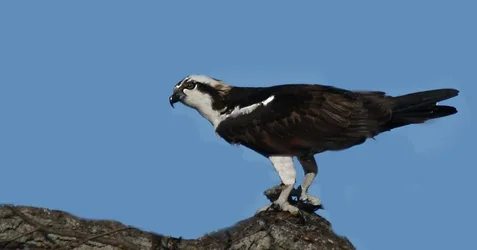
I picked up a Canon EF 70-300mm f/4-5.6 IS USM Lens the other day and I've always wanted to try wildlife photography because I've just always enjoyed bird watching and such, so I thought I'd give it a go with the longer focal length (previously had 200mm). I went out to the Colorado River in Webberville (outside of Austin, TX) on the recommendation of a member of a Facebook group and had an Osprey just hanging out in front of me across the water. I set up my tripod and snapped away feeling confident.

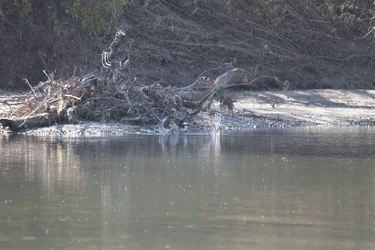
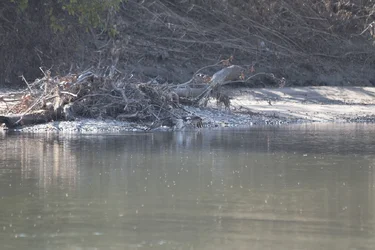
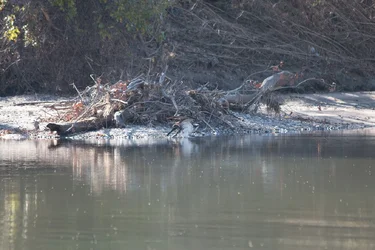
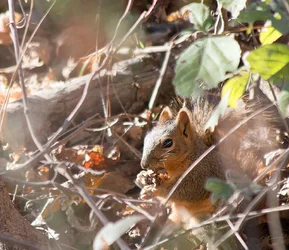
I got home and checked the photos and when zoomed in they look extremely soft compared to what I expected, or maybe I have unrealistic expectations of how they should look zoomed to 100%? Here's some uncropped, unedited examples. I know they aren't framed well. I was mostly just trying out the lens.
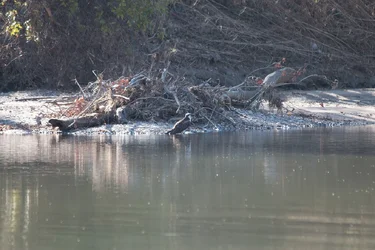
$IMG_0808.webp$Osprey_orig.webp$Osprey_RedShoulder_orig.webp$Osprey_unhappy_orig.webp$Osprey_wing_orig.webp
 
I figured. I didn't think they would let me get much closer than I was. I saw a hawk while driving down the highway on the way home and I was pretty far away, and as soon as I was in his field of vision he took off.

I'm going to buy some waders and try walking out in the water, very carefully, next time I'm there.
 
I figured. I didn't think they would let me get much closer than I was. I saw a hawk while driving down the highway on the way home and I was pretty far away, and as soon as I was in his field of vision he took off.

I'm going to buy some waders and try walking out in the water, very carefully, next time I'm there.

Just looking at the pictures it looks like a missed focus point. I don't use a Canon myself but my guess would be you had the AF settings on whatever the canon equivalent is to Autofocus area - allowing the camera to guess what to focus on - and it looks like the camera actually focused on the logs behind the bird. This one is always a trade off in wildlife photos - using a single focus point requires more practice especially for distant targets or moving targets but in the long run I think you get better results because so often your shooting into a very "busy" background and the camera (well at least mine) always seems to pick the wrong thing to focus on as a result.
 
I figured. I didn't think they would let me get much closer than I was. I saw a hawk while driving down the highway on the way home and I was pretty far away, and as soon as I was in his field of vision he took off.

I'm going to buy some waders and try walking out in the water, very carefully, next time I'm there.

Just looking at the pictures it looks like a missed focus point. I don't use a Canon myself but my guess would be you had the AF settings on whatever the canon equivalent is to Autofocus area - allowing the camera to guess what to focus on - and it looks like the camera actually focused on the logs behind the bird. This one is always a trade off in wildlife photos - using a single focus point requires more practice especially for distant targets or moving targets but in the long run I think you get better results because so often your shooting into a very "busy" background and the camera (well at least mine) always seems to pick the wrong thing to focus on as a result.

I actually used the single autofocus point :-\ he wasn't even walking so I figured it wouldn't be hard to keep it on him. maybe I didn't have it perfectly on him though.

Edit: forgot to mention in the original post, I'm using a 70D
 
There are a number of reasons why your shots might be "soft". You shot from a tripod and that is a good start. If you tell us what your shutter speed was and whether you used mirror lockup and remote shutter release, then it may be possible to narrow down some explanation. Also, if you are shooting raw and converting them directly to jpg for web display here, then that could also be the reason. Raw files straight out of the camera almost always require a bit of sharpening before conversion. Tell us a bit more about your exposure details and maybe the answer is somewhere in there. The other possibility is that your depth of field is very small and unless you have your focus "right-on", the you can get slightly fuzzy=soft images - robbins.photo has already suggested that "focus" might be part of the problem.

WesternGuy
 
Looks like you've got plenty of light here and the bird is pretty far off so hitting with a single focus point does take some practice, one other thing you can do if you have enough light is to increase your DOF (depth of field) by stopping down the lens. If you increase the aperture number it will give you more depth of field and bring more objects into focus that way - works great in good lighting conditions especially in situations like this where your shooting over a long distance and your not really going to be able to separate your subject from the background anyway.
 
Looking at the EXIF data for one of the Osprey photos,

Exposure: 1/400 rec f / 5.6
Focal Length: 300mm
ISO 500

There's a lot I don't know about processing the photos. I shot in RAW and viewed in Lightroom (where they look soft to me when zooming). I then just exported unedited jpegs to post in here. I didn't want to try messing with them and not show exactly what came from the camera and then try to get your input.

I'm sure it's mostly due to not being near close enough and also missing the focus as a result. :-\
 
For getting to a spot that's more reasonable to sit and wait for closer opportunities, as I was in a boat landing for all of today's photos, and private property to my left and right preventing me from walking the shore, should I try wading across the water and setting up? I'm unsure of how to go about finding birds of prey.. (as far as finding a new location altogether). I'm using one site with location suggestions but this location I heard about on facebook, for instance.
 
Looking at the EXIF data for one of the Osprey photos,

Exposure: 1/400 rec f / 5.6
Focal Length: 300mm
ISO 500

There's a lot I don't know about processing the photos. I shot in RAW and viewed in Lightroom (where they look soft to me when zooming). I then just exported unedited jpegs to post in here. I didn't want to try messing with them and not show exactly what came from the camera and then try to get your input.

I'm sure it's mostly due to not being near close enough and also missing the focus as a result. :-\

Shutter speed looks okay, so I doubt that is the cause of your problem. I notice that you are shooting fully zoomed out at 300mm. Sometimes, on zoom lenses, they can be a bit soft at full zoom, in your case, 300mm. The only way to test this is to go out and try taking images of the same object at different zoom levels, e.g., 200mm, 250mm and 300mm, and see if there is any difference in the softness of the image. I doubt that "not being near close enough" is the problem, unless it causes you to miss focus. The thing I found interesting when I looked a enlargements of the images, is that the entire image looks soft, so maybe it is a problem with the lens and not missing focus. I would try the test at different zoom levels and see what you get. I would also try and sharpen them a bit in Lightroom to see if that helps, because as I noted in my previous posting, raw images right out of the camera almost always need a bit of sharpening. This is often referred to as Capture Sharpening - Guide to Image Sharpening - as it is difficult to judge the softness or sharpness of an image until it has had some sharpening applied to it. Lightroom does have, I believe, some presets that come with it that can be used for capture sharpening. Alternatively, you could search the web and see what you can find. For example, here is one I found on a quick search - Sharpening in Lightroom Part One ? Overview and Capture Sharpening | Laura Shoe's Lightroom Training, Tutorials and Tips.

Hope this helps.

WesternGuy
 
For getting to a spot that's more reasonable to sit and wait for closer opportunities, as I was in a boat landing for all of today's photos, and private property to my left and right preventing me from walking the shore, should I try wading across the water and setting up? I'm unsure of how to go about finding birds of prey.. (as far as finding a new location altogether). I'm using one site with location suggestions but this location I heard about on facebook, for instance.

Not sure what part of Louisiana you are from, but one place to check for all kinds of birds in Louisiana is here - Birding News | #birdingnews via @aba.

WesternGuy
 
For getting to a spot that's more reasonable to sit and wait for closer opportunities, as I was in a boat landing for all of today's photos, and private property to my left and right preventing me from walking the shore, should I try wading across the water and setting up? I'm unsure of how to go about finding birds of prey.. (as far as finding a new location altogether). I'm using one site with location suggestions but this location I heard about on facebook, for instance.

Not sure what part of Louisiana you are from, but one place to check for all kinds of birds in Louisiana is here - Birding News | #birdingnews via @aba.

WesternGuy

I'm from LA but not currently living there, I've been in Austin, TX for about a year and a half now. I've been distracted by my "new" job so much that I hadn't gotten out to do any photography. I couldn't afford longer lenses before moving here so I haven't tried wildlife photography until now. (just a little background info).

I will try taking some test shots and see how they look. I've heard about a lot of zoom lenses being soft at maximum focal length like you said. I'm going out today to check out another location (I'm just going to different places each day to get out see what's out there) and will try some sharpening on the images.

Does using image stabilization while using a tripod hurt? I while back I read that on Nikon lenses with VR, you should turn the VR off while using a tripod because it'll actually cause blur. Not sure if that's true or if it works the same way for Canon IS. I was using IS I while using the tripod.

Also, not sure if it's used for birds, but I have a cable release arriving today or tomorrow.

Here's a Ken Rockwell review of the lens I'm using if you feel like looking at that.
Canon 70-300mm IS

Thanks for all your input :) I definitely need to learn more.
 
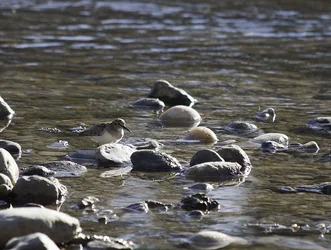
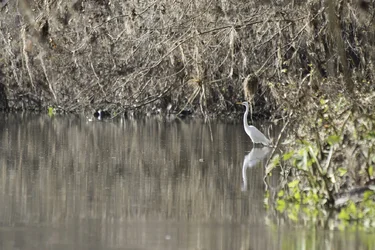
A couple other photos from yesterday. not edited in any way.

$IMG_0995.webp
$IMG_0774.webp
 
.... (edited) Does using image stabilization while using a tripod hurt? I while back I read that on Nikon lenses with VR, you should turn the VR off while using a tripod because it'll actually cause blur. Not sure if that's true or if it works the same way for Canon IS. I was using IS I while using the tripod.

Also, not sure if it's used for birds, but I have a cable release arriving today or tomorrow.

Here's a Ken Rockwell review of the lens I'm using if you feel like looking at that.
Canon 70-300mm IS

Thanks for all your input :) I definitely need to learn more.

Yes, if you have your lens on a tripod, turn the IS off. I always turn mine off for both the 100-400 and the 600Mk II, unless, of course, trying for birds in flight (BIF). I almost always use a cable release or set the timer on my camera. This may not always be necessary, but it is just a habit that I have adopted over the years when I am shooting on a tripod. I also use mirror lockup at slower speeds. For example, if I have to shoot at a speed that is less than 1/(focal length x crop factor), then I will definitely use a cable release and mirror lockup.

You can try this page in Texas - Birding News | #birdingnews via @aba.

In your second post, the bird in the first one looks fairly sharp, whereas the egret in the second one looks a little fuzzy.

WesternGuy
 
I will try changing some things and getting closer and see how it goes. I haven't been able to go since that first day. Hopefully tomorrow morning I can get out and try. It's supposed to be foggy/overcast so I'm worried there won't be enough light for a faster shutter speed without higher ISO.
 

Create an account or login to comment

You must be a member in order to leave a comment

Create account

Create an account on our community. It's easy!

Log in

Already have an account? Log in here.

Back
Top Bottom