What's new

Outdoor Shoot C&C

dandaluzphotography said:
In Lightroom I selected the camera neutral color profile. If this is what you're asking. It seemed to be the one that matched what I saw the most.

Check the color space or file type when you export it. I'm not in front of it right now to show you 100% but ideally you would want to save in RGB.
 
dandaluzphotography said:
In Lightroom I selected the camera neutral color profile. If this is what you're asking. It seemed to be the one that matched what I saw the most.

Check the color space or file type when you export it. I'm not in front of it right now to show you 100% but ideally you would want to save in RGB.
Thanks for the tip. Color management is still something i haven't fully wrapped my head around. I'm getting there though.
 
dandaluzphotography said:
Thanks for the tip. Color management is still something i haven't fully wrapped my head around. I'm getting there though.

Yea you want SRGB not adobe RGB. Adobe will make your pics look like poop without color aside from the editing editing program.
 
Neutral.
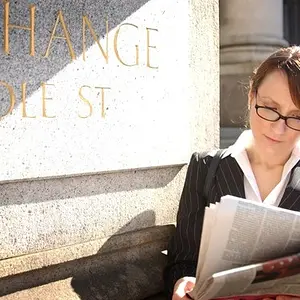
From there you need to add back in some black point, contrast and levels adjustment. The first is slightly underexposed with gives the skin a muddy tone, brightening clears the skin tone up. Needs some sharpening.
The crop is too large.
Photo was taken in very contrasty light, with the light from the wrong side.
Background is distracting.
The photo as presented is pretty close to it's potential. Very pretty lady.
 
So I added some sharpening and adjusted the crop. Thoughts?

Thanks!

2ch41p2.jpg
 

Create an account or login to comment

You must be a member in order to leave a comment

Create account

Create an account on our community. It's easy!

Log in

Already have an account? Log in here.

Back
Top Bottom