What's new

Overexpose? How can you tell?

hamlet

No longer a newbie, moving up!
Joined
Sep 12, 2013
Messages
2,894
Reaction score
435
Location
Belgium
Can others edit my Photos
Photos OK to edit
I have just taken two pictures.


One straight from the camera
daV0xbt.jpg

S9Iyw5Q.jpg


and one made to look brighter with the lightroom 5 auto function that is found in the basic menu.
jIU2sAa.jpg

rhOFy0n.jpg


To me the second one looks brighter edited by lightroom. What is your opinion?
 
Second one is brighter. Most software will average out a whole scene in auto. This will try to get mid-grey out of the picture. Sometimes this works, sometimes it doesn't. You are better off selecting exposure , shadow and highlight and other various adjustments yourself if you are going to the trouble of post processing. The histogram helps. Sometimes though you can end up clipping highlights or shadows etc in a small portion of the photo to give the overall photo a good look
 
LR tries to make the entire picture medium grey.
There is a good amount of dark area and so it will increase exposure until the average of the entire scene is medium grey.

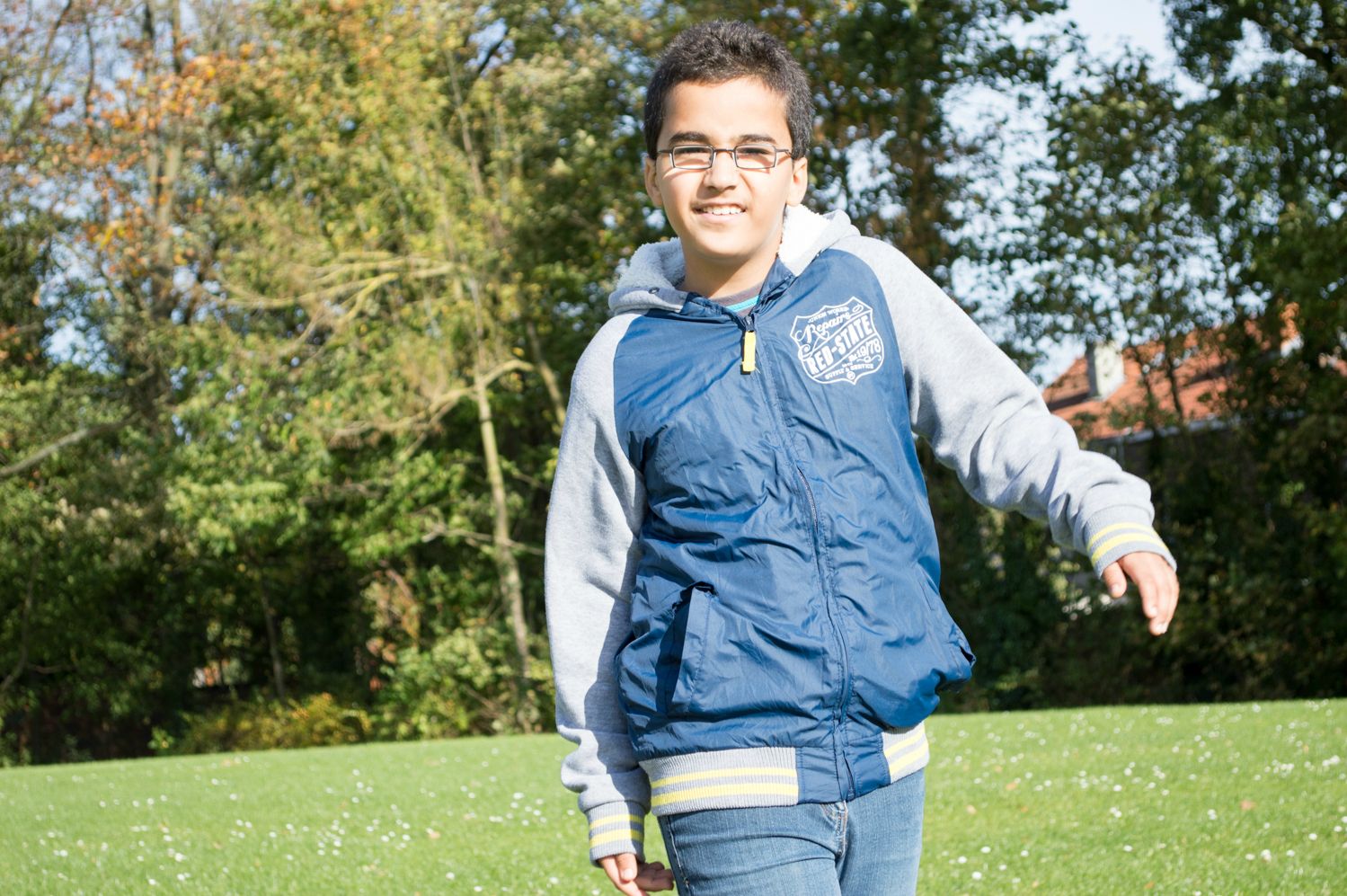
Look for the burnt out spots on the tops of his cheeks. No detail there. Burnt out, overexposed for the highlights but his jacket is OK.
Too much dynamic range for the sensor.
Expose for the face to hold the highlights and let the rest fall where it may.
 
So that's why it looks brighter. I am a bit overwhelmed by all of the options in this very capable software, but i do understand now why the second one doesn't look right to me.
 
Overexpose? How can you tell?
You take a close look at the part of the image frame you want to judge the exposure of.

In most scenes you have a primary subject and some number of secondary and tertiary subjects.

In the photos you posted some parts in each photo are over exposed, and some parts (shadows) are under exposed.

Lightroom doesn't really have a good tool for judging exposure in a somewhat small area, like the forehead, cheeks, and chin of the subject in your photos.

Your camera has 3 reflected light metering modes, and the camera light meter can be biased, or fooled, by scenes that have a lot of contrast in them.
The camera light meter is designed based on the assumption that all scenes average to a luminosity value that is a neutral gray.
The average luminosity in a scene is assumed to be between 12% and 15% neutral gray.
When a scene averages more or less than 12% to 15% the light meter is 'fooled' and the photographer has to make a judgement add or subtract exposure to compensate.
 
Last edited:
Do i use the direct sunlight contrast mode in situations like this? Could that possibly help my image?
 
I see exposure compensation in my camera. But that would bring down the overall picture brightness rendering any changes moot. I don't see how this helps? These things can be adjusted in lightroom just as well.
 
Because, at the exposure you are using the highlights get burnt out.
In order to keep the highlights you need to lower the exposure and then edit the image.
JPEGs have a lower dynamic range than raw files - which is why people use raw files and not jpegs.

If you don't know the difference, you need to read about it.
 
I think you need to lay down the camera for a day or so and do some reading on:

dynamic range
exposure triangle
exposure compensation
raw versus jpeg

so you have these facts in hand and you will know more what you are doing.


Lew
 
I can see you have the same problem I had about exposure.

What you need to test is precisely this, exposure.

Take pictures of the same thing and use the exposure button or simply increase shutter speed. You know if the shutter is open too long that the entire photo is bright white. That is clearly over exposed, every detail is gone.

As you bring the exposure down you see more and more details.
as you get closer to the "correct exposure" the details are more detailed.

Your question is about improving your expertise on exposure, and you just have to practice and experiment to improve your ability of seeing the details.
Thus, you need to practice making multiple exposures of the same object and then looking very closely at the details of that object. Then seeing which ones are better. By repeating this you will gain experience in understanding when some details get blown out a bit. once the details are blown out and NOT THERE then post processing IS NOT going to make them magically reappear. practice, practice practice. that is why digital is so much more fun. Don't think about film anymore as that was my crutch too.

Conversely, you can think of this in a dark room. You INCREASE shutter speed times to gain exposure to an object in the dark. Until you can see the details.
 
- read below for edits -
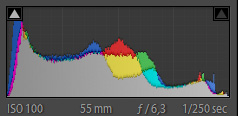
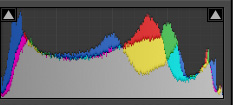
Back to the question in the OP - "how can you tell if something is over exposed" - it will be pure white (especially if JPG). In LR, in the View menu, there is an option to "Show Clipping" - shortcut J. This will make any overexposed areas red, and lost detail in the shadows as blue (if you drag the exposure slider down). This will help you to visually see what's going on.

Clipping is referred to when the curve in the histogram goes flat (like at the top, higher than the maximum value, and it clips the top of the peak off).
As stated, read up on RAW formats, Dynamic Range, and how the eye differs from the camera sensor.

Getting a correct exposure is about balance between the details and colors you want to see. The more detail, the better the exposure. I'm not talking about being able to see words on a sign a mile away, I'm talking about contrast, detecting subtle changes in color. Look at the color in the hood to the right (the boy's left) of his face. In the first image, you can clearly see the gray hood with white lining, but can't see the texture of the lining - so I'd say that area is just slightly over exposed. In #2, that whole area is white, with no detail at all - so it is definitely over exposed.

It is also important to have a computer monitor with accurate colors and brightness/contrast - calibration is important. There are some wishy-washy guides to work through calibration, OS X has a decent one built in, or you can go to a hardware calibration with a Spyder or something similar. These will try to match white balance (temperature), brightness, contrast to be more accurate to what you see with your eye, and in some cases, to be accurate with prints.

[edit]
I want to edit this slightly in case someone doesn't read the entire thread. There are mistakes in the statement(s) above.
Extreme Overexposure (or underexposure) will show up on the histogram as flat regions (clipped) on the left (under) or right (over).
The histogram's left/right scale is brightness/luminosity, while the vertical up/down represents the amount of a color value in the image (sort of like tonal saturation). These regions, whether they are of the luminosity sort, or tonal saturation sort, represent areas of lost detail. There is no way to bring the detail back from those blown-out areas. Whether it's totally white, or black, or too strong in a deep red, or blue. It's like audio waveforms that get the peaks cut off from a mic recording, once the audio is gone, it's gone.
 
Last edited:
Fyi, You have come along way from just 2 weeks ago, when Over Exposure was obvious
http://www.thephotoforum.com/forum/...2045-my-long-exposure-picture-too-bright.html

Now, you are getting more detailed and more fine in making that exposure more proper.

It's just experience and being critical of your own photos. And you are getting there ... as you learn more, you become more critical of your own photos.

Just practice practice practice especially on one stationary object and playing with the exposure levels.

Your 2 pictures are worlds better than from the other thread.

After you get the exposure turned down a bit you will then probably look at the colors to see if "what is in" your photo is "what you see in your eyes".
That's where I went after my exposures got good. making the colors what I see, or better.


Also, I mentioned this before and Lew reminded me of it.

Learn your camera inside and out.
Learn what each button and function does. At first you will "know" what they do but not understand it. This will come in practice of testing each feature/function one at a time. And over time it will become second nature to change something.

It took me some time for me to know what to change and how to do it on the camera. I read alot about my camera in a "How to d7000" book. Invaluable as they teach you why you change something too.

You are learning at a faster clip than I did (I wasn't on this forum yet either and I did it by myself), and you had previous experience. The jump to digital I've basically ignored what I knew in the past as what I knew in the past wasn't at any level of what I'm learning now .. if that makes any sense.

It's coming together :)
 

Create an account or login to comment

You must be a member in order to leave a comment

Create account

Create an account on our community. It's easy!

Log in

Already have an account? Log in here.

Back
Top Bottom