What's new

PANNING QUESTION.

ewick

TPF Noob!
Joined
Dec 12, 2011
Messages
464
Reaction score
74
Can others edit my Photos
Photos NOT OK to edit
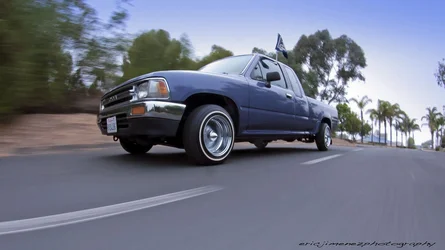
So I did some research and I'm getting mixed answers. Maybe I'm not phrasing the question right so any help will be appreciated. My question is: IS IT POSSIBLE TO REPLACE THE SKY ON A PANNING SHOT? I took this pic and the sky looked too white cause it was over cast so i tried replacing the sky but it didnt match. so i tried the gradient tool but not happy with my results.I know my framing is not the best as well but i'm focusing on the sky for now. maybe later i will crop different. Any suggestions and C&C is welcomed and appreciated. thanks everybody.


7007659564_19d380fc6c.jpg
[/URL] panning by pop-a-dot, on Flickr[/IMG]
 
Your actual question has nothing to do with panning, it's about photo editing to replace the sky, in which case, the answer is yes. Is this the original or the one you replaced?

This doesn't look too bad to me, but I think your image is slightly overexposed, which is why your sky was blown out, so it could've been mostly avoided. With digital photos, it's best to expose for the highlights then bring your shadows up when you edit, assuming you're shooting in raw. You can do it with jpgs too, but a raw file would resolve the shadows better.
 
The sky is fine in this shot.
This is not a good candidate for sky replacement, see all those teeny tiny sky spots in the tree branches.....not fun.
 
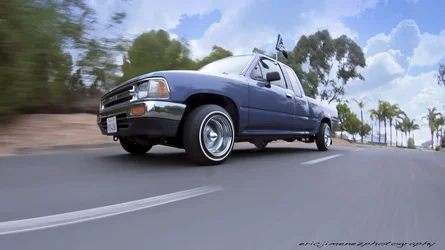
Here's an ultra quick edit with photoshop and adobe camera raw. The quality isn't awesome because it was edited with your jpg, but as you can see, adjusting the exposure, the 'recovery' slider, and messing with the contrast a little, yielded some subtly better skies IMO. If you've still got the raw file, experiment some and see what you come up with.

$truck.webp
 
Your actual question has nothing to do with panning, it's about photo editing to replace the sky, in which case, the answer is yes. Is this the original or the one you replaced?

This doesn't look too bad to me, but I think your image is slightly overexposed, which is why your sky was blown out, so it could've been mostly avoided. With digital photos, it's best to expose for the highlights then bring your shadows up when you edit, assuming you're shooting in raw. You can do it with jpgs too, but a raw file would resolve the shadows better.

Technically its not a question about the actual panning. I guess maybe my first problem is stating the question right. This is not the original photo. The blue in the sky was added with the gradient tool but it doesn't look natural to me. Oh and I do shoot RAW and thank you for the tip. next time I go out I will try exposing for the highlights and see what I can get. So how do I look up replacing the sky in a panning shot? MReid below us doesn't seem to think its a good candidate for replacing the sky.
 
Here's an ultra quick edit with photoshop and adobe camera raw. The quality isn't awesome because it was edited with your jpg, but as you can see, adjusting the exposure, the 'recovery' slider, and messing with the contrast a little, yielded some subtly better skies IMO. If you've still got the raw file, experiment some and see what you come up with.

View attachment 7939

So in your opinion I shouldn't try to add some blurry clouds or something to make this a little more interesting? I will definitely go back and try to re-edit this photo since I do keep all my RAW files. thanks a bunch.
 
The sky is fine in this shot.
This is not a good candidate for sky replacement, see all those teeny tiny sky spots in the tree branches.....not fun.

Masking out the trees is the hard way to do it.

Try this in photoshop:

1)Get an image of some clouds you like & paste it in a new layer on top of your photo
2)Change the layer blend mode to Darken (this will make it not show up on the trees because they're darker than the sky you're adding in)
3)Create a mask & mask out any highlighted areas you don't want sky in such as the foreground, truck, etc.
4)Adjust the opacity of your new sky layer down to around 60-70% or whatever suits your taste so that the natural ambient light of the shot still shows through & you don't have a sky that's the wrong color.

Seeing if I can attach an edited version here...my computer isn't behaving...
$replacedskyexample.webp
 

Create an account or login to comment

You must be a member in order to leave a comment

Create account

Create an account on our community. It's easy!

Log in

Already have an account? Log in here.

New Topics

Back
Top Bottom