What's new

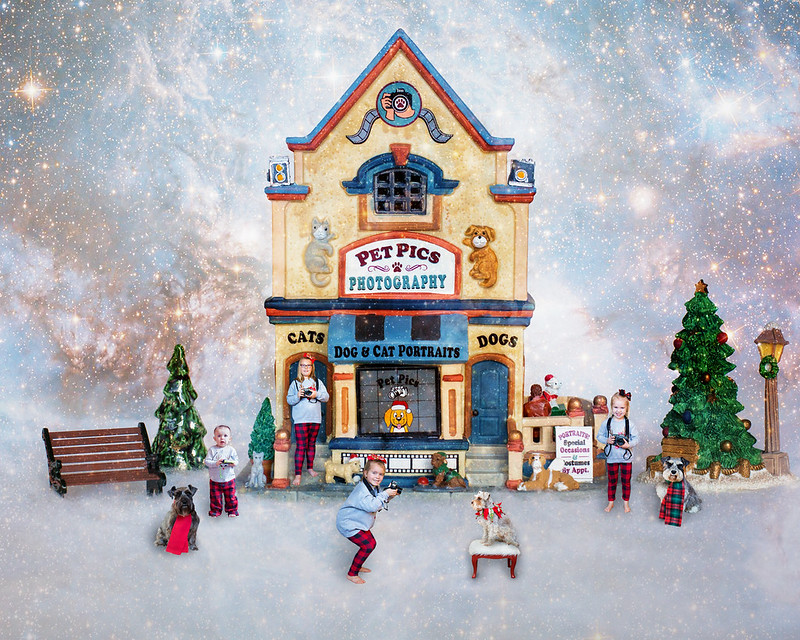
Pet Photographers - miniature series

I like this, and the title, but wait - the dogs aren't holding cameras! lol

The kids and dogs being in reds and greens look good against the blue background, they stand out nicely. I like that they all are in different poses too. So much fun, this made me smile.
 
Very cute! Good job!
 
Just perfect!
 
Love it! So creative and fun Cheryl, really wonderful.
 
Way to go Cheryl. Another great miniature!
 
Nice one.......
That is outstanding!!!
Very cute! Good job!
Very cute image.

Nicely done.
Love it! So creative and fun Cheryl, really wonderful.

Thanks! The grands have fun!

I like this, and the title, but wait - the dogs aren't holding cameras! lol

The kids and dogs being in reds and greens look good against the blue background, they stand out nicely. I like that they all are in different poses too. So much fun, this made me smile.

Thanks! My daughter made their graphic shirts and bought pants to match. Shot on all white and used a NASA image twice. Once the layer above the BG and another as the very top layer. Both masked and painted in the images. The dogs didn't want to hold a camera ;) Each time I handed the camera to a Grand I said firmly this is not a toy.

Way to go Cheryl. Another great miniature!

Thanks! I am working on a 2nd holiday themed miniature. I printed out both backgrounds unedited to show the grands the scene. It was a group effort on where and how to stand.
 
Thanks! I am working on a 2nd holiday themed miniature. I printed out both backgrounds unedited to show the grands the scene. It was a group effort on where and how to stand

Can't wait, I'm sure they will be great. I'm struggling with a Valentine idea this year. So far no "light bulbs" have come on.

Quick comment/question on your process. What blending mode are you using for your layers? I've been using "Overlay" mode to quickly add objects/people/etc. in layers, The Overlay Blend Mode In Photoshop then using Layer Style panel and the Blend If sliders to fine tune how it interacts with the other layers. Julieanne Kost's Blog | “Blend If” Sliders in Photoshop I'm still learning with it, but I find it looks more realistic then a cut and paste image and eliminates all the tedious selection and refine edges. If you'll remember to shoot the kiddos, and puppers against a gray background it really speeds up the process.

Also the end of the process using a Color Lookup layer will help blend everything together.
 
Last edited:

Create an account or login to comment

You must be a member in order to leave a comment

Create account

Create an account on our community. It's easy!

Log in

Already have an account? Log in here.

Back
Top Bottom