What's new

Pet w/tree & flash - Help

Joined
Aug 6, 2012
Messages
5,529
Reaction score
7,100
Location
near St Louis
Can others edit my Photos
Photos NOT OK to edit
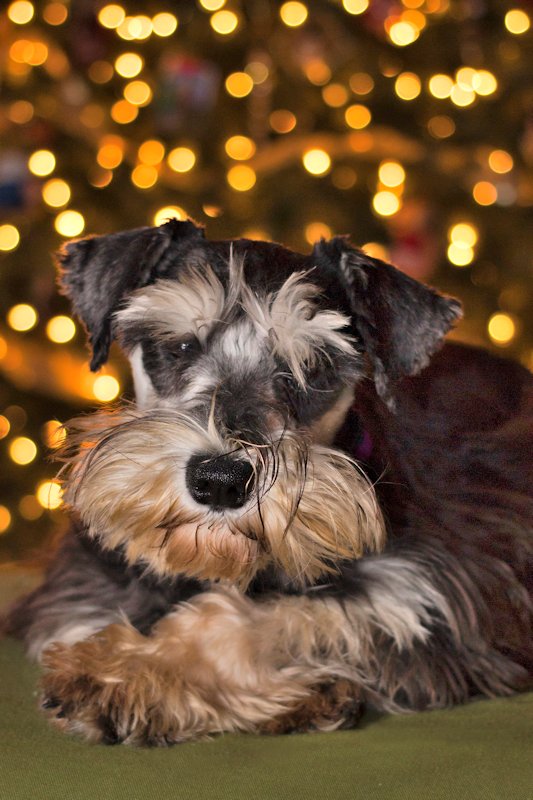
After seeing a few other posts with pets or kids with the Christmas tree, I tried a few shots with our new puppy. Both photos: T4i, 40mm, 1/60 400 f2.8 Raw. The 430 ex ii speedlight was off camera to the left on a table shooting into paper towels and a lamp to the right on dim. The darker photo had the flash set to -1 and the other photo the flash was set to -2/3.

I plan on reshooting these so any help is appreciated. His nose is in focus compared to his eyes. And probably should trim his eyebrows. I've included the SOOC photos for comparison. I made adjustments to both photos in ACR & PS. Just recalibrated my monitor to the new build and not sure if it is correct. Thanks!

Photo 1 SOOC


IMG_0877SOOC by Cheryl3001, on Flickr

Photo 1 Edited


IMG_0877 by Cheryl3001, on Flickr

Photo 2 SOOC


IMG_0890SOOC by Cheryl3001, on Flickr

Photo 2 Edited


IMG_0890 by Cheryl3001, on Flickr
 
I'm not far enough along to give you advice, but I do love the second edited pic. I'm a sucker for those expressive bushy eyebrows.
 
Just needs a little light on the right side ...

8279309432_f48f515982_k.jpg
 
I'm not far enough along to give you advice, but I do love the second edited pic. I'm a sucker for those expressive bushy eyebrows.

I am new to photography too, about 6 months. Just got the speedlite. Guess I'll play with the settings and see if I can't get the exposure better.
 
That was a 30-second edit ;) If I brighten it up much more there is a lot of noise on his back that starts to show up and I didn't want to get into a bunch of noise reduction, just wanted to show what could be done.

If you've got a white wall behind you fire the flash at that wall and see how that works. Might have to move the camera slightly right to prevent a shadow, but you need more light on the right side of him since that's where the underexposure is.

Keep in mind that light fall-off is based on the inverse square law. If, for example, the distance from the flash to the pup is 5 feet and the paper towels are another 5' on the other side of the dog the distance on that side is 15' from the flash from to the dog (10' from the flash to the towels and then 5' back to the dog). The difference between one side and the other is 10' (15' - 5') so you will only have 1/100 (10 squared) as much light on the right side as the left side. Paper towels aren't a very efficient reflector so it will actually be less than that.
 
That was a 30-second edit ;) If I brighten it up much more there is a lot of noise on his back that starts to show up and I didn't want to get into a bunch of noise reduction, just wanted to show what could be done.

If you've got a white wall behind you fire the flash at that wall and see how that works. Might have to move the camera slightly right to prevent a shadow, but you need more light on the right side of him since that's where the underexposure is.

Keep in mind that light fall-off is based on the inverse square law. If, for example, the distance from the flash to the pup is 5 feet and the paper towels are another 5' on the other side of the dog the distance on that side is 15' from the flash from to the dog (10' from the flash to the towels and then 5' back to the dog). The difference between one side and the other is 10' (15' - 5') so you will only have 1/100 (10 squared) as much light on the right side as the left side. Paper towels aren't a very efficient reflector so it will actually be less than that.

The wall behind me is at least 20' away. Maybe bounce the flash onto a white poster board behind me? I'll experiment with a stuffed animal for the lighting, he won't stay still for me to change settings. Thanks for your explanation on the light & feet.
 
That was a 30-second edit ;) If I brighten it up much more there is a lot of noise on his back that starts to show up and I didn't want to get into a bunch of noise reduction, just wanted to show what could be done.

If you've got a white wall behind you fire the flash at that wall and see how that works. Might have to move the camera slightly right to prevent a shadow, but you need more light on the right side of him since that's where the underexposure is.

Keep in mind that light fall-off is based on the inverse square law. If, for example, the distance from the flash to the pup is 5 feet and the paper towels are another 5' on the other side of the dog the distance on that side is 15' from the flash from to the dog (10' from the flash to the towels and then 5' back to the dog). The difference between one side and the other is 10' (15' - 5') so you will only have 1/100 (10 squared) as much light on the right side as the left side. Paper towels aren't a very efficient reflector so it will actually be less than that.

The wall behind me is at least 20' away. Maybe bounce the flash onto a white poster board behind me? I'll experiment with a stuffed animal for the lighting, he won't stay still for me to change settings. Thanks for your explanation on the light & feet.


Just bump up the flash comp to maybe +2.0 and see how that works. Walls make great softboxes.


p!nK
 
Just bump up the flash comp to maybe +2.0 and see how that works. Walls make great softboxes.

p!nK

Thanks for the suggestion. I tried this and got too much light with harsh shadow from the Christmas tree. But, good to know in future situations.
 
After much trial & error ended up with these shots. At first I tried the speedlite on a tripod behind me and the flash would not work. After changing the batteries, etc. I realized that the flash needed to be to the left or right of the camera or in front to get the signal. Tried various positions shooting the flash into a trifold white board. These shots I put the flash on the camera and shot to the back into a trifold white board. Thanks for the help and any suggestions welcome.

I used a DIY star bokeh filter. The older dog is blind and getting them both to "pose" wasn't easy. Edited in ACR & PS.

1.


TedSnick by Cheryl3001, on Flickr

2.


Snicker by Cheryl3001, on Flickr
 
Expose for the ambient light (meter the background) using a slow shutter speed... but expose the subject (dog) using flash (aperture control / GN)
 
Expose for the ambient light (meter the background) using a slow shutter speed... but expose the subject (dog) using flash (aperture control / GN)

What would be the safest slowest shutter speed with pets moving? These were at 1/60. Thanks.
 
Expose for the ambient light (meter the background) using a slow shutter speed... but expose the subject (dog) using flash (aperture control / GN)

What would be the safest slowest shutter speed with pets moving? These were at 1/60. Thanks.

If the ambient light is low enough, the animals moving won't matter.... as it is the flash the will capture the animal, and very sharply at that. You can use whatever shutter speed is needed pretty much... dragging the shutter, as it were. You might want to use rear curtain sync if your body will do it, but probably not necessary.

EDIT>.. I should say... if your camera is on a tripod, the shutter speed wont matter! I keep assuming that things like that are obvious... need to quit doing that! lol!
 
Last edited:

Create an account or login to comment

You must be a member in order to leave a comment

Create account

Create an account on our community. It's easy!

Log in

Already have an account? Log in here.

New Topics

Back
Top Bottom