What's new

Photo critique please

gossamer

TPF Noob!
Joined
Dec 24, 2013
Messages
234
Reaction score
23
Location
New Jersey
Can others edit my Photos
Photos OK to edit
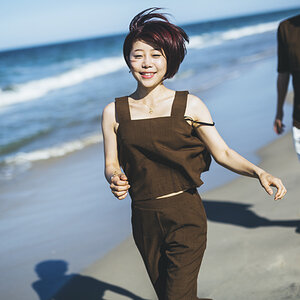
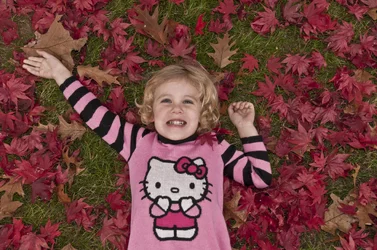
Hi, I'd like to have this image printed as a canvas, and was hoping before I did, that someone would give me an idea how it can be improved in post-processing. I'm a novice Photoshop CS5 user.

How can I improve the color in her face? Does the white balance look correct?

Any other suggestions?

What do you think of the picture overall?
 

Attachments

  • DSC9390_ReganLeavesForum50.webp
    DSC9390_ReganLeavesForum50.webp
    813.9 KB · Views: 208
I like the picture. I think a slight increase in Brightness and a little bit of warmth would make this an excellent print.

I could be wrong on the warmth. I'm on an uncalibrated monitor.
 
Hi, I'd like to have this image printed as a canvas, and was hoping before I did, that someone would give me an idea how it can be improved in post-processing. I'm a novice Photoshop CS5 user.

How can I improve the color in her face? Does the white balance look correct?

Any other suggestions?

What do you think of the picture overall?
I think someone with better skills than I should make some adjustments to her skin.

I made some adjustments to the WB, reds, and overall exposure. I think the saturations was too high. Before you get this printed, get somebody skilled to made some edits.

DSC9390_ReganLeavesForum50 - Version 2.webp
 
I like what you did designer though I think the sharpening or clarity is a bit too high.

I'll see what I can do when I get home from work.
 
I like what you did designer though I think the sharpening or clarity is a bit too high.

I'll see what I can do when I get home from work.

That would be awesome. I'm the designer and photographer - a lot of it was luck, though. I think I could reproduce it now, but I was lucky to get all the pieces to fit together just as they did.

I'd sure appreciate any input - I would just need to be able to reproduce it on the original NEF so I can set it up for printing, rather than this lower-resolution version.
 
Do you use lightroom and photoshop or just lightroom?
 
I'd sure appreciate any input - I would just need to be able to reproduce it on the original NEF so I can set it up for printing, rather than this lower-resolution version.
1. You should NOT use the original NEF for any editing. Make a copy and do whatever you want to to the copy.

2. In preparing to send it out to the printer, you should inquire as to what color space they use. Also, you'll probably want to save it as a TIFF.

3. You can download the color specs from most commercial printers so you can "soft proof" it before you send it off.
 
Do you use lightroom and photoshop or just lightroom?

Just Photoshop, as my original post explained. I'm relatively familiar with photoshop, and even less familiar with lightroom. I'm not at the level where I understand how to create my own effects if they're not part of the default options.
 
I'd sure appreciate any input - I would just need to be able to reproduce it on the original NEF so I can set it up for printing, rather than this lower-resolution version.
1. You should NOT use the original NEF for any editing. Make a copy and do whatever you want to to the copy.
Yes, thanks, I understood that. I also just choose "Save As" to always leave the original pristine.

2. In preparing to send it out to the printer, you should inquire as to what color space they use. Also, you'll probably want to save it as a TIFF.

It's RGB, and I've always saved as TIFF for this kind of thing. One of the canvas print shops requires the images to be less than 60MB, so I've had to choose jpeg at maximum size.

For a canvas, it's really okay anyway, since the resolution of the print isn't even all that high.

3. You can download the color specs from most commercial printers so you can "soft proof" it before you send it off.

Yes, I recently purchased a Canon Pixma Pro-100. I also need to calibrate my monitor (Samsung S27C650), but haven't looked into doing that yet.

Thanks so much for your help.
 
I'd sure appreciate any input - I would just need to be able to reproduce it on the original NEF so I can set it up for printing, rather than this lower-resolution version.
1. You should NOT use the original NEF for any editing. Make a copy and do whatever you want to to the copy.

2. In preparing to send it out to the printer, you should inquire as to what color space they use. Also, you'll probably want to save it as a TIFF.

3. You can download the color specs from most commercial printers so you can "soft proof" it before you send it off.

That's why lightroom is great. No actual editing of the original involved.

I like what you did designer though I think the sharpening or clarity is a bit too high.

I'll see what I can do when I get home from work.

That would be awesome. I'm the designer and photographer - a lot of it was luck, though. I think I could reproduce it now, but I was lucky to get all the pieces to fit together just as they did.

I'd sure appreciate any input - I would just need to be able to reproduce it on the original NEF so I can set it up for printing, rather than this lower-resolution version.

I got really busy when I got back home and I won't have time today either. Hope tomorrow's not too late.
 
1. You should NOT use the original NEF for any editing. Make a copy and do whatever you want to to the copy.

Any decent raw processor will leave the NEF alone and put all the edits in a separate metadata file.

If you see a DSC_0111.NEF and a DSC_0111.NEF.XMP file in a folder that generally means you are safe. :)
 
I'd sure appreciate any input - I would just need to be able to reproduce it on the original NEF so I can set it up for printing, rather than this lower-resolution version.
1. You should NOT use the original NEF for any editing. Make a copy and do whatever you want to to the copy.

2. In preparing to send it out to the printer, you should inquire as to what color space they use. Also, you'll probably want to save it as a TIFF.

3. You can download the color specs from most commercial printers so you can "soft proof" it before you send it off.

That's why lightroom is great. No actual editing of the original involved.

I like what you did designer though I think the sharpening or clarity is a bit too high.

I'll see what I can do when I get home from work.

That would be awesome. I'm the designer and photographer - a lot of it was luck, though. I think I could reproduce it now, but I was lucky to get all the pieces to fit together just as they did.

I'd sure appreciate any input - I would just need to be able to reproduce it on the original NEF so I can set it up for printing, rather than this lower-resolution version.

I got really busy when I got back home and I won't have time today either. Hope tomorrow's not too late.

Today/tomorrow would be terrific. Really looking forward to it. Would it be helpful if you had the original NEF somehow?

btw, I've been doing this long enough to know how to avoid writing over my originals :-)
 
Sure, yeah. My email is listed on my website.

I'll edit in Photoshop and tell you everything I did. That way you can reproduce it if you like it enough.
 
Sure, yeah. My email is listed on my website.

I'll edit in Photoshop and tell you everything I did. That way you can reproduce it if you like it enough.
Awesome, thanks so much. Email sent.
 
Hi, I'd like to have this image printed as a canvas, and was hoping before I did, that someone would give me an idea how it can be improved in post-processing. I'm a novice Photoshop CS5 user.

How can I improve the color in her face? Does the white balance look correct?

Any other suggestions?

What do you think of the picture overall?
I think someone with better skills than I should make some adjustments to her skin.

I made some adjustments to the WB, reds, and overall exposure. I think the saturations was too high. Before you get this printed, get somebody skilled to made some edits.

View attachment 93750

I'm not a professional by any means, but may I take a shot at editing her skin? Just want practice :)
 

Create an account or login to comment

You must be a member in order to leave a comment

Create account

Create an account on our community. It's easy!

Log in

Already have an account? Log in here.

New Topics

Back
Top Bottom