What's new

Photo Editing System

porkhips

TPF Noob!
Joined
Sep 20, 2013
Messages
4
Reaction score
0
Feel like this one is one foot in the right place and one foot out of it, but here goes.

I plan on getting a new computer set-up by the end of this year - which at that time, there will be the new Mac Mini and a new Mac Pro. I want a new computer for my normal, day to day stuff, but also something I can edit photos on.
Is there any specific reason one can think for why these two needs need to be kept separate on two different systems?

I could get a Mac Pro and run two monitors from it - an Eizo for photo editing and a Mac display for my daily usage. I don't really want two computers but if there was a diehard reason to do it that way, I could just get two Mac Minis and two monitors.
 
It's definitely possible to run a system for your day to day and photo edits. One thing I would say though, is that with modern dslr's having such high pixel counts, fast processors (2.3GHz or faster) and at least 8GB of RAM would be in your favour.

I do wonder why you feel the need for two separate monitors though. That doesn't make a whole lot of sense. If anything, I'd stick with just an editing monitor.
 
It's definitely possible to run a system for your day to day and photo edits. One thing I would say though, is that with modern dslr's having such high pixel counts, fast processors (2.3GHz or faster) and at least 8GB of RAM would be in your favour.

I do wonder why you feel the need for two separate monitors though. That doesn't make a whole lot of sense. If anything, I'd stick with just an editing monitor.


I'm working with XPro1's/X-E1's/X100s's - but even with the bigger D600/D800 or 5DM3's of the world - I understand your advice about investing in a higher processor and packing on the RAM - even using SSD or Fusion Drive.

The only reason I would consider two monitors is I'm guessing the Eizo models aren't going to have as many ports as you'd find on a Mac monitor (usb 3, thunderbolt, etc). But that being said, my main concern was more if there was any real 'bad idea' thinking in using one computer for both those roles - day to day and photo editing.
 
Two monitors mean a lot of great space for PS pull outs, other applications.
I use the 'expensive' monitor for editing and another consumer flat screen for the other stuff.
 
There's no real good reason to run two separate computers for day-to-day stuff and for editing. I also don't really understand your desire to have two monitors, at least not what you wrote about. Apple's monitors are certainly high enough quality to edit on, so I don't really think it is important to have a second monitor dedicated to editing. If you really want to have an Eizo monitor to edit on, then there are probably better ways to get the ports than an additional monitor. The computer will have ports on it, and you can get docking stations for additional ports too.

Also, if a mac mini is a potential solution, why aren't you considering an iMac? They're certainly enough machine to do photo editing on.
 
There's no real good reason to run two separate computers for day-to-day stuff and for editing. I also don't really understand your desire to have two monitors, at least not what you wrote about. Apple's monitors are certainly high enough quality to edit on, so I don't really think it is important to have a second monitor dedicated to editing. If you really want to have an Eizo monitor to edit on, then there are probably better ways to get the ports than an additional monitor. The computer will have ports on it, and you can get docking stations for additional ports too.

Also, if a mac mini is a potential solution, why aren't you considering an iMac? They're certainly enough machine to do photo editing on.

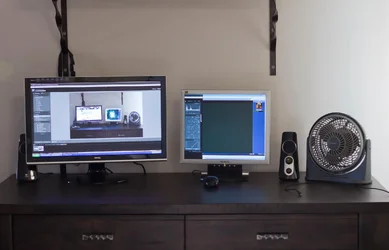
The best thing about dual monitors is you can put the image on one and all the tools on the other. This leaves the one (image) monitor clean and clear and uncluttered. I would never consider going back to a single monitor for editing.
 
Me either. Dual displays is sweet. One entire display (1600 x 1200 pixels) is dedicated to the image I am editing.

My 22" (diagonal) display is 24" from my eyes. At 200% zoom the PSD image file made from my Raw conversion I am editing is huge, and I can see in very nice detail what my edits are doing.
 
Yes, dual monitors work a treat. Having the tool pallet on the second screen leaves the main screen just for the image.
Or you can even do all your other stuff WHILE your processing if you want!

$285882_3958212067481_1818996256_o.webp

:mrgreen:
 

Create an account or login to comment

You must be a member in order to leave a comment

Create account

Create an account on our community. It's easy!

Log in

Already have an account? Log in here.

New Topics

Back
Top Bottom