What's new

Photo Processor

I have no problem with that. It certainly is an affordable option. Personally I think Adobe has gotten greedy and I don't want to feed the greed. I also don't want to encourage other software publishers to get into the renting business. I've settled on Affinity because, not only is it affordable, but it gives photoshop a good run for the money. Affinity is not for beginners to photo editing. It is definitely a pro level product with amazing capabilities. It does everything I need. $39.95. What's not to like?
 
Not so much a matter of affordability, but of principle. I buy a software license to use this or that piece of software indefinitely. Adobe wants to start only renting out use of their software, then I feel compelled to buy a different software license than theirs, rather than reward such behavior.

I only use photo editing for making throwaway art or to resize and/or crop my images anyhow. For most photography, I was just importing from my camera until I got back into film. Now I just scan in my negatives and that's what I have. At most, tweek my exposure with the scanning software that runs my negative scanner.
 
I have no problem with that. It certainly is an affordable option. Personally I think Adobe has gotten greedy and I don't want to feed the greed. I also don't want to encourage other software publishers to get into the renting business. I've settled on Affinity because, not only is it affordable, but it gives photoshop a good run for the money. Affinity is not for beginners to photo editing. It is definitely a pro level product with amazing capabilities. It does everything I need. $39.95. What's not to like?

I actually agree whole heardidly. But it's been 2 years now since Adobe and Microsoft went the way of rental instead of owning. And I don't think they are going to change back either. And yes, it was a money move and not a way to help people keep current. Like myself, I would only upgrade PS every other version. So, they are missing out on the cash from me skipping every other generation. But if you work out the money. What I was paying for just PS. I now get PS and LR every generation. I absolutely would not do it for their $49 price each though! Matter of fact I will not do it for $25 a month (I pay 12 months). To me $126 for a year is doable (with tax). And was my average cost for upgrading PS and LR (PS every other, and LR almost every edition).

 
I have no problem with that. It certainly is an affordable option. Personally I think Adobe has gotten greedy and I don't want to feed the greed. I also don't want to encourage other software publishers to get into the renting business. I've settled on Affinity because, not only is it affordable, but it gives photoshop a good run for the money. Affinity is not for beginners to photo editing. It is definitely a pro level product with amazing capabilities. It does everything I need. $39.95. What's not to like?

I actually agree whole heardidly. But it's been 2 years now since Adobe and Microsoft went the way of rental instead of owning. And I don't think they are going to change back either. And yes, it was a money move and not a way to help people keep current. Like myself, I would only upgrade PS every other version. So, they are missing out on the cash from me skipping every other generation. But if you work out the money. What I was paying for just PS. I now get PS and LR every generation. I absolutely would not do it for their $49 price each though! Matter of fact I will not do it for $25 a month (I pay 12 months). To me $126 for a year is doable (with tax). And was my average cost for upgrading PS and LR (PS every other, and LR almost every edition).

My photoshop is CS2 so it goes back many years. The version is no longer supported. My cameras are newer so I can't get raw images into bridge. I had to use other software to work on the raw files and save them out to tiff or png so that I could use them in photoshop. I got sick of it. Affinity has a much improved workflow than CS2. Perhaps the newer versions of PS do too, I don't know. My $39.99 Affinity license allows me to put the program on as many devices as I want as long as I use them myself. I have it on my main computer, my photo editing computer and my laptop. I'll bet Adobe takes notice.
 
I have no problem with that. It certainly is an affordable option. Personally I think Adobe has gotten greedy and I don't want to feed the greed. I also don't want to encourage other software publishers to get into the renting business. I've settled on Affinity because, not only is it affordable, but it gives photoshop a good run for the money. Affinity is not for beginners to photo editing. It is definitely a pro level product with amazing capabilities. It does everything I need. $39.95. What's not to like?

I actually agree whole heardidly. But it's been 2 years now since Adobe and Microsoft went the way of rental instead of owning. And I don't think they are going to change back either. And yes, it was a money move and not a way to help people keep current. Like myself, I would only upgrade PS every other version. So, they are missing out on the cash from me skipping every other generation. But if you work out the money. What I was paying for just PS. I now get PS and LR every generation. I absolutely would not do it for their $49 price each though! Matter of fact I will not do it for $25 a month (I pay 12 months). To me $126 for a year is doable (with tax). And was my average cost for upgrading PS and LR (PS every other, and LR almost every edition).

My photoshop is CS2 so it goes back many years. The version is no longer supported. My cameras are newer so I can't get raw images into bridge. I had to use other software to work on the raw files and save them out to tiff or png so that I could use them in photoshop. I got sick of it. Affinity has a much improved workflow than CS2. Perhaps the newer versions of PS do too, I don't know. My $39.99 Affinity license allows me to put the program on as many devices as I want as long as I use them myself. I have it on my main computer, my photo editing computer and my laptop. I'll bet Adobe takes notice.
Au Contraire Pierre. If you downloadeded Affinity through the App Store and you have a family sharing enabled, the other family members can also download the program and use it. You can download their purchased programs as well.
 
I have no problem with that. It certainly is an affordable option. Personally I think Adobe has gotten greedy and I don't want to feed the greed. I also don't want to encourage other software publishers to get into the renting business. I've settled on Affinity because, not only is it affordable, but it gives photoshop a good run for the money. Affinity is not for beginners to photo editing. It is definitely a pro level product with amazing capabilities. It does everything I need. $39.95. What's not to like?

I actually agree whole heardidly. But it's been 2 years now since Adobe and Microsoft went the way of rental instead of owning. And I don't think they are going to change back either. And yes, it was a money move and not a way to help people keep current. Like myself, I would only upgrade PS every other version. So, they are missing out on the cash from me skipping every other generation. But if you work out the money. What I was paying for just PS. I now get PS and LR every generation. I absolutely would not do it for their $49 price each though! Matter of fact I will not do it for $25 a month (I pay 12 months). To me $126 for a year is doable (with tax). And was my average cost for upgrading PS and LR (PS every other, and LR almost every edition).

My photoshop is CS2 so it goes back many years. The version is no longer supported. My cameras are newer so I can't get raw images into bridge. I had to use other software to work on the raw files and save them out to tiff or png so that I could use them in photoshop. I got sick of it. Affinity has a much improved workflow than CS2. Perhaps the newer versions of PS do too, I don't know. My $39.99 Affinity license allows me to put the program on as many devices as I want as long as I use them myself. I have it on my main computer, my photo editing computer and my laptop. I'll bet Adobe takes notice.
Au Contraire Pierre. If you downloadeded Affinity through the App Store and you have a family sharing enabled, the other family members can also download the program and use it. You can download their purchased programs as well.

I downloaded it from Affinity. I just repeated what the site said about the license.
 
I have no problem with that. It certainly is an affordable option. Personally I think Adobe has gotten greedy and I don't want to feed the greed. I also don't want to encourage other software publishers to get into the renting business. I've settled on Affinity because, not only is it affordable, but it gives photoshop a good run for the money. Affinity is not for beginners to photo editing. It is definitely a pro level product with amazing capabilities. It does everything I need. $39.95. What's not to like?

I actually agree whole heardidly. But it's been 2 years now since Adobe and Microsoft went the way of rental instead of owning. And I don't think they are going to change back either. And yes, it was a money move and not a way to help people keep current. Like myself, I would only upgrade PS every other version. So, they are missing out on the cash from me skipping every other generation. But if you work out the money. What I was paying for just PS. I now get PS and LR every generation. I absolutely would not do it for their $49 price each though! Matter of fact I will not do it for $25 a month (I pay 12 months). To me $126 for a year is doable (with tax). And was my average cost for upgrading PS and LR (PS every other, and LR almost every edition).

My photoshop is CS2 so it goes back many years. The version is no longer supported. My cameras are newer so I can't get raw images into bridge. I had to use other software to work on the raw files and save them out to tiff or png so that I could use them in photoshop. I got sick of it. Affinity has a much improved workflow than CS2. Perhaps the newer versions of PS do too, I don't know. My $39.99 Affinity license allows me to put the program on as many devices as I want as long as I use them myself. I have it on my main computer, my photo editing computer and my laptop. I'll bet Adobe takes notice.
Au Contraire Pierre. If you downloadeded Affinity through the App Store and you have a family sharing enabled, the other family members can also download the program and use it. You can download their purchased programs as well.

I downloaded it from Affinity. I just repeated what the site said about the license.
So did I. If you download from the maker you get the full blown version and updates faster. From the App store you may not get all the features and the updates come later.
 
I have no problem with that. It certainly is an affordable option. Personally I think Adobe has gotten greedy and I don't want to feed the greed. I also don't want to encourage other software publishers to get into the renting business. I've settled on Affinity because, not only is it affordable, but it gives photoshop a good run for the money. Affinity is not for beginners to photo editing. It is definitely a pro level product with amazing capabilities. It does everything I need. $39.95. What's not to like?

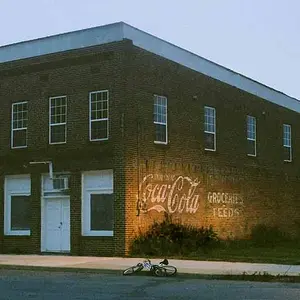
Just one thing: Arguably the sky in your processed version of the office building above is a tad cyan. So re-open the original raw file and without changing any of the other work you did, make a tweak to the Tint value in white balance and then generate a new JPEG. All other raw file processing software supports doing that since it's so fundamentally basic -- they save the work you do. Affinity's work flow however, when processing raw files, is totally destructive which is totally unacceptable.

Joe
 
I have no problem with that. It certainly is an affordable option. Personally I think Adobe has gotten greedy and I don't want to feed the greed. I also don't want to encourage other software publishers to get into the renting business. I've settled on Affinity because, not only is it affordable, but it gives photoshop a good run for the money. Affinity is not for beginners to photo editing. It is definitely a pro level product with amazing capabilities. It does everything I need. $39.95. What's not to like?

Just one thing: Arguably the sky in your processed version of the office building above is a tad cyan. So re-open the original raw file and without changing any of the other work you did, make a tweak to the Tint value in white balance and then generate a new JPEG. All other raw file processing software supports doing that since it's so fundamentally basic -- they save the work you do. Affinity's work flow however, when processing raw files, is totally destructive which is totally unacceptable.

Joe

Unacceptable to you. Then I recommend you not use it. It works fine for me.
 
I have no problem with that. It certainly is an affordable option. Personally I think Adobe has gotten greedy and I don't want to feed the greed. I also don't want to encourage other software publishers to get into the renting business. I've settled on Affinity because, not only is it affordable, but it gives photoshop a good run for the money. Affinity is not for beginners to photo editing. It is definitely a pro level product with amazing capabilities. It does everything I need. $39.95. What's not to like?

I actually agree whole heardidly. But it's been 2 years now since Adobe and Microsoft went the way of rental instead of owning. And I don't think they are going to change back either. And yes, it was a money move and not a way to help people keep current. Like myself, I would only upgrade PS every other version. So, they are missing out on the cash from me skipping every other generation. But if you work out the money. What I was paying for just PS. I now get PS and LR every generation. I absolutely would not do it for their $49 price each though! Matter of fact I will not do it for $25 a month (I pay 12 months). To me $126 for a year is doable (with tax). And was my average cost for upgrading PS and LR (PS every other, and LR almost every edition).

My photoshop is CS2 so it goes back many years. The version is no longer supported. My cameras are newer so I can't get raw images into bridge. I had to use other software to work on the raw files and save them out to tiff or png so that I could use them in photoshop. I got sick of it. Affinity has a much improved workflow than CS2. Perhaps the newer versions of PS do too, I don't know. My $39.99 Affinity license allows me to put the program on as many devices as I want as long as I use them myself. I have it on my main computer, my photo editing computer and my laptop. I'll bet Adobe takes notice.
Au Contraire Pierre. If you downloadeded Affinity through the App Store and you have a family sharing enabled, the other family members can also download the program and use it. You can download their purchased programs as well.

I downloaded it from Affinity. I just repeated what the site said about the license.
So did I. If you download from the maker you get the full blown version and updates faster. From the App store you may not get all the features and the updates come later.

You know more about it than I do. The web site says:

"How many computers can I install a digital product on?
As a private individual, you can download, install, use and run for personal use, one copy of the Serif Software directly on each computer running Microsoft Windows (“Windows Computer”) that you personally own or control."
 
I have no problem with that. It certainly is an affordable option. Personally I think Adobe has gotten greedy and I don't want to feed the greed. I also don't want to encourage other software publishers to get into the renting business. I've settled on Affinity because, not only is it affordable, but it gives photoshop a good run for the money. Affinity is not for beginners to photo editing. It is definitely a pro level product with amazing capabilities. It does everything I need. $39.95. What's not to like?

Just one thing: Arguably the sky in your processed version of the office building above is a tad cyan. So re-open the original raw file and without changing any of the other work you did, make a tweak to the Tint value in white balance and then generate a new JPEG. All other raw file processing software supports doing that since it's so fundamentally basic -- they save the work you do. Affinity's work flow however, when processing raw files, is totally destructive which is totally unacceptable.

Joe

Unacceptable to you. Then I recommend you not use it. It works fine for me.

In a thread responding to a question from a novice about processing software: Let's not ignore or fail to mention critical concerns. Affinity Photo is a great price and a very capable RGB image editor. I recommend it as such for a Photoshop alternative sans ACR.

Raw file processing is another issue.
Affinity Photo is utterly unique in the world or raw processing software. No other raw converter at any price, including all free software, forces a totally destructive raw processing work flow. Affinity is the only software program to do this. It's important to understand the implications of that. ALL work you do on a raw file in Affinity must be re-done from the ground up if you want to make a change later. Wow!!! The minute you generate an RGB image in Affinity from a raw file Affinity dumps all work you did processing the raw file -- 100% do over to make even the slightest change.

Raw file processing has evolved over the years so that with software like LR and C1 we now have the real possibility of doing most and frequently all raw file processing parametrically. That's a really big deal because parametric editing is fully non-destructive providing the option to surgically and independently re-edit any aspect of an image without re-doing any other work. That's the ideal work flow and where possible it avoids RGB pixel level editing in software like Photoshop or Affinity. Affinity turns that around 180 degrees and again it's worth stressing how unique that is: NO OTHER raw converter does what Affinity does and discards all your raw processing work.

Joe
 
I got it. It doesn't matter to me. It matters to you. So don't use it.
 
It is only destructive if you save the the changes. If instead you Save As it creates a new file with you finished edit and the original raw is not changed at all.
 
Correct, Gryphon. He's wrong. I just went back to do what he said I couldn't do. Affinity is never destructive. You can't save the raw file. You can't export it from the export persona. When you save the file it is saved as an Affinity file. It contains every pixel of the raw file with whatever editing was done in the Develop persona. You can bring it back in at will, choose an RGB layer and put it back into the Develop persona for more raw editing. The original raw file is never changed and never used after development. Completely non destructive. In fact, even though I don't go back for more editing after development, I like the system better than one that overwrites the raw file. It isn't a shortcoming of Affinity. It is a better system.
 
I got it. It doesn't matter to me. It matters to you. So don't use it.

It may well matter to the OP (and any others interested) -- just trying to get good useful information passed out. And it does seem to matter to others trying to use Affinity Photo:
save RAW adjustments / non-destructive editing - Questions - Affinity | Forum
How to export/save as a raw format file? - Questions - Affinity | Forum
Affinity Photo Destructive RAW developing- deal breaker?: Retouching Forum: Digital Photography Review

Joe
 

Create an account or login to comment

You must be a member in order to leave a comment

Create account

Create an account on our community. It's easy!

Log in

Already have an account? Log in here.

Back
Top Bottom