I have recently been asked to photograph two different gigs: engagement photos and an office space. For the engagement photos - I will be shooting in raw, but what is a good size to edit them to in order for the couple to make nice prints? For the office space - they plan on using them in their portfolio - so a good size for that?
I am confident in capturing what I need to capture with my camera - but I am lost with editing. If anyone could point me to a good how to for getting the photos from the camera to ready for the clients, I would greatly appreciate it!
Thanks!
Print size is determined by the image pixel dimensions, and the pixels-per-inch (PPI) assigned the the image. For electronic display, the only numbers that matter are the pixel dimensions.
DDGphotos recommends 2592 x 3888 pixels. At
100 PPI, 2592 x 3888 would print as a 25.92 inch by 38.88 inch print. (do you follow the math there?).
At 200 PPI the same 2592x3888 pixel dimension image would print at 12.96" x 19.44", and at 300 PPI would print 8.64" x 12.98 inches.
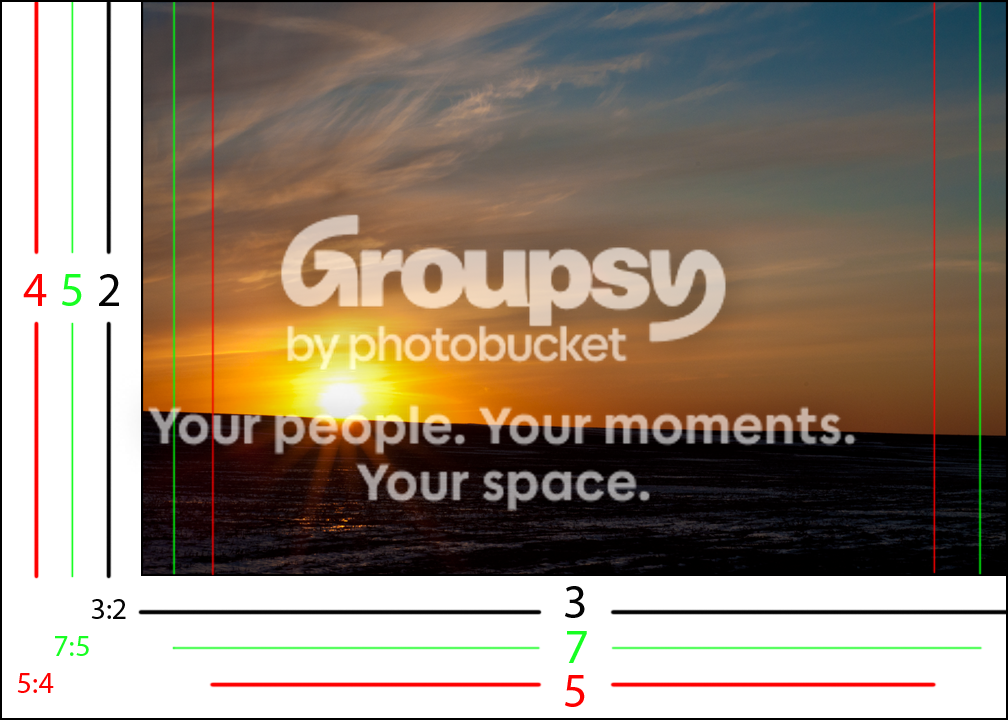
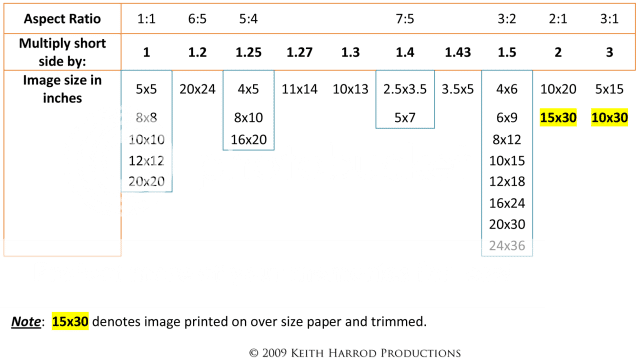
Now lets think about print aspect ratios. The pixel dimensions - 2592 x 3888 - has a 3:2 aspect ratio. Most DSLR cameras make 3:2 aspect ratio photos and print at sizes like 4x6, 6x9, 8x12, etc. Some of the popular print sizes have different aspect ratios. 8x10's have a 5:4 aspect ratio. Wallets and 5x7's have a 7:5 aspect ratio.
So a 3:2 aspect ratio photo has to be cropped, to some extent to be printed as either an 8x10, or a 5x7.
Then there are issues like: what file type? what color space?







![[No title]](/data/xfmg/thumbnail/31/31754-af76ae89cc75bd1855937374ff359efe.jpg?1734160476)