What's new

Photographing old maps

selsa84

TPF Noob!
Joined
Mar 24, 2017
Messages
6
Reaction score
1
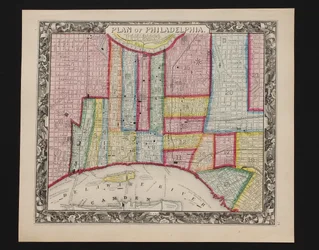
Hello everyone, Trying to get a little help in photographing some antique maps. I use a Canon t3 rebel Eos with window lighting and sometimes can lights. My pictures seem to always come out tinted blue/green or they are so overexposed I cant even edit them with out them looking way overexposed. Ive tried ALL my white balance settings and nothing works, even tried the Gray card and that was no help. I cannot go out and spend 100s on lights. Wanting any advice on camera settings or anything, Thank you
 
I "think" manual WB will only work on Manual and Av and Tv exposure modes on the T3. Not 100% sure, but that might be an issue. I would try different preset WB settings like Incandescent or Tungsten. Maybe even try the built-in flash with a half of a piece of typing paper curled like a big half-tube, taped in front of the pop-up flash as a diffusing tool.
 
Post a down-sized but otherwise unedited image so we can see what you're up against.
 
Post a down-sized but otherwise unedited image so we can see what you're up against.

Uploaded pic but not sure if it can be seen. New to this site.
 

Attachments

  • IMG_1353.webp
    IMG_1353.webp
    1.5 MB · Views: 218
  • IMG_1353.webp
    IMG_1353.webp
    1.5 MB · Views: 224
Pics show up. Not as bad as I had thought.
 
Here's my take: I'm with Derrel..... I really don't see much issue with them. Given a full-size JPEG, or better yet a raw file, I have no doubt you could make them look like how you want them to.

Your camera settings are fine.

Camera Maker: Canon
Camera Model: Canon EOS REBEL T3
Lens: EF-S18-55mm f/3.5-5.6 IS II
Image Date: 2017-03-22 11:46:07 (no TZ)
Focal Length: 39mm
Aperture: ƒ/18.0
Exposure Time: 0.167 s (1/6)
ISO equiv: 400
Exposure Bias: +0.33 EV
Metering Mode: Matrix
Exposure: aperture priority (semi-auto)
White Balance: Manual
Flash Fired: No (enforced)
Orientation: Normal
Color Space: sRGB
GPS Coordinate: undefined, undefined
Software: Windows Photo Editor 10.0.10011.16384


They're a bit underexposed, but that's to be expected when shooting what we visualize as being white paper. The camera will always try to make pure white look more like your 18% gray card. Adjusting your Exposure Bias to +0.67 or +1.00 will help.

You say you tried a gray card? What process did you follow from taking the photo to adjusting the WB in post? Did you use a raw file, or JPEG?

Also, is your monitor calibrated?
 
The exposure issue may be your monitor, it doesn't look bad to me. Have you hardware calibrated your monitor?

Same with the color issue. I suspect it is at your end.
 
I'll go with the others - the photos seem fine to me.
Nice maps. I love the way the compass points were handled and the current flow.
 
The Philadelphia map is white not brown, so when I take pics they will look brown or green blue tint. Looking for help on what I should set my settings too. That pic is shot in auto. if I use the other settings it gets way worse.
 
Yo0u say they look overexposed, but we're all saying they look fine if not underexposed. Is your monitor calibrated?
 
As soon as I edit and brighten them up they are washed out and have bright burn spots.
 
Could anyone recommend some camera settings that I can try?
 
Mainly shoot in auto because Ive never found the perfect setting for my prints or maps.
 

Create an account or login to comment

You must be a member in order to leave a comment

Create account

Create an account on our community. It's easy!

Log in

Already have an account? Log in here.

Back
Top Bottom