What's new

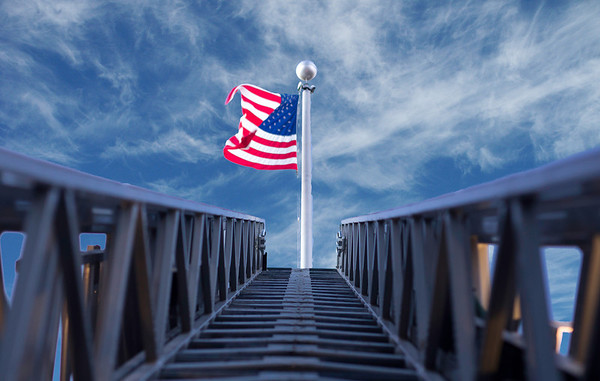
Playing around at work. C&C always appreciated.

I don't get the "mini effect" some are seeing. Doesn't look like anything but real and life size to me. Great shot too.


Here's my edit. Let me know what you think.

The sky you selected is a bit too blue, see how different it is than the color cast on the latter? Might look a little more natural if you change the blend mode of your cloud layer from Normal to Overlay. That'll keep the clouds but basically lay it into the same sky that actually exists instead of the wrong blue, so the color temp of the sky will coincide with the lighting on your subject. Also, use the refine tool to clean up the edges of your mask...smart radius & a little tweaking of the feather/contrast will work wonders.



Here's my edit. Let me know what you think.

The sky you selected is a bit too blue, see how different it is than the color cast on the latter? Might look a little more natural if you change the blend mode of your cloud layer from Normal to Overlay. That'll keep the clouds but basically lay it into the same sky that actually exists instead of the wrong blue, so the color temp of the sky will coincide with the lighting on your subject. Also, use the refine tool to clean up the edges of your mask...smart radius & a little tweaking of the feather/contrast will work wonders.

Thanks for the tip. I'll give that a try. This was done in Photoshop Elements 9. I have ordered CS5 and it will be here soon. I can't wait!
 
flameshots said:
Photoshop. I masked the flag and the ladder and pasted a shot of a cloudy sky in. Pretty simple once you get the hang of it.

Cheers!
 
Very creative...I dont mind the blue in the sky
 
being a former firefighter, this image hit me more than most. I love it!
 

Create an account or login to comment

You must be a member in order to leave a comment

Create account

Create an account on our community. It's easy!

Log in

Already have an account? Log in here.

New Topics

Back
Top Bottom