What's new

PLEASE HELP; IS THIS POSSIBLE?

Voguejene

TPF Noob!
Joined
Apr 3, 2012
Messages
1
Reaction score
0
Location
London, ON
Can others edit my Photos
Photos OK to edit
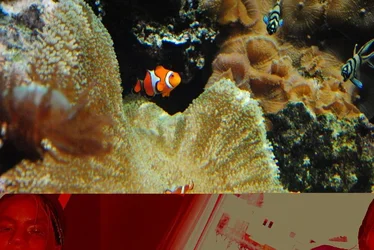
I have attached a photo I took with my nikon D3000 about a year ago while I was on vacation in Switzerland. The top half of the picture is an aquarium at a zoo I was visiting. On my camera, it is still this photo only but as soon as I uploaded it onto iPhoto, this was the result. The picture is the bottom half pushed the other photo upwards, it is red and it is definitely my dining room at home because that is the view out of that window. The person in the bottom left corner is NOT familiar to me and it does NOT look like an old photo. I am not a ghost believer and am not looking for this sort of validation. Just wondering if it is possible for my computer to superimpose these two images, even if I do not know where this other image is from. It is also my own SD card that I used so it isn't possible it came from my camera or card. Please help explain this strange happening. Is this a common phenomena?
 

Attachments

  • $44867_420559804031_514744031_4742544_8300868_n.webp
    $44867_420559804031_514744031_4742544_8300868_n.webp
    93.8 KB · Views: 177
Uhhh... call or email Nikon.
 
Call the ghost busters ;)

.. looks like a glitch in iphoto to me. try to read the card on a different computer with different software.
 
It is a common issue for people that improperly mamage their memory cards.

I will bet you are using your SD card to store the images, and that you routinely delete images from the card while it is in the camera.

If so, both are a poor practice.

Each photo file is a slightly different size based on the content in the photo. A shot of a solid white wall will be a smaller file than a landscape shot made with the same camera.

At the end of each shooting day upload the photos on the card to the computer or a dedicated storage device, verify the photos uploaded successfully, and then reformat the memory card in the camera

The memory card controller maintains a File Allocation Table (FAT) that keeps track of what memory locations are, or are not, available. By deleting photos in the camera it is possible the card controller tries to write a photo file that doesn't match the size available in the memory address range.

Uploading photos doesn't remove them from the memory card. Uploading just copies the photo files and leaves the photos in place. Uploading does not re-write the FAT, but reformatting the card does. Even with the FAT re-written, all the photo data is still on the memory card, but the FAT has been told that all memory locations are again available and writes new photo file data over the old photo file data.
 
Last edited:
So the actual problem here is File Allocation Table Corruption. Basically the FAT table has an erroneous bit of corruption and it has lost track of where one file starts and ends. The result is you open the file and for the most part its right but part of it is read from a different area from the storage which in this case belongs (or belonged, past tense as mentioned deleted files don't actually get deleted) to your dining room.

I suggest you bin the card.
 
Why not just reformat the card in the camera? You think the card is now a dud?
 
You think the card is now a dud?

It's already proven itself to be a dud. For the cost of a memory card why risk it happening again. Sure the card may not be completely dead, but it's not reliable either.
 
Yeah, I would call in a spiritual medium to get your house cleansed. It's obvious you've upset some spirits in your dining room and they're taking it out on your photos.
 

Create an account or login to comment

You must be a member in order to leave a comment

Create account

Create an account on our community. It's easy!

Log in

Already have an account? Log in here.

New Topics

Back
Top Bottom