What's new

POLKA DOTS! c&c please :)

kric2schaam626

TPF Noob!
Joined
Jul 5, 2009
Messages
361
Reaction score
17
Location
Fox Cities, WI
Can others edit my Photos
Photos OK to edit
Hi all - so as I begin the "stepping back" process to further my photography - catch that irony? Ha, jk.
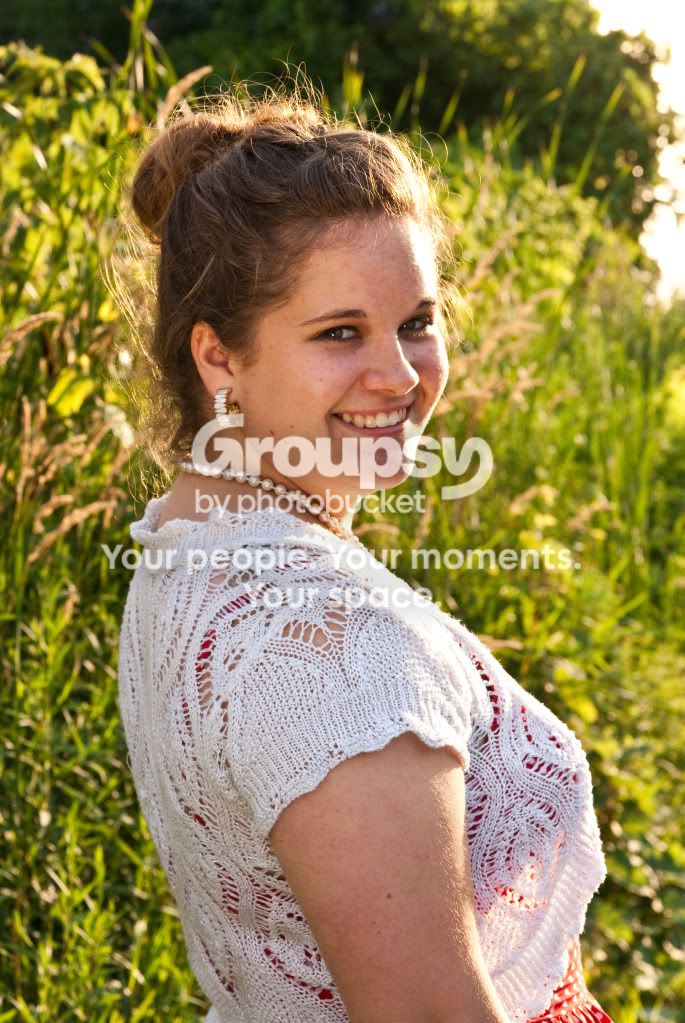
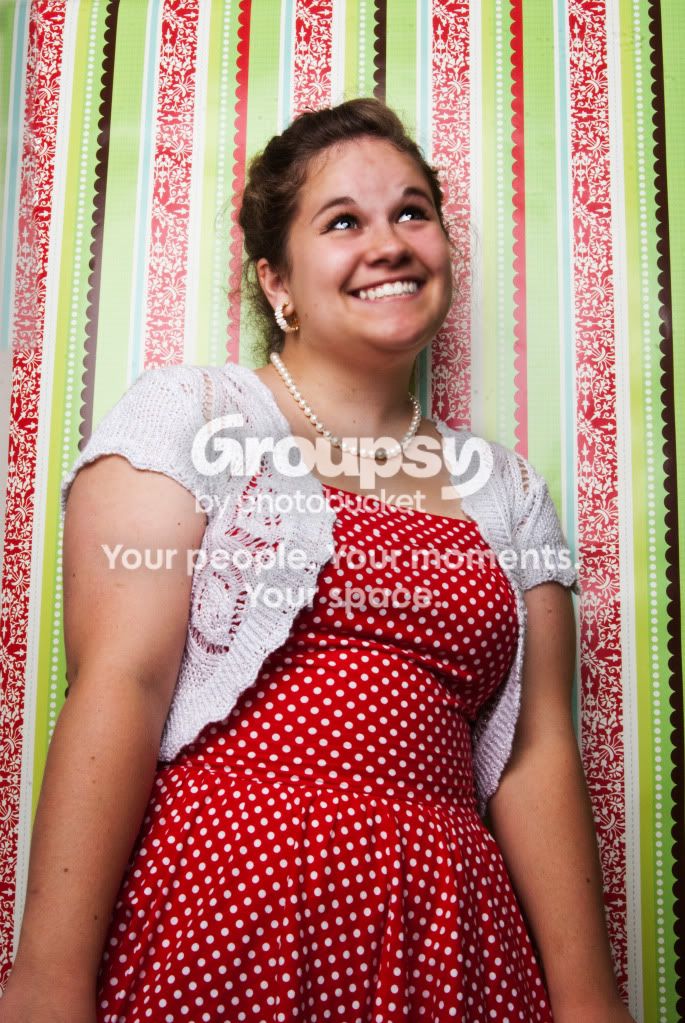
Anyway, I am practicing with my alien bee to understand my lighting and composition. Here is a photo from tonight, just being fun. I can see a few flaws in it but I think it turned out pretty cute. I tried to get rid of the blemish in her face with the blur tool, but I will probably fix that. Let me know what you all think as far as my big components like lighting and composition. Thanks all.
DSC_06392lowres.jpg
 
Last edited:

Well, from my point of view, certain background areas of the photo are overexposed and are drawing my eyes to them.
 
If I may, leave the AB in the box for now and keep working on the basics. This image has a number of issues; the face is soft, the images is tilted, and the composition is lacking. These are all minor issues, and easily fixed. Start by getting the focus nailed; use a single focus point and place it on the eye(s). Use the grid-lines in your viewfinder to ensure that the camera is square and level and always make sure that you have sufficient subject-to-background separation. If you're going to have the subject looking away from the camera, try and show us what she is looking at.

Once you can pull off images with the basics correctly nine out of ten times, then get the 'bees out of the box and work on that. From a technical POV, the main issue here was that your background was rather reflective, and the subject was wayyyyyyyyyyy too close (try for at least 6-8' and preferably 10' or more). What sort of modifier was used here?
 
I don't mind the composition and she has a great smile. The lighting needs work to help expose her arms and hair properly. The retouching on the face is making her look blurry. I tried to do a bit of correction myself but it is a web quality image and blurring had been done already. These tweks might give you a direction to go though.
Before:
DSC_06392lowres.jpg

5ew27g
 
What sort of modifier was used here?

Don't hate me for asking - what is an example of a modifier? I'm sure I don't have one if I don't know what it is :/

I do know that I have to work on my basic composition and lighting. I think I get too concerned with trying to be creative or come up with something unique that I miss the idea of getting the basics under belt. I will post another photo we took outside. LMK what you think .....
 
Don't hate me for asking - what is an example of a modifier? I'm sure I don't have one if I don't know what it is :/
.....
Typically and in general, a modifier is considered an umbrella or a soft box, but in reality, it is any device that modifies the light eminating from the light source.
 
Don't hate me for asking - what is an example of a modifier? I'm sure I don't have one if I don't know what it is :/
.....
Typically and in general, a modifier is considered an umbrella or a soft box, but in reality, it is any device that modifies the light eminating from the light source.

Okay, then yes, I do have a softbox.
 
I don't mind the composition and she has a great smile. The lighting needs work to help expose her arms and hair properly. The retouching on the face is making her look blurry. I tried to do a bit of correction myself but it is a web quality image and blurring had been done already. These tweks might give you a direction to go though.
Before:

5ew27g

Love this edit btw, what did you do here?
 
I don't mind the composition and she has a great smile. The lighting needs work to help expose her arms and hair properly. The retouching on the face is making her look blurry. I tried to do a bit of correction myself but it is a web quality image and blurring had been done already. These tweks might give you a direction to go though.
Before:

5ew27g

Love this edit btw, what did you do here?

Let me see if I can remember :
- Selectively sharpened the hair
- colour corrected the skin by desaturating orange and increasing the orange luminance
- made an exposure adjustment layer in PS and masked in areas like the hair and face that needed a little more light
- cleaned up the red in the face to even out the tone with cloning and patching
- the whole photo seemed a little soft and I remember doing some sharpening, which is why the eyes look a little too glassy. It helps the pearls and the smile.

Really, a lot of what I did is personal taste stuff. The photo really came to life after tweaking the exposure and getting rid of the orange.

Keep shooting :)
 
It looks great. However, I do know better to rely on the editing. When I am shooting and I have a person's eyes as the focal point, why does it seem that sometimes it looks slightly OOF? Or that the picture itself is soft? I try to get a good DOF by having a more open f/stop and longer focal length. Does that not help?
 
It looks great. However, I do know better to rely on the editing. When I am shooting and I have a person's eyes as the focal point, why does it seem that sometimes it looks slightly OOF? Or that the picture itself is soft? I try to get a good DOF by having a more open f/stop and longer focal length. Does that not help?

If you are shooting RAW you will have to apply some sharpening. You can do that yourself or have an app do it automatically for you. It just depends on your work flow.
 
As far as shooting goes though? When I shoot portraits outdoors and I want the person's face to be in focus, is there a proposed balance between the shutter speed and aperture that works best? And is there a way to know that your lighting is spot on or is it better to be a little underexposed then fix in PP?
 
As far as shooting goes though? When I shoot portraits outdoors and I want the person's face to be in focus, is there a proposed balance between the shutter speed and aperture that works best? And is there a way to know that your lighting is spot on or is it better to be a little underexposed then fix in PP?

You can get a hyper-focal app for your ipod that calculates your DOF given the lens, aperture, focal length and distance to your subject. I tend not to shoot below f5.6 for portraits. As for lighting, there are two things I use to get me really close to a good exposure: 1) a flash meter when I work in a studio and 2) a grey card for other lighting situation. Check your histogram when shooting as the bulk of your colour information is in the lighter dynamic range, so make sure your histogram leans to the right but not so much that it clips. A right leaning histogram is far easier to manipulate into the desired PP than one that is too dark and leaning left. There are many articles available that explain the details and specific colour information you gain and lose if you are interested in such things. Don't rely on how your image looks on the camera LCD... it's not the best indicator.

Hope that helps.
 

Create an account or login to comment

You must be a member in order to leave a comment

Create account

Create an account on our community. It's easy!

Log in

Already have an account? Log in here.

New Topics

Back
Top Bottom